
[CS50] 06 Data Structures
Published:
In this post, the sixth lecture of CS50 is summarized.
Resizing Arrays
Assume that we defined an array of integer with size 3(12 bytes). Suppose now we want to add a fourth number to the array. Since we don’t know what’s going on the computer’s memory right next to the array we defined(just by bad luck, string “hello, wrold\0” could be allocated right next to the array), we can’t simply add the fourth integer right next to it.
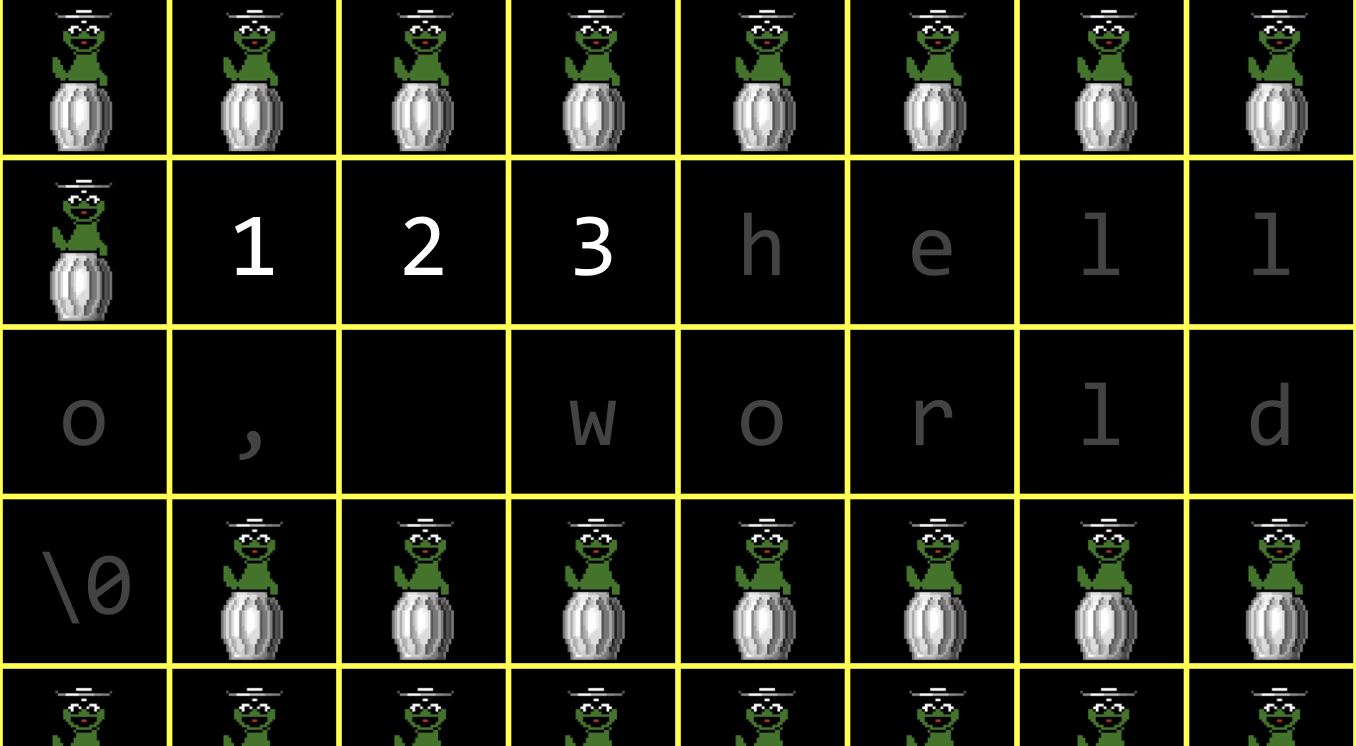 One solution for this problem is to abstract the array and move to a different location of bigger memory.
int list[3];

list[0] = 1;
list[1] = 2;
list[2] = 3;
Now, I want to copy the ‘list’ array to new array with size 4 and remove the old one. In order to do this, I can’t use an traditional array syntax to define ‘list’ because that makes the variable, forever of size 3 and can’t free it. Instead, we will use malloc.
int *list = malloc(3 * sizeof(int));
if (list == NULL){
  return 1;
}

list[0] = 1;
list[1] = 2;
list[2] = 3;
In extreme cases malloc can return not the address of an actual chunk of memory. In cases of error, it will return NULL which represents address 0. It’s a good practice to check whether malloc returns NULL. We can still use the bracket when assigning the values because ‘list’ is still a chunk of memory. We can treat this chunk of memory as though it’s an array(think about pointer arithmetic in last week). Now, this code here does not need to change because list is now still a chunk of memory of size 12, I can actually get away with still using square bracket notation and treating this chunk of memory as though it’s an array. And this is a bit subtle. But recall from last time, we talked briefly about pointer arithmetic, whereby the computer can do some arithmetic, some addition, subtraction on the actual addresses to get from one location to the other. And that’s what the computer is going to do here. Because it says list bracket 0, that’s essentially just going to put the number 1 literally at the beginning of that chunk of memory. And because this is a modern computer, it’s going to take four bytes in total. But I don’t want to put the number 4 here to shift it over myself. Because I’m using square brackets and because the computer knows that this chunk of memory is being treated as a chunk of addresses of integers, pointer arithmetic magically kicks in. So what the computer is going to do for me is put this 1 at location 0. It’s going to put this number 2 at location 1 times size of int, so 4. And it’s going to put this number 3 at location 2 times size of int, which gives me 8. So in other words, you don’t have to think about how big that chunk of memory is if you already gave the compiler a clue as to the size. Now let’s assume in this moment I want to dynamically allocate more space and free up the old.
int *list = malloc(3 * sizeof(int));
if (list == NULL){
  return 1;
}

list[0] = 1;
list[1] = 2;
list[2] = 3;

int *tmp = malloc(4 * sizeof(int));
if (tmp == NULL){
  free(list);
  return 1;
}

for (int i = 0; i < 3; i++){
  tmp[i] = list[i];
}
tmp[3] = 4;

free(list);
list = tmp;

for (int i = 0; i < 4; i++){
  printf("%i\n", list[i]);
}

free(list);
return 0;
In the line where I defined ‘tmp’, the computer gives you space for 4 integers elsewhere that might very well be grabage values now. I should not forget to free up ‘list’ when ‘tmp’ equals to NULL because otherwise, memory leak will occur. This is where C does get a little annoying because the programmer have to remember all of these details. Although technically when any progam quits, all of the memory is going to be given back to the operating system, but still it’s a good practice. Then, we copy each value which takes \(O(n)\) time complexity. It’s a lot of work to do. Ideally, we would not do this in the first place. Instead, maybe we should allocate more memory from the get go, for instance, allocate an array of size 1000. But this solution also remains issues. You can waste large amount of memory if you only deal with a few numbers. Also, we can still run into the exact same problem because if I want to put 1001 numbers in the list. Linked List would be a nice solution.
Linked List
Instead of using contiguous chunk of memory, linked list connect values that are stored in seperate memory location using pointers. In this process, larger amount of memory is used to save time by avoiding stupid copying of data from one place to another. There is always a trade of between time and space. 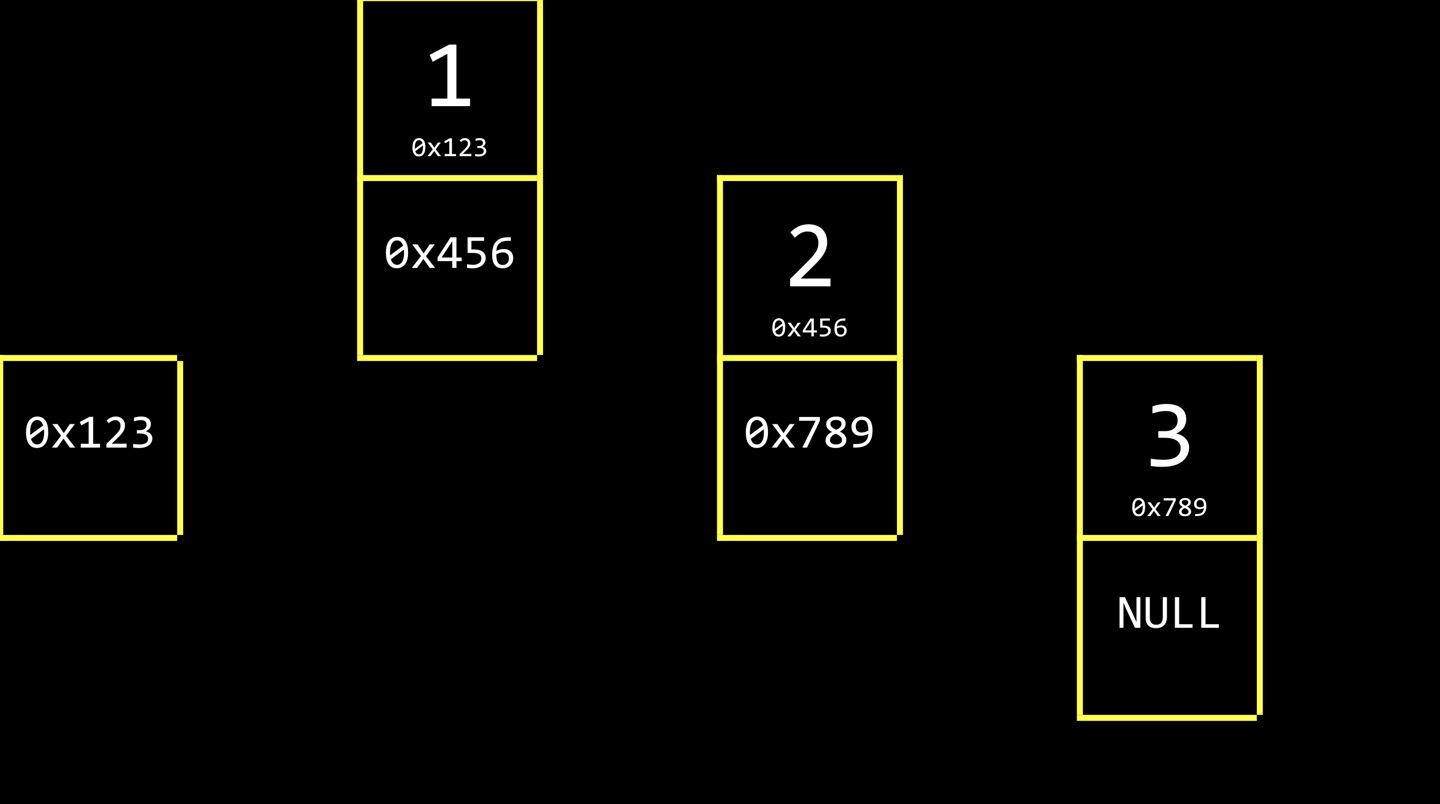 Inside of each of these nodes is two values, the actual number(data) we care about and then a pointer(metadata). Metadata is distince from data in taht I don’t fundamentally care about the metadata. It’s an implementation detail. But it does help me ornaize my actual data. In the picture we can see each node stores the address of next element. The last node stores 0x0, which is NULL. The store linked list will generally use one more value. If I declare a variable that points to the first node, I can implement a linked list as a picture below.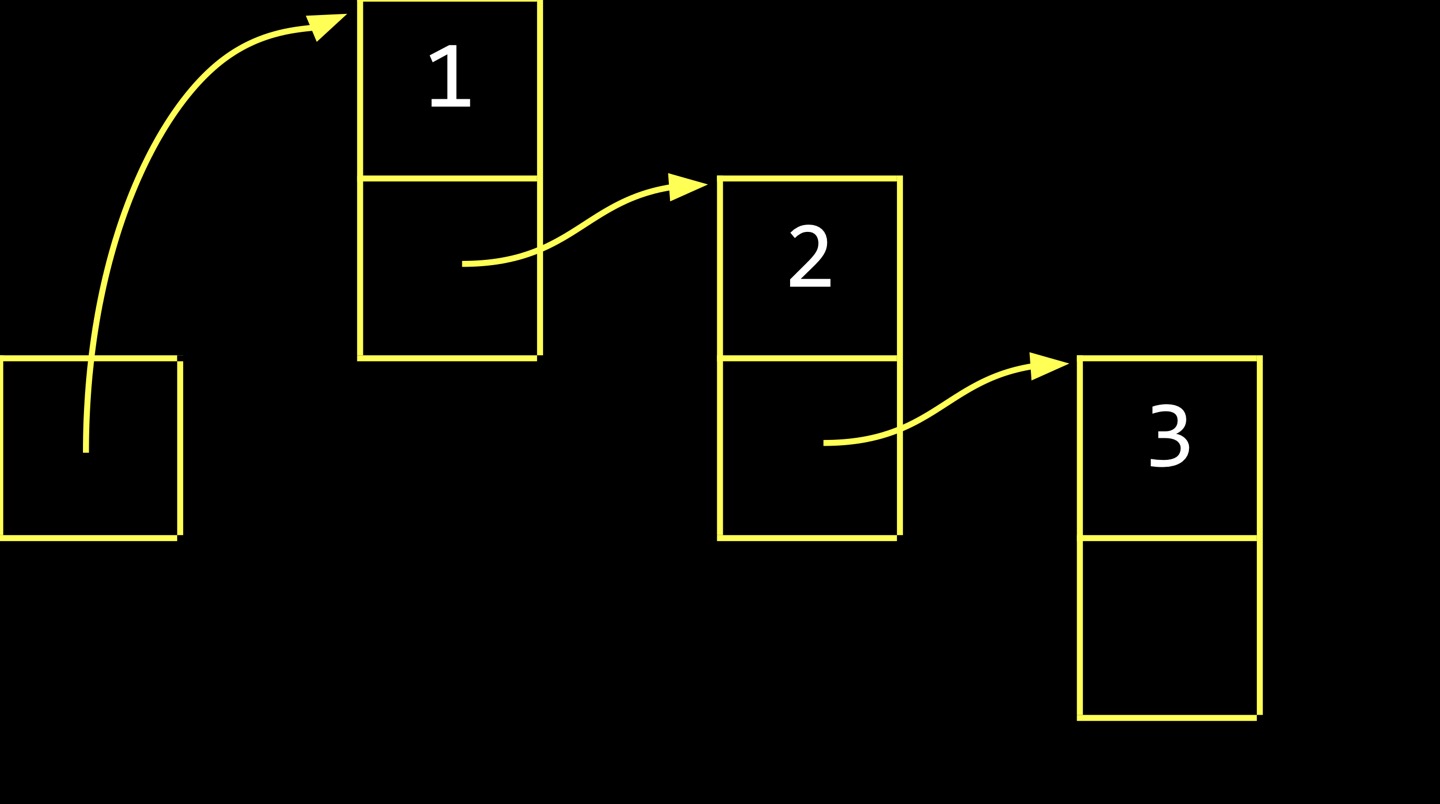
typedef struct{
  int number;
  node *next;
} node;
In order to implement node, you might be inclined to write ‘node *next;’. However, the word ‘node’ does not exist until you get to this last line of code. Here is the simple fix for this code.
typedef struct node{
  int number;
  struct node *next;
} node;
Since C code is read from top to bottom, if you give this structure a name called ‘struct node’, you can refer to it inside of the bracket. It’s annoying to write ‘struct node’ everywhere in your code so this last line now gives you a synonym. It shortens ‘struct node’ to just ‘node’.
initialize
node *list = NULL;
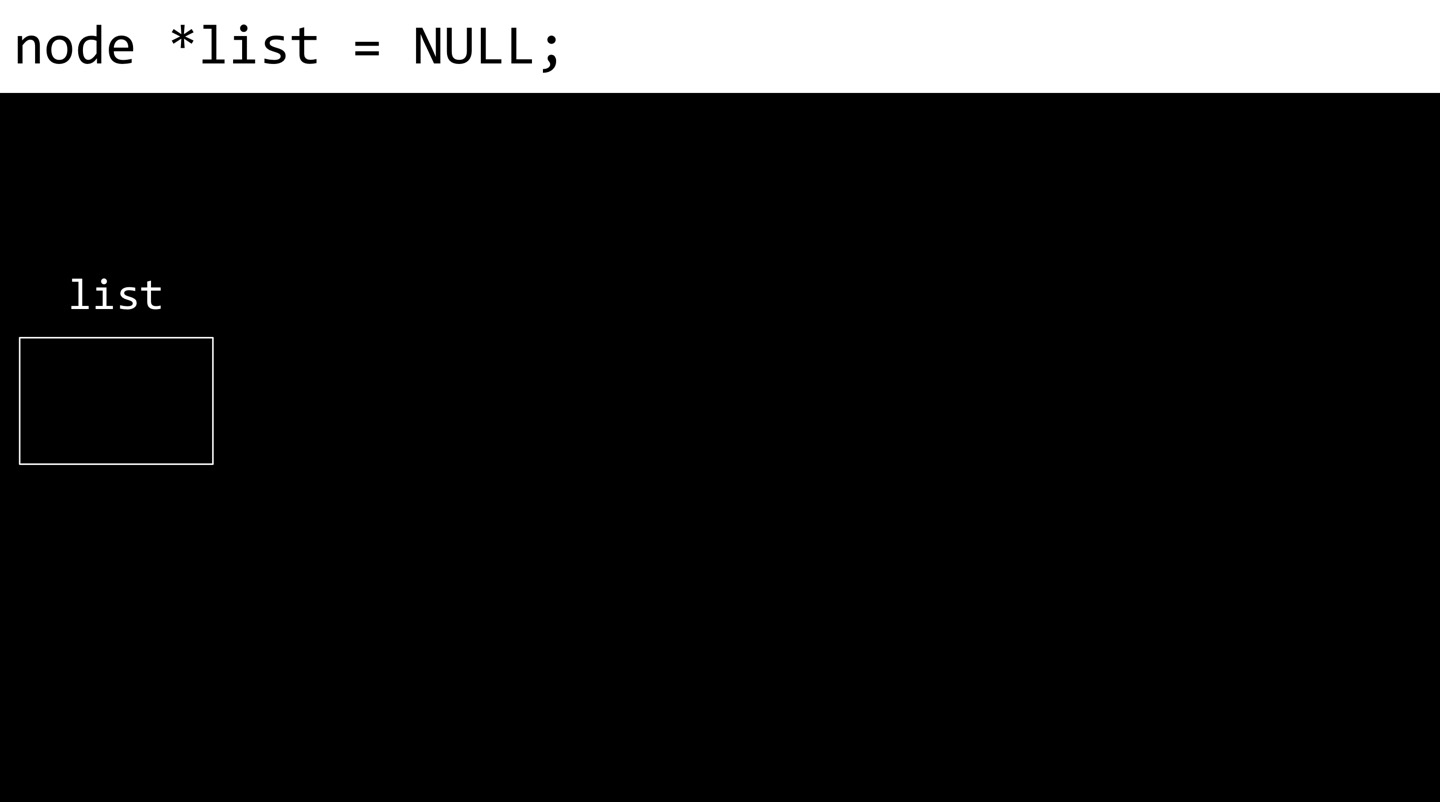 Instead of just declaring ‘node *list;’, which will lead ‘list’ to store a garbage value, we can initialize it to NULL.
memory allocation
node *n = malloc(sizeof(node));
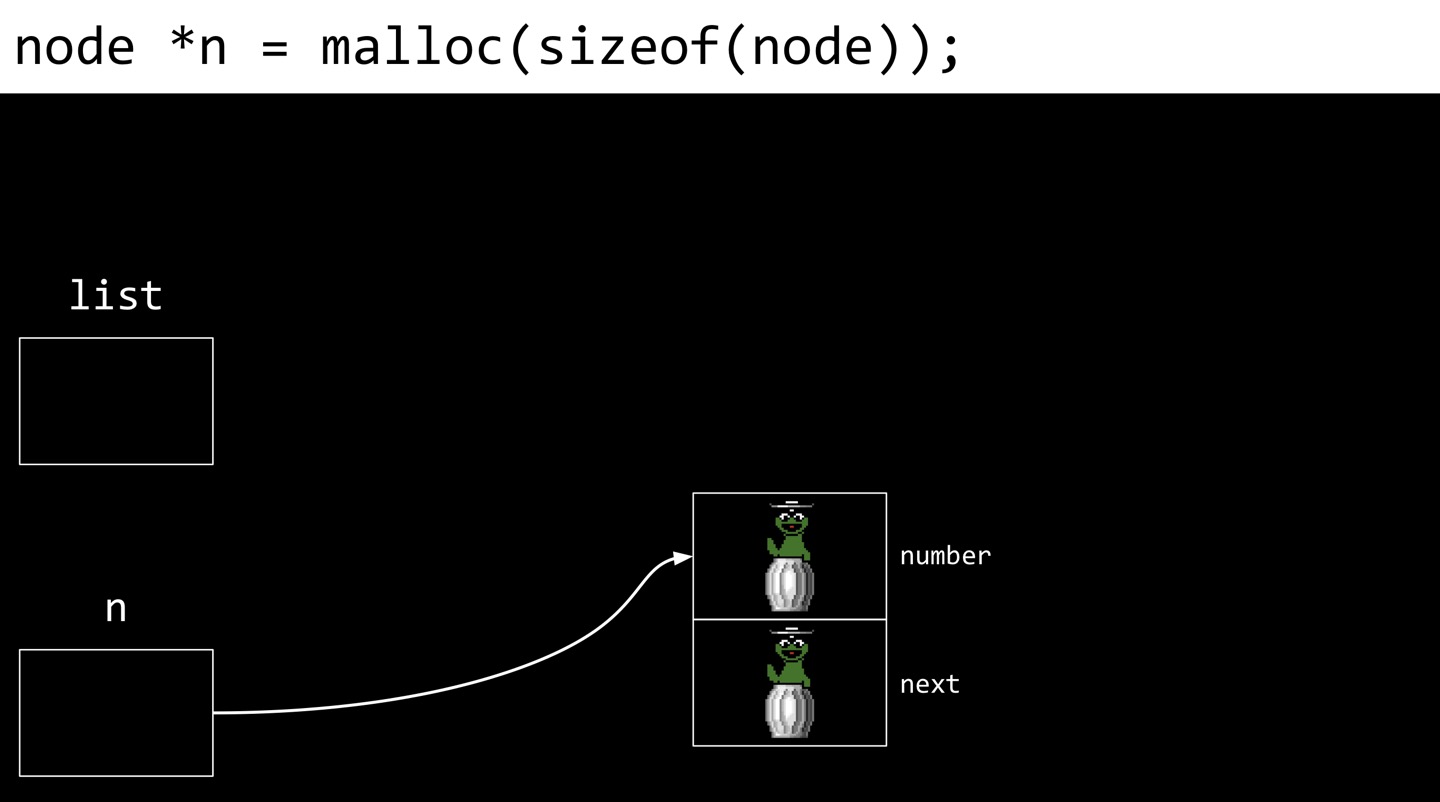 ‘node *n’ creates this(guess in the picture below) in memory, ‘malloc(sizeof(node))’ creates this(same as before) in memory. And the equal sign, essentially does the role of arrows.
assign first value
(*n).number = 1;
(*n).next = NULL;
The syntax is cryptic. The below is a code that you can synonymously use instead.
n->number = 1;
n->next = NULL:

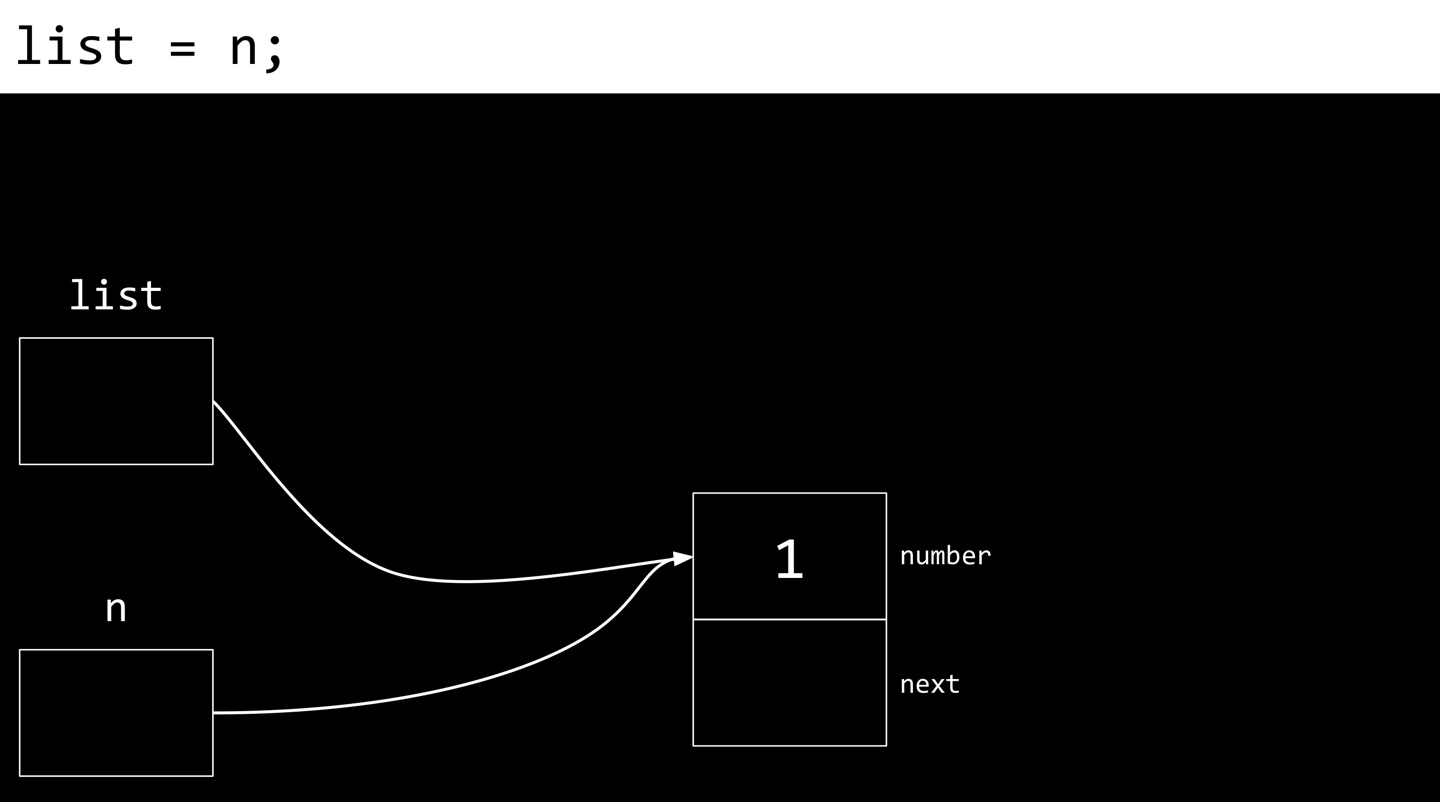
list = n;
‘n’ is a pointer and ‘->’ means ‘go there’. Exactly same thing as ‘(*n)’. The last line means ‘whatever address is in ‘n’, put it to ‘list’. Pictorially what that menas is, temporarily point both pointers to the same exact place. Why? Because ‘list’ is that I care about long term. This may be my global variable that I’m going to keep around forever in my computer’s memory. ‘n’ is just a temporary pointer so that I could get a chunk of memory and go to its locations and update it with those values. Eventually, it is probably going to go away.
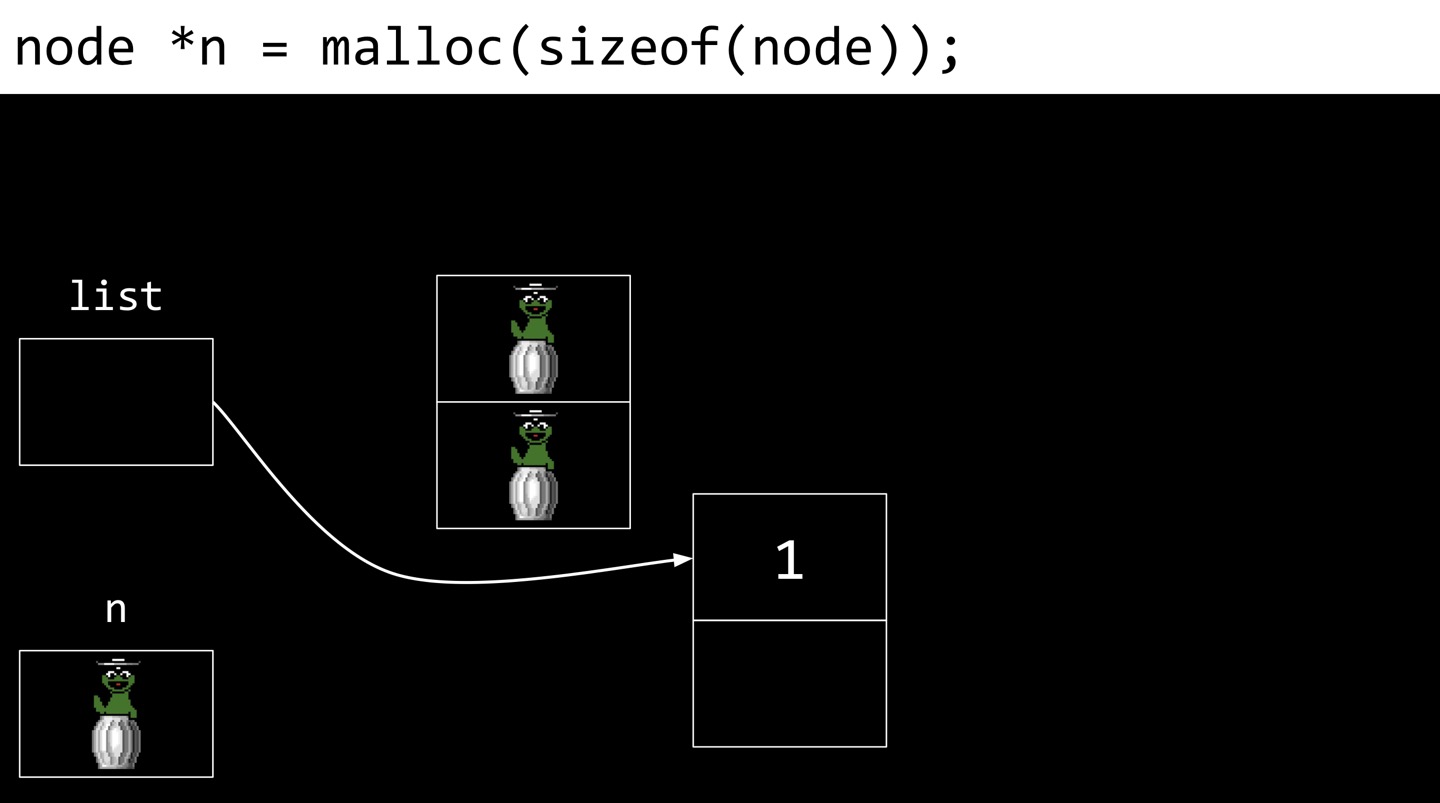
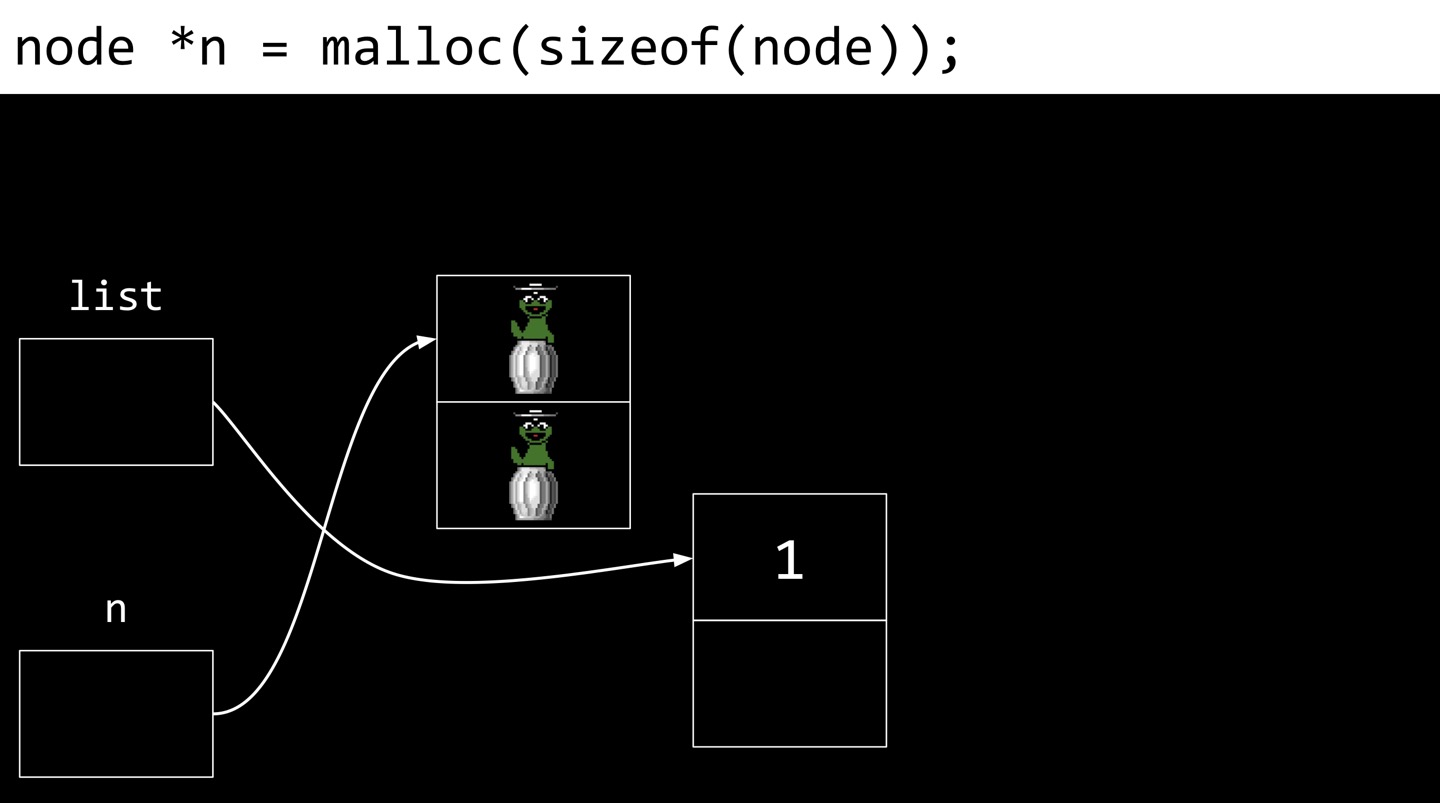
assign more nodes
assign more nodes
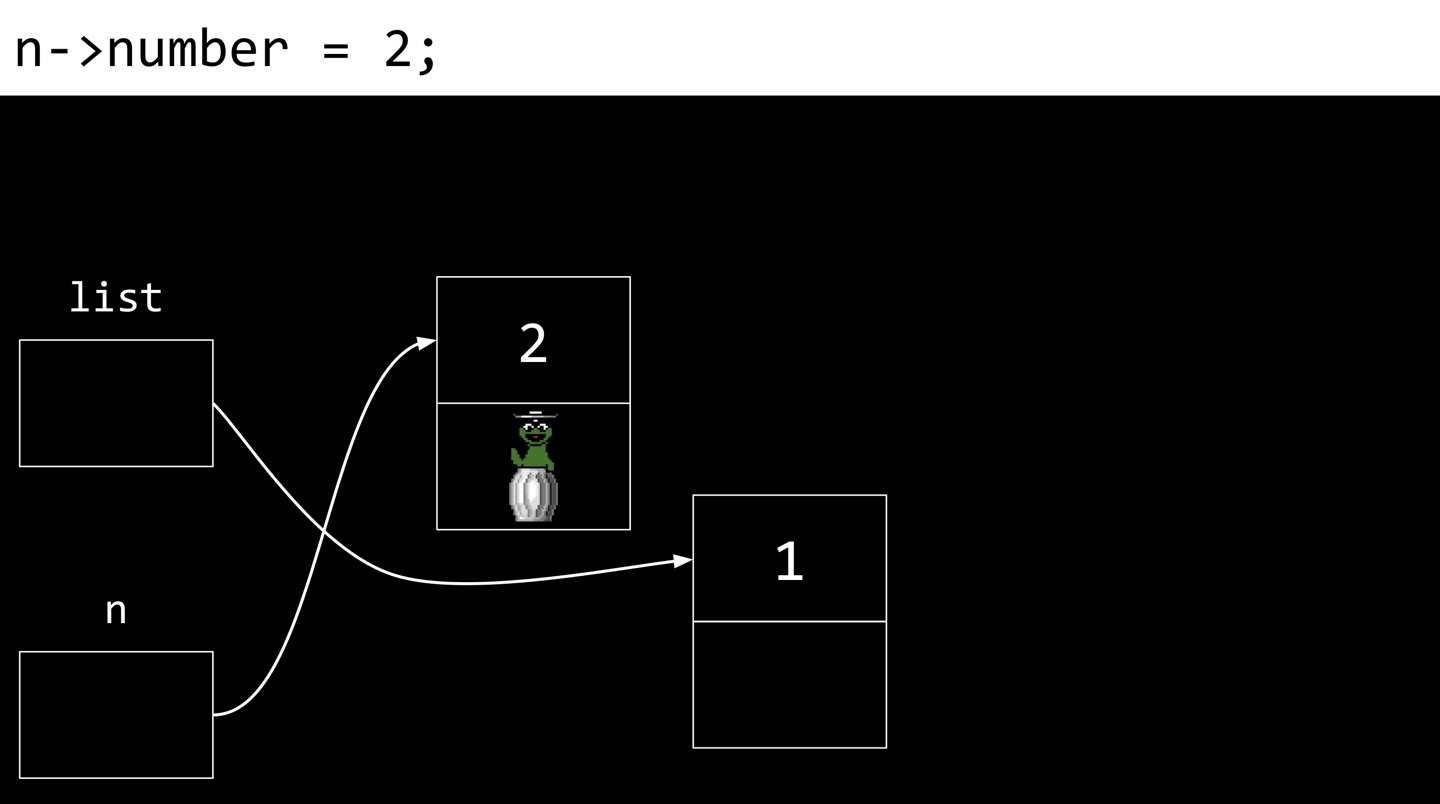
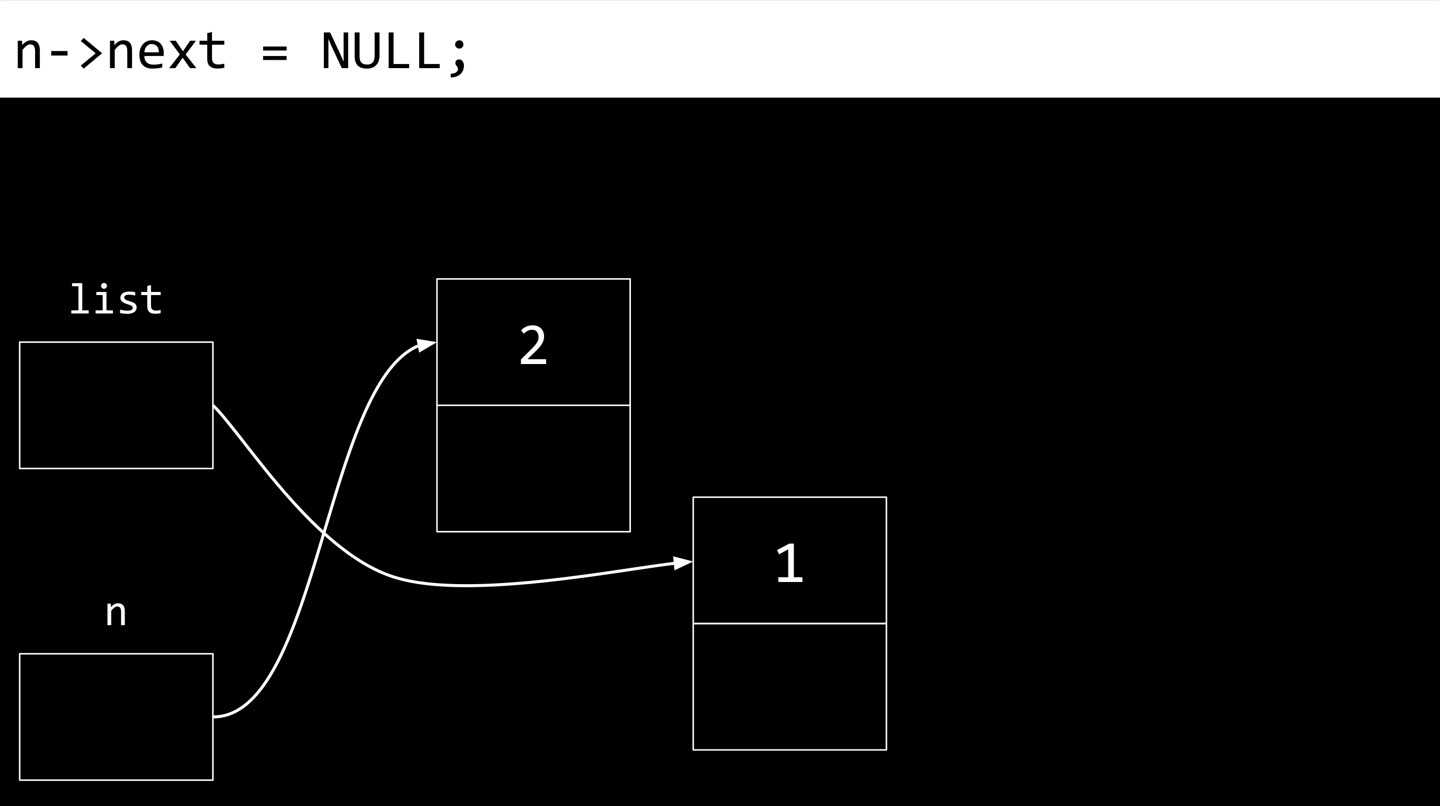
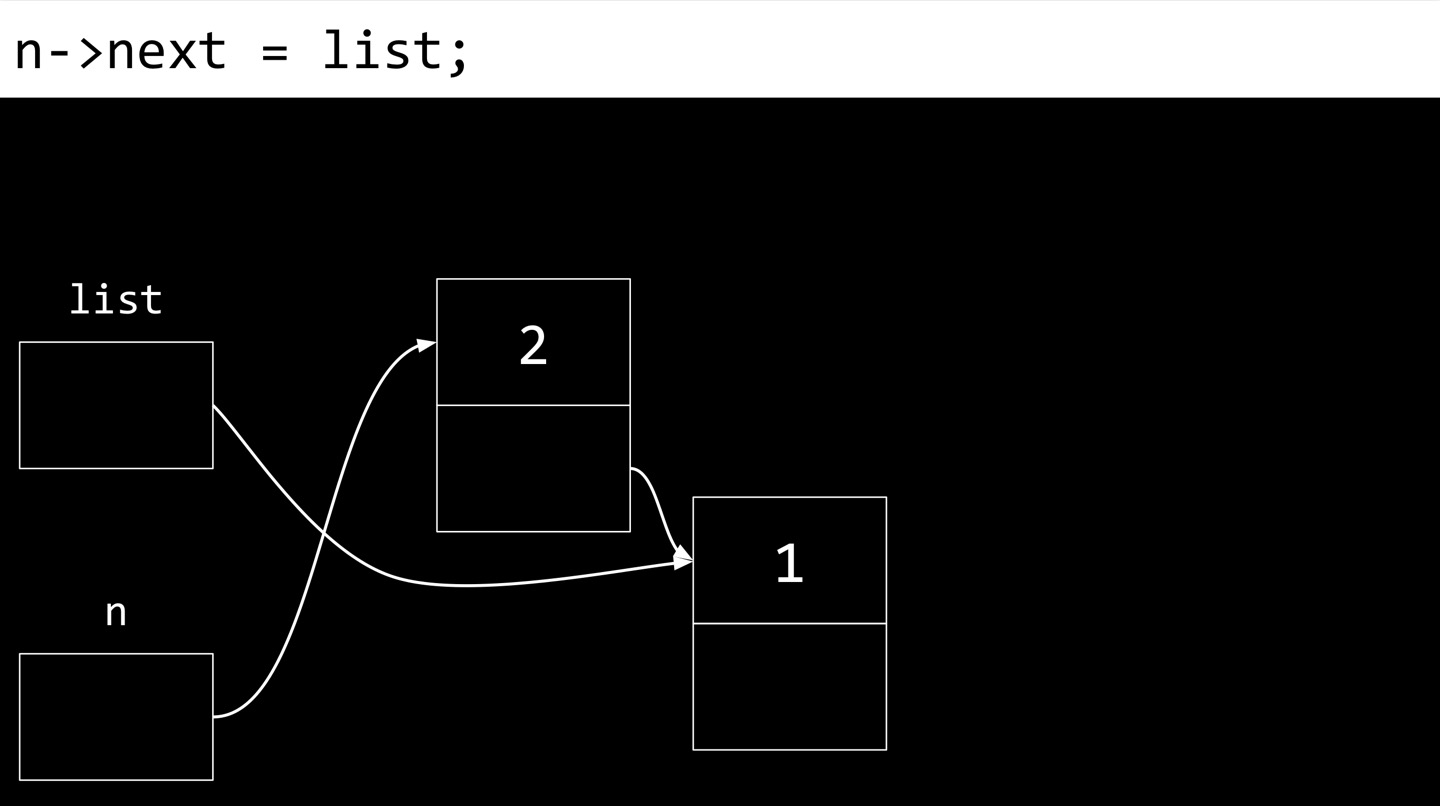
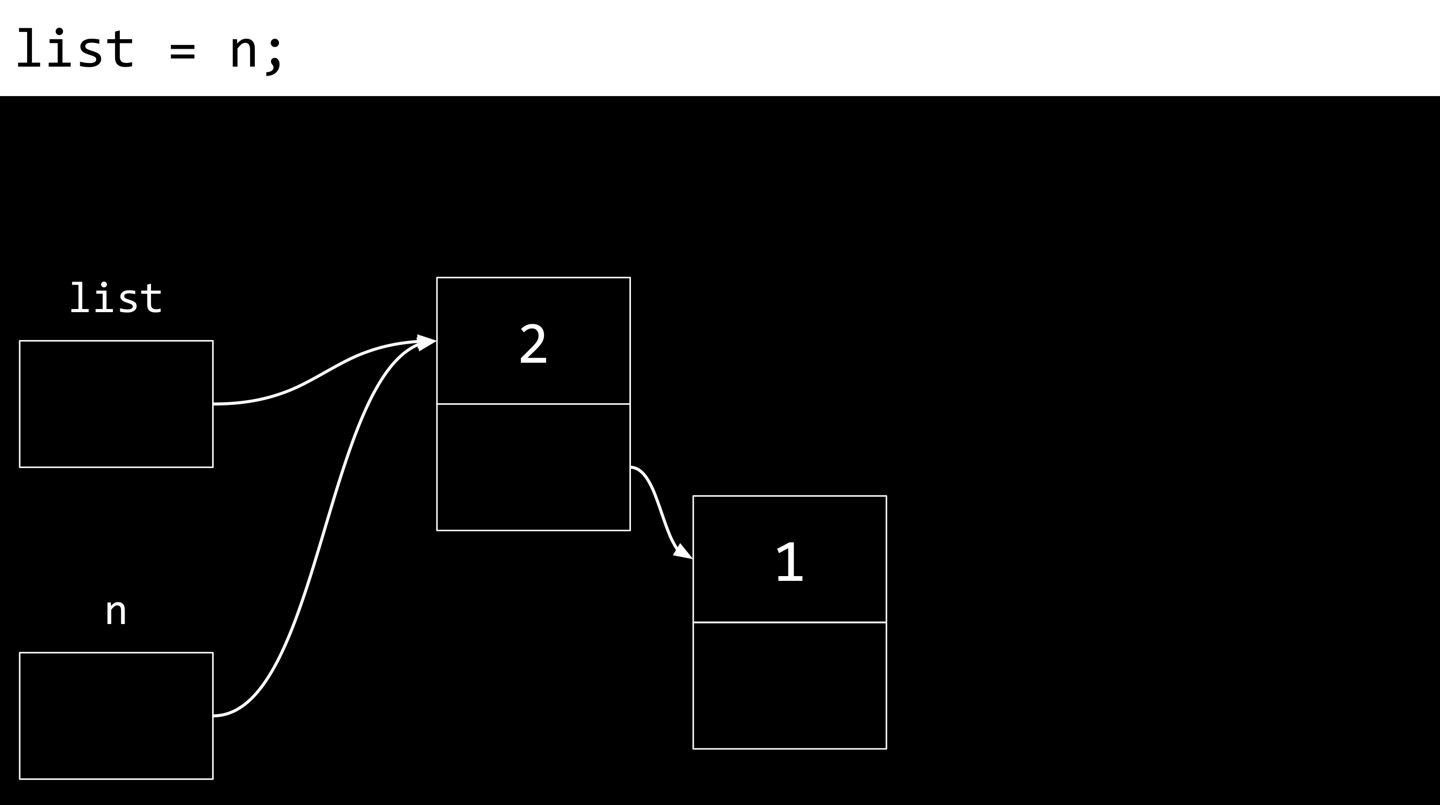
list.c
#include <stdio.h>
#include <stlib.h>

typdef struct node{
  int data;
  struct node* next;
} node;

int main(int argc, char *argv[]){
  node *list = NULL;

  for (int i = 1; i < argc; i++){
    int number = atoi(argv[i]);

    node *n = malloc(sizeof(node));
    if (n == NULL){
      // free memory thus far
      return 1;
    }
    n->number = number;
    n->next = list;
    list = n;
  }

  // Print whole list
  node *ptr = list;
  while (ptr != NULL){
    printf("%i\n", ptr->number);
    ptr = ptr->next;
  }
}
insertion running time
In the above algorithm, we prepend the new element to the beginning of the list. Given a linked list of size n, the running time of inserting 1 more node to the list is . So the upside of prepending the nodes in this way is that we have constant time insertion of new nodes. The side effect of this is that the numbers might end up in completely reverse order as they have here.
searching running time
What’s the running time of searching a linked list? is the answer. You’ve got to start at the beginning of the list itself and keep searching. And so wehreas in the world of arrays where you had contiguous chunk of memory, and you could jump to the middle recursively, that was all predicated on contiguousness.
appending insertion
Now we take different approach and append the nodes upon insertion instead.
int main(int argc, char *argv[]){
  node *list = NULL;

  for (int i = 1; i < argc; i++){
    int number = atoi(argv[i]);

    node *n = malloc(sizeof(node));
    if (n == NULL){
      // free memory thus far
      return 1;
    }
    n->number = number;
    n->next = NULL;

    // If list is empty
    if (list == NULL){
      // This node is the whole list
      list = n;
    }
    // If list has numbers already
    else{
      // Iterate over nodes in list
      for (node *ptr = list; ptr != NULL; ptr = ptr -> next){
        // If at end of list
        {
          if (ptr->next == NULL){
            // Append node
            ptr->next = n;
            break;
          }
        }
      }
    }
  }
}
When we’re appending, the running time for the insertion is .
sorted linked list
Suppose the inputs are not necessasrily be in order. But we want to maintain this linked list in sorted order.
int main(int argc, char *argv[]){
  node *list = NULL;

  for (int i = 1; i < argc; i++){
    int number = atoi(argv[i]);

    node *n = malloc(sizeof(node));
    if (n == NULL){
      // free memory thus far
      return 1;
    }
    n->number = number;
    n->next = NULL;

    // If list is empty
    if (list == NULL){
      // This node is the whole list
      list = n;
    }

    // If number belongs at beginning of list
    else if (n->number < list -> number){
      n->next = list;
      list = n;
    }

    // If number belongs later in list
    else{
      // Iterate over nodes in list
      for (node *ptr = list; ptr != NULL; ptr = ptr->next){
        // If at end of list
        if (ptr->next == NULL){
          // Append node
          ptr->next = n;
          break;
        }

        // If in middle of list
        if (n->numbr < ptr->next->number){
          n->next = ptr->next;
          ptr->next = n;
          break;
        }
      }
    }
  }
}
In this case, the running time of insertion is .
Trees
To recap, the problems we’ve solved and the problems we’ve created are arrays were problematic because they were a fixed size. And that can get us into trouble. Or it causes us to waste more space preemptively even though we might not ever use it. So we introduce the linked lists again to solve that problem by being more dynamic and only allocate as much memory as we need on demand step by step. But of course, we’re spending extra space for this pointers. We might gain performance if we at least prepend all of our elements to it. But we lose time again if we append or insert in sorted order. So it’s not clear even hearing these upsides and downsides, if there’s a clear win. But maybe there’s a way to get the best of both worlds by trying to capture the upsides of having information that is kept in sorted order that allows us to maybe divide and conquer but still gives us the dynamism to grow or shrink the data structure.
binary search trees
So when the world of arrays, it was pretty efficient because we can do binary search which gives us logarithmic running time. But it’s going to be like headache to copy this into a slightly bigger array, free the old memory. And thus were born linked list. But with linked lists, we lost log of n running time.
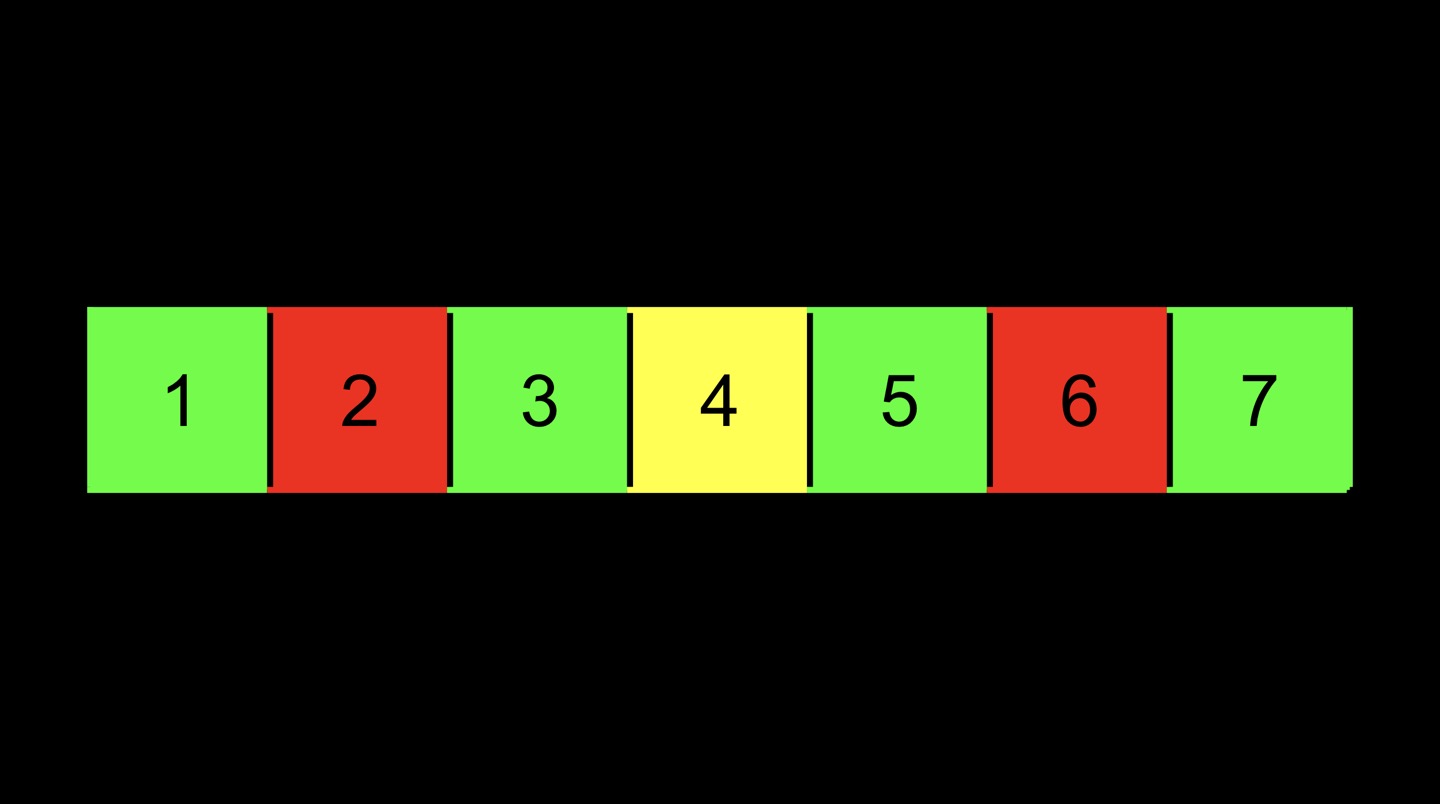 Instead of treating this array as one dimension left to right, we can interpret as 2-dimensional structure as below.
 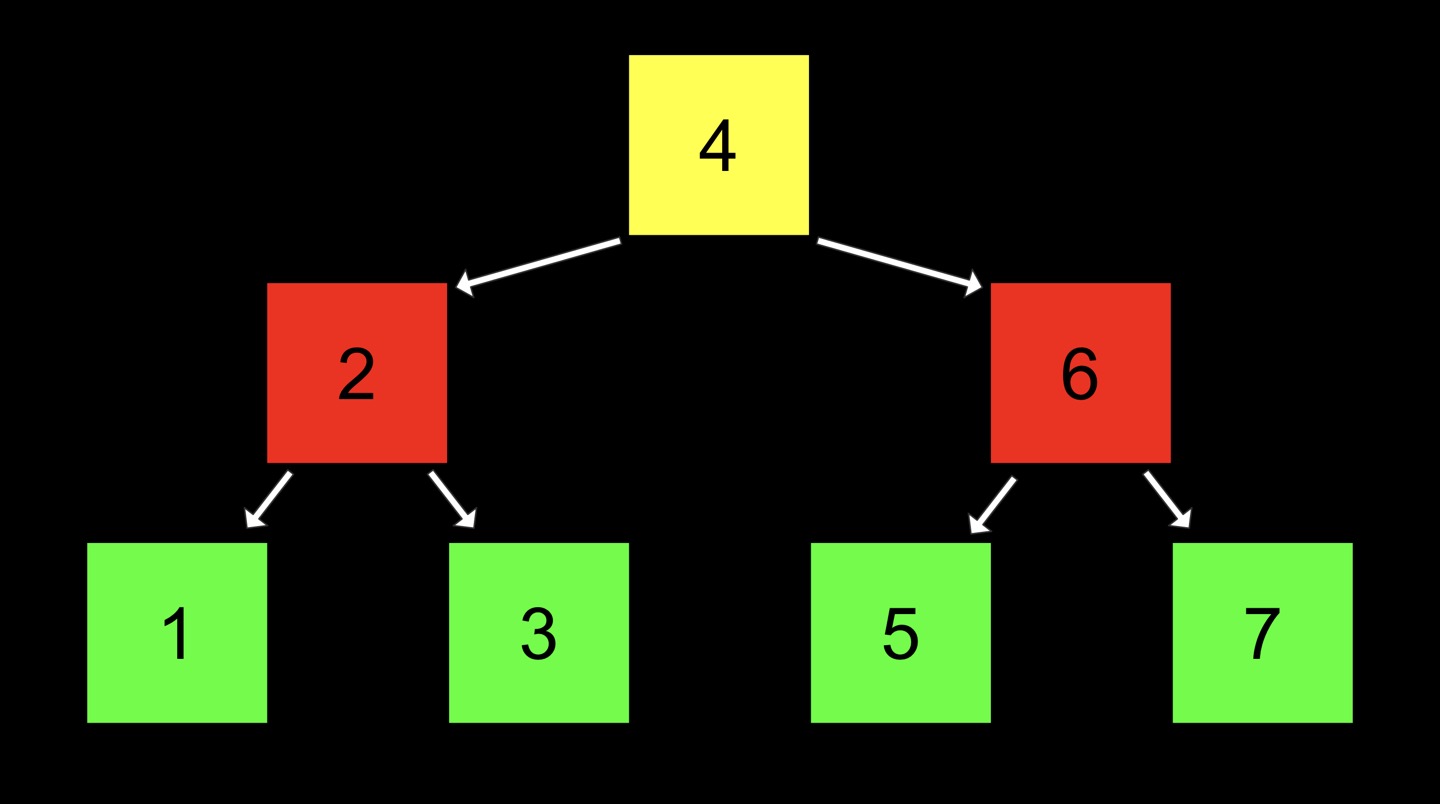 Followings are true for binary search trees.
- Leaf nodes or leaves are the ones at the very bottom. Root node is the one at the very top.(True for all trees.)
- It’s a data structure that’s kept in sorted order. If you pick any node in this tree, everything to the left of it, its left subtree so to speak, is smaller. Everything to the right of it, its right subtree, is larger. This is a recuresive data structure because each of these subtrees compose a larger tree.
We give each node a number and two pointers, a so-called left child and right child.
typedef struct node{
  int number;
  struct node *left;
  struct node *right;
} node;
In binary search tree, the running time of searching is . So we have binary search back. We did so by operating in 2 dimensions to mitigate the reality that our memory is no longer contiguous. We can use pointers instead to get anywehere we actually want. Binary search trees have all of the upsides of an array - log n running time - and all of the upsides of the dynamism of linked list - can grow and shrink and doesn’t need to be contiguous.
search in BST
bool search(node *tree, int number){
  if (tree == NULL){
    return false;
  }
  else if (number < tree->number){
    return search(tree->left, number);
  }
  else if (number > tree->number){
    return search(tree->right, number);
  }
  else{
    return true;
  }
}
We use recursive function and divide and conquer strategy to search number in BST.
balanced BST
When in comes to BST, by themselves they don’t necessarily guarantee any balance - left subtrees < root < right subtrees. So even though theoretically, it’s not if you get a perverse set of inputs. You will learn how to tweak the code for insertion and deletion in BST to maintain the balance.
Dictionaries
A dictionary is an ADT that stores keys and values.
hashing / hash function
Hashing is a technique, literally a function that takes any number of inputs and maps them to a finite number of outputs. We can use hashing as an operation to implement hash tables.
hash table
Hash table is an array of linked list. For instance, if the goal is to implement the contacts in my phone we can build has table as an array of size 26. Location 0 represents ‘A’, and location 25 represents ‘Z’. In constant time we can find location of the certain alphabet. 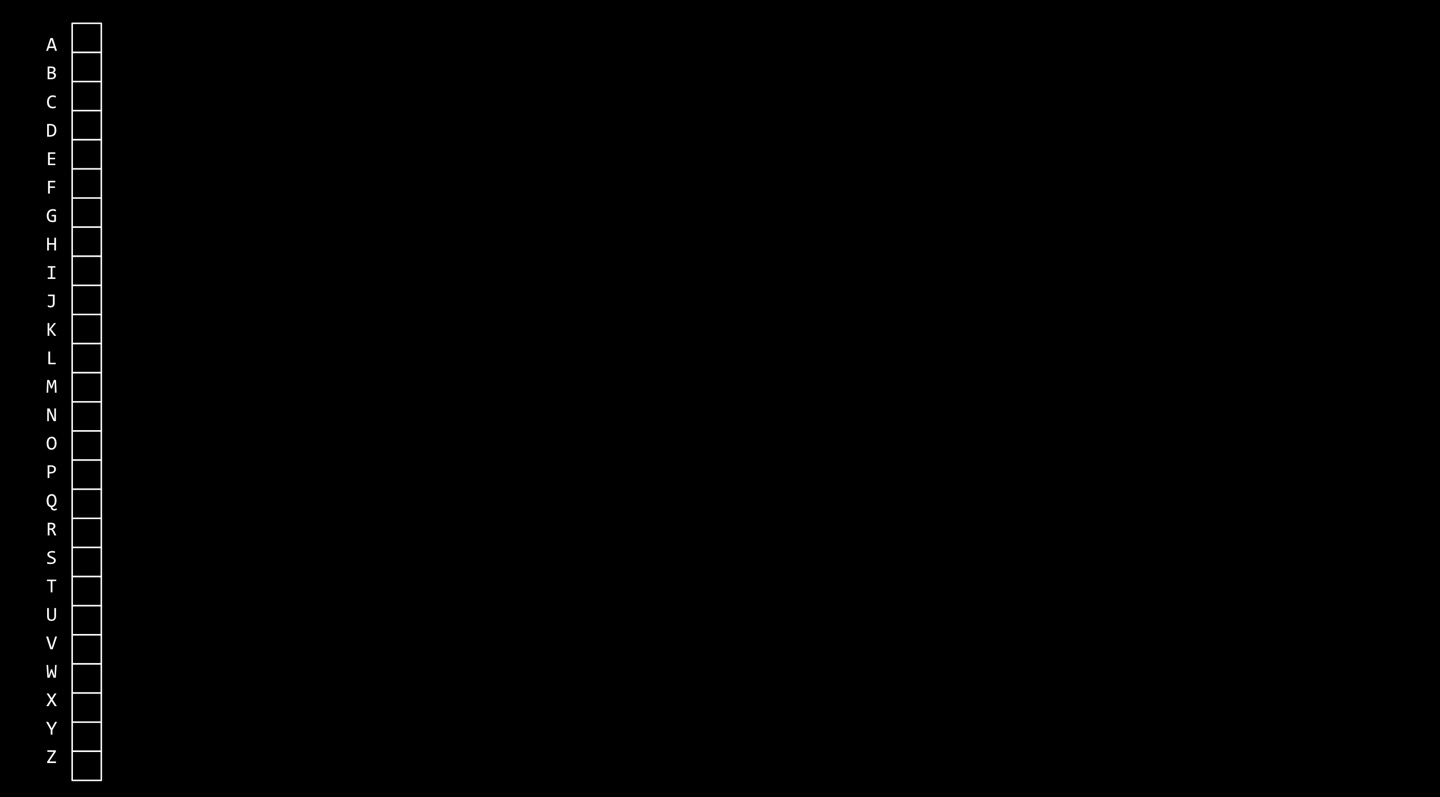 Now I can add freinds’ number to my address book as below. Each element in the array is a pointer to a linked list of friends whose name’s first alphabet is same.
 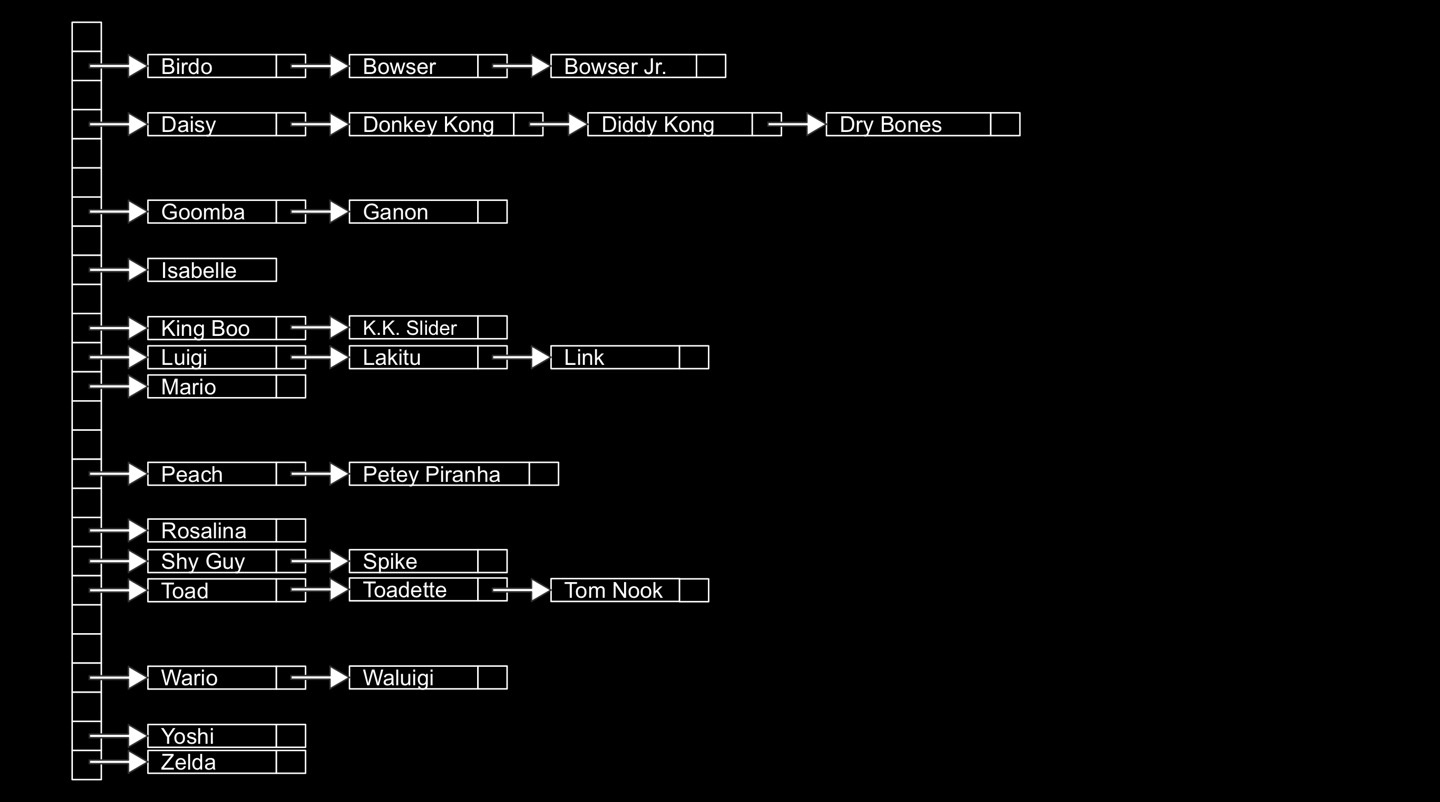 Hash table gives us speed benefit, but it still covers the case where some people have the same first letters. So collisions are an expected problem with a hash table whereby 2 values from some domain happen to map to the same value. However, the time complexity of searching in this case is still because in worst case, every friend might have same first letters. In this case, all you have is a linked list. To solve this problem, we can use a bigger array as below.
 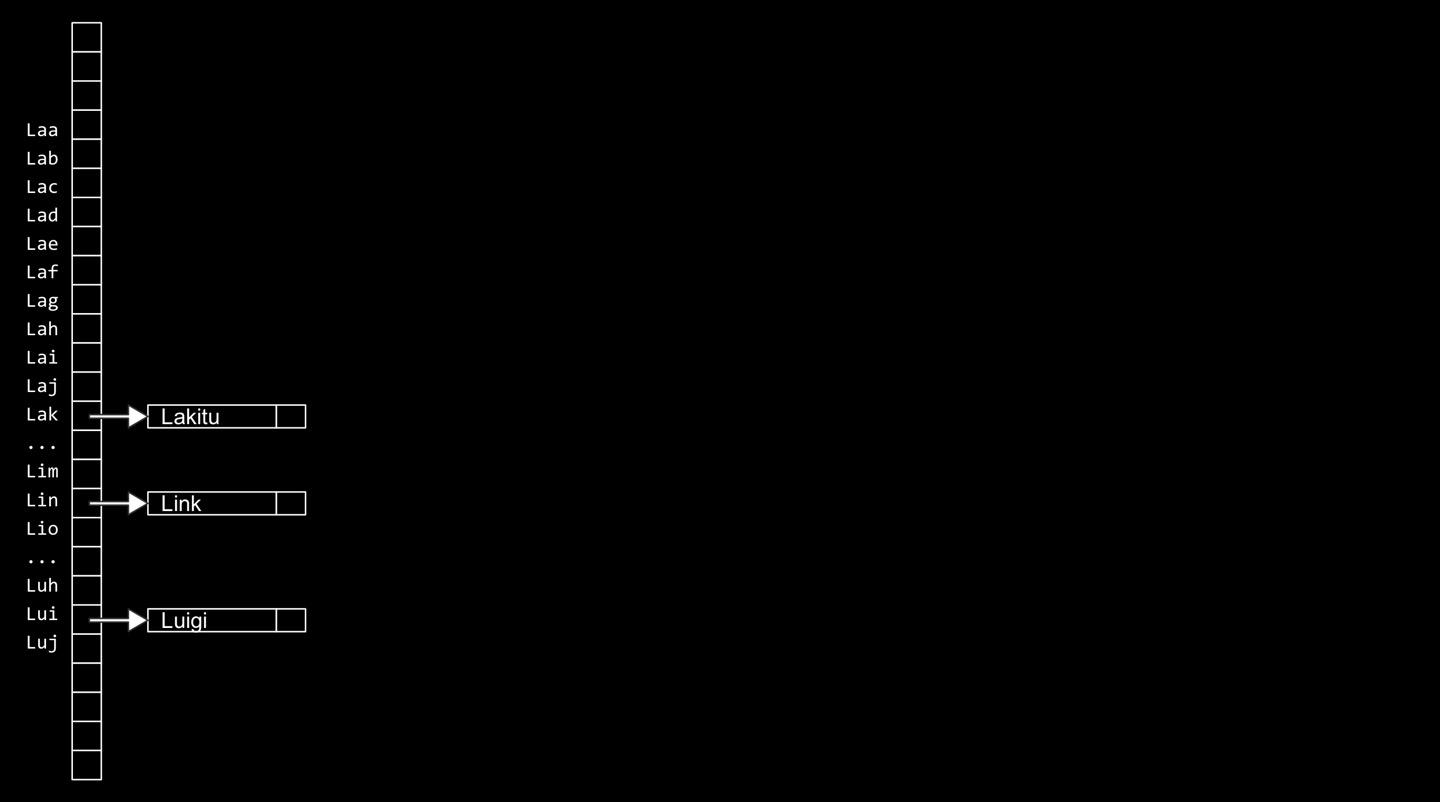 However, the downside is memory. Because if I’m takiing into account not just the first letter, but the first 3 letters, that’s 26^3. But the point is if we have an ideal hash function whereby the function ensures that no values collide, we do obtain . Below is the code of each node.
typdef struct node{
  char *name;
  char *number;
  struct node *next;
} node;
Below is the code of hash table.
node *table[26];
Below is the code of hash function.
#include <ctype.h>
unsigned int hash(const char *word){
  return toupper(word[0] - 'A');
}
If you’re passing in a string and you have no intention of letting that function change the string, you should probably declare the argument to the function as const. That will tell the compiler to don’t let the programmer actually change the string.
time complexity of hash table
As mentioned earlier the time complexity of hash table is . But practically, if you suppose a uniform distribution, the time complexity of a hash table for searching, deleting or inserting is .is case, k = 27. In reality, 26 times faster is actually faster in the real world even though it is asymptotically . Ideally, if we pick an ideal hash function would be the running time we achieve. People develop some fancier math to put real downward pressure on the probability of collisions, so most of the time even it’s not quite ideal, it will be darn close to constant time which makes hash tables and in turn dictionaries one of the most universally compelling daqta strucrtures to use.
Tries
A try is a tree of arrays. In a try, every node is an array. And every location in that array generally represents a letter of the alphabet(you could generalize this away from words too). If you want to insert names or words into a try, you hash again and again creating one array for every letter in your word.  For instance, let’s say I want to include ‘Toad’. I would first find the location for ‘T’ based on its number 0 through 25(hash). Then I would change the NULL to be a pointer to another node(another array). And then I would go to the second array and hash on the second letter ‘O’. And then I would set a pointer to a third node in my tree. Then I would find the pointer representing ‘A’. And I would finally create a fourth node, another array representing the fourth letter of Toad’s name. But because Toad’s name ends with ‘D’, we need to specially color - we could probably use an actual variable in code - to indicate that Toad’s name stops here. So it’s not NULL.
 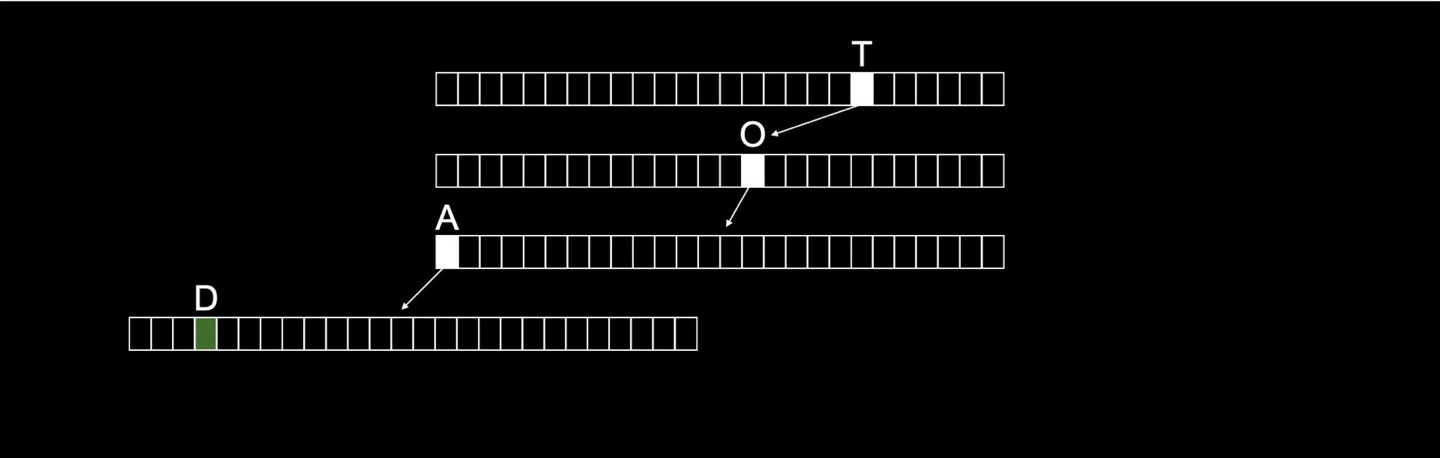 My other friend’s name might be Toadette which is a superstring of Toad. So it could continue and do the same things. So even though they share a common prefix, the fact that there’s 2 green boxes means that Toad is in this dictionay as a key and Toadette is another key. Technically, what’s in these boxes is not just pointer, but their phone number, the actual value of the dictionary. Which is to say, this too is in fact dictionary. A dictionary is just an ADT, a collection of key value pairs and how you implement it can differ.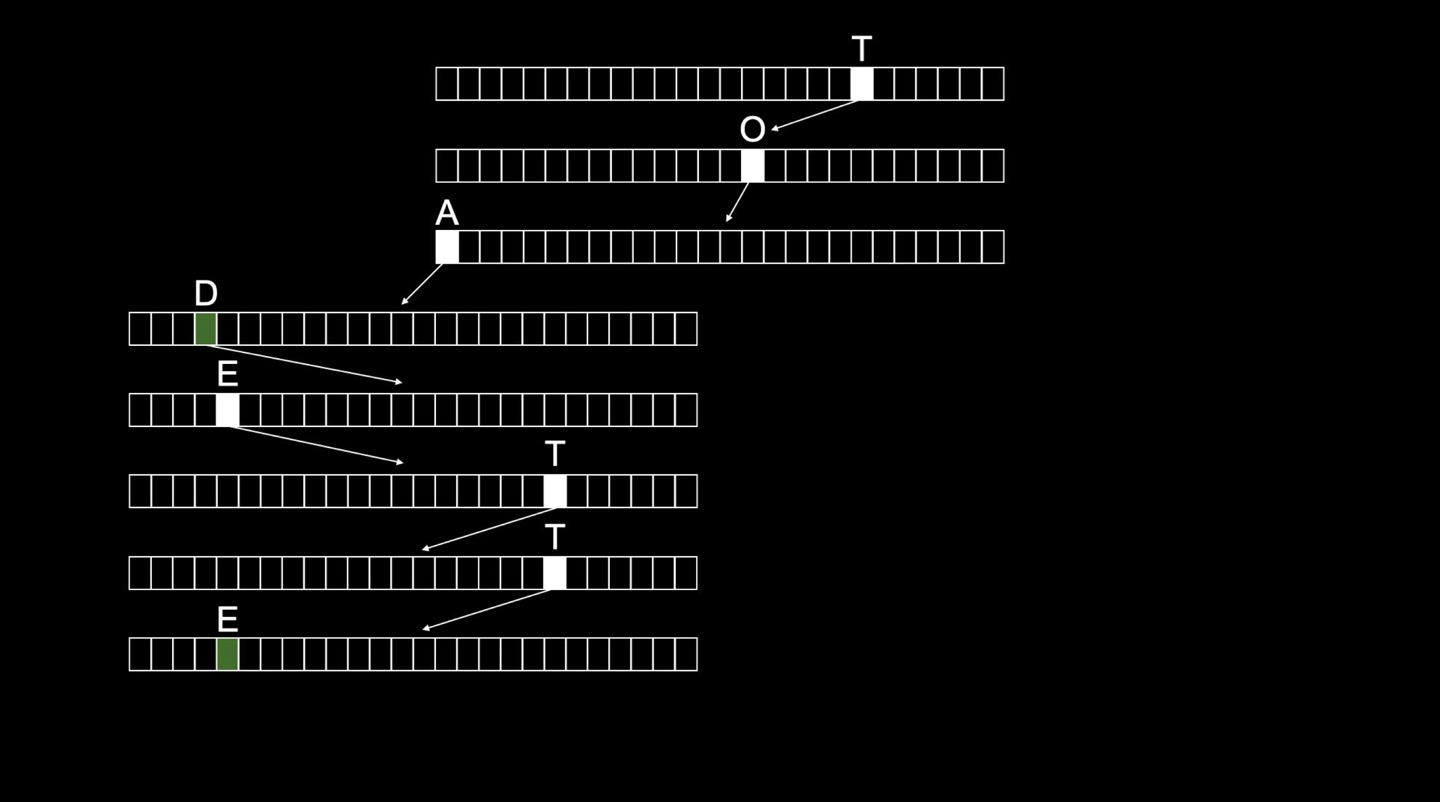
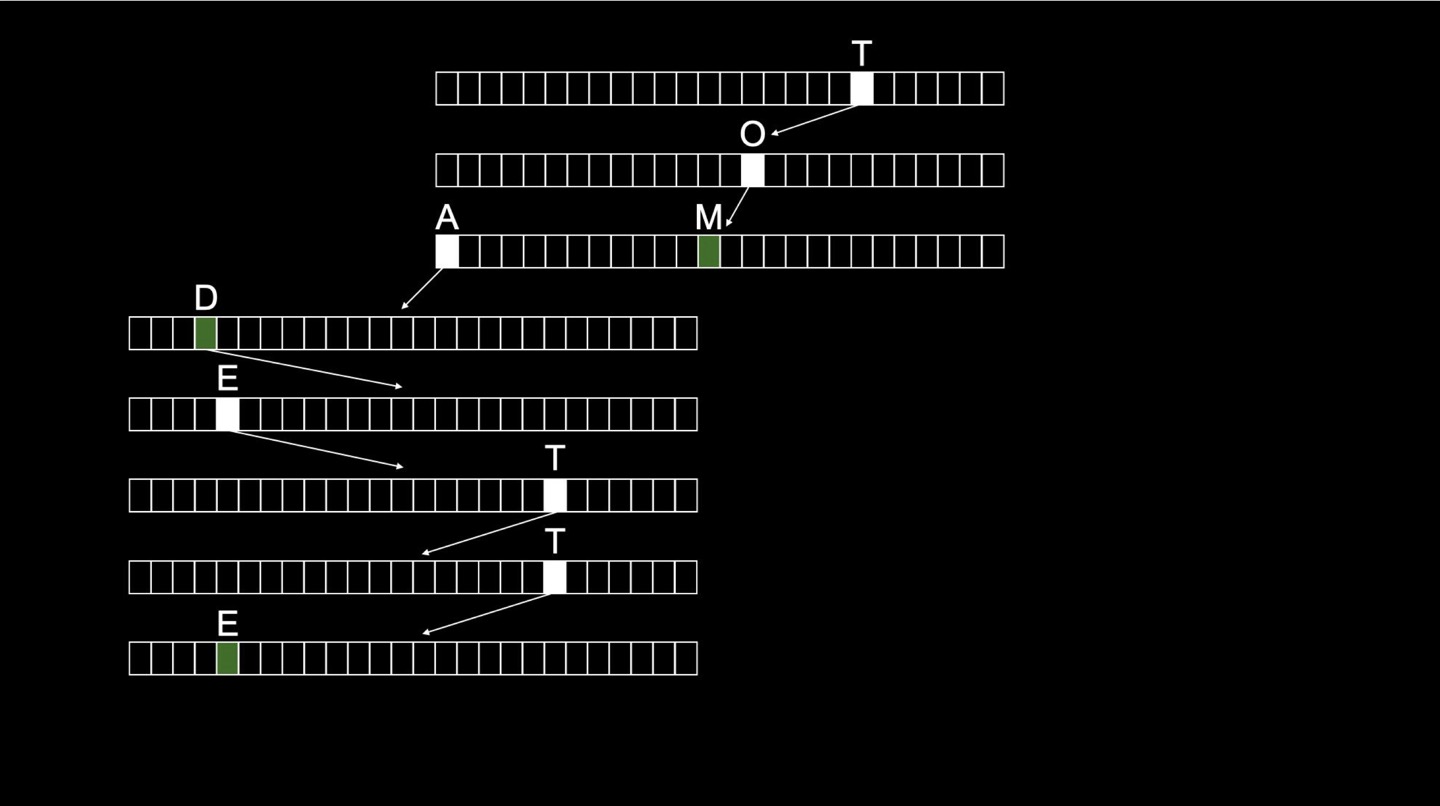
Below is the code of each node.
typdef struct node{
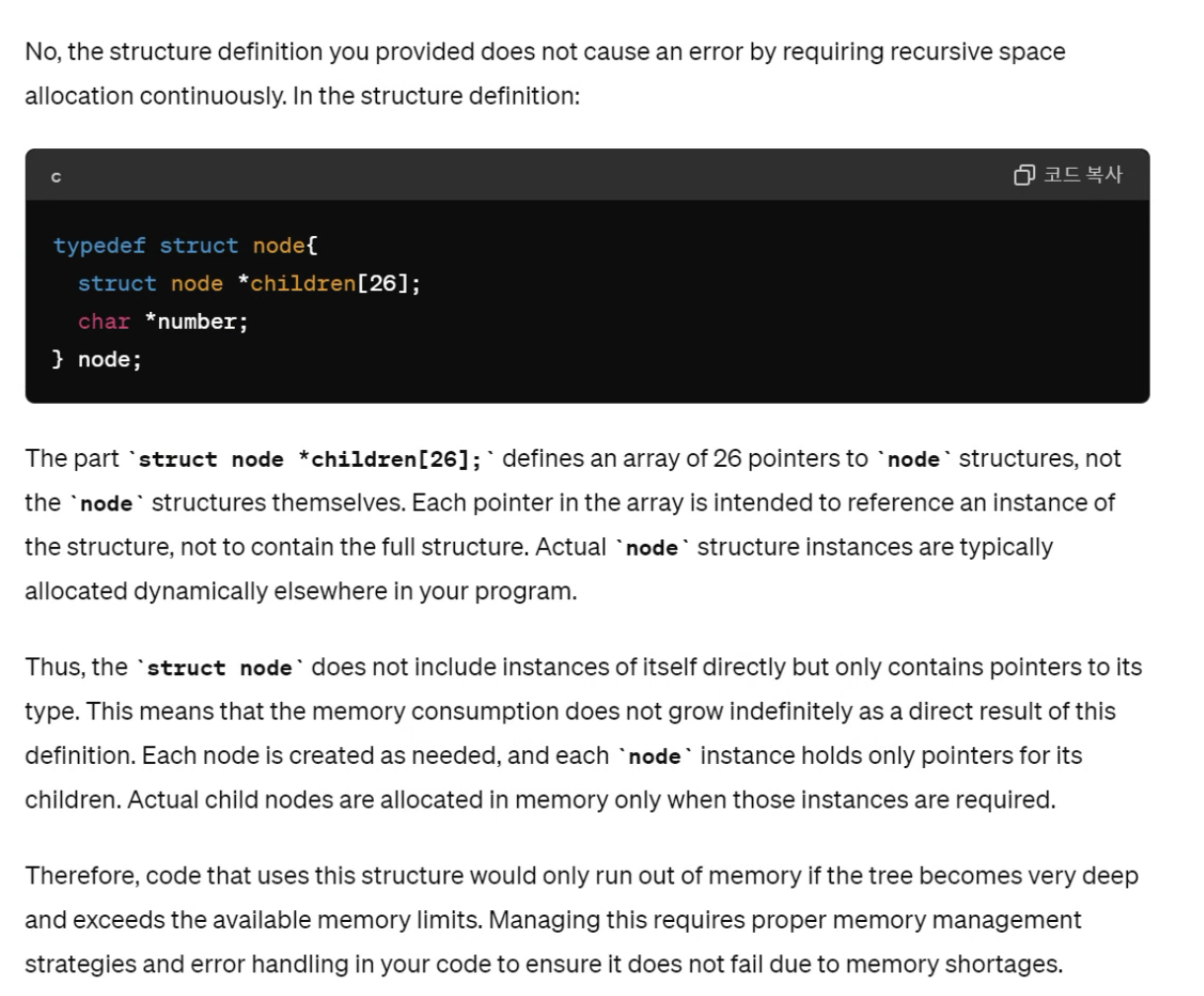
  struct node *children[26];
  char *number;
} node;
All we need to keep track of this data structure is one pointer.
node *trie;
Every node in a try is redefined as being an array of size 26. And in each of these nodes there is room for the person’s phone number. If there’s actually a non-NULL number there - equivalent to a green box - it means there’s name that ends there.
time complexity
Try is a data structure that can be navigated in constant time. To find Toad, it takes 4 steps to find his name. It doesn’t depend on n. In practice, most computers, most systems would use hash tables, not tries, to implement dictionaries because of memory waste in tries.
more details
I thought there was an error of defining node in try, because I thought it demands infinite memory from it’s recursive definition. I asked chatGPT about it and here’s the answer.
Leave a Comment