
[CS50] 09 SQL
Published:
In this post, the ninth lecture of CS50 is summarized.
Flat-file database
Flat-file database is code for a text file containing your data. Your data has delimiters that separate some values from others. The most common approach is to use comma-separated values, or, CSV files.
CSV
In simple text alone, newline characters like ‘\n’ are used to distinguish rows and ‘,’ is used to distinguish columns. In Google Sheets, Excel, and Numbers, you can export your data not in proprietary Apple, Microsoft or Google format, but in a globally portable format known as .csv. In python, you can import csv library which is a python module that gives you csv related functionality.
import csv

file = open("favorites.csv", "r")
# Do something with file
close(file)
To work with csv files, you can use above code but more pythonic way is to write code as below.
import csv

with open("favorites.csv", "r") as file:
    reader = csv.reader(file)
    next(reader) # to get start from the second line of csv file since the first is header
    for row in reader:
        print(row[1])
If you use, keyword ‘with’, the file willbe automatically closed. The CSV reader in python is going to return to you, one row after another through the loop. ‘row[1]’ refers to the second column data in that row. In the code above, the problems is that we have to remember the second column of each row is the data we care about - for instance, scores. But suppose someone can change the order of columns in csv file. Thus this code is fragile because I’m hopping that row[1] is always the data that I care about. Instead, we use the header row, and use Dictionary Reader instead of reader.
import csv

with open("favorites.csv", "r") as file:
    reader = csv.DictReader(file)
    for row in reader:
        print(row["language"])
What DictReader does, which reader does not, is it automatically analyzes the first line in the file, figures out what are all of your columns called, and thereafter, when you iterate over this reader what each of your rows now is - it’s no longer a list - a dictionary. Keys of whhich are from the header field. Now, let’s do more things related to numbers.
import csv
with open("favorites.csv", "r") as file:
    reader = csv.DictReader(file)
    scratch, c, python = 0, 0, 0

    for row in reader:
        favorite = row["language"]
        if favorite == "Scratch":
            scratch += 1
        elif favorite == "C:
            c += 1
        elif favorite == "Python":
            python += 1

print(f"scratch: {scratch}")
print(f"C: {c}")
print(f"python: {python}")
Below is more pythonic code using dictionary. The difference is I’m now using one dictionary instead of 3 variables.
import csv

with open("favorites.csv", "r") as file:
    reader = csv.DictReader(file)
    counts = {}

    for row in reader:
        favorite = row["language"]
        if favorite in counts:
            counts[favorite] += 1
        else:
            countes[favorite] = 1

for favorite in sorted(counts, key=counts.get, reverse=True):
    printf(f"{favorite}: {countes[favorite]}")
sorted function sorts the dictionary by key by defalut. A dictionary is an object, so it has its own methods and one of them is get. And if you tell the sorted function to use thath built-in method, it will get its value from every key and sort effectively by the value. Below is easier code to do the samething by using Counter object.
import csv
from collections import Counter

with open("favorites.csv", "r") as file:
    reader = csv.DictReader(file)
    counts = Counter()

    for row in reader:
        favorite = row["language"]
        counts[favorite] += 1

for favorite, count in counts.most_common():
    printf(f"{favorite}: {count}")
What the Counter class is going to do is automatically initialize everything to 0. Also, Counter has method named most_common and it returns a pair of (key, value), (key, value).
Relational Database
Instead of just dealing with CSV files, pure text, it turns out there’s an entire world of proper databases. Not flat file databases where you store everything in text files, but a database program, a piece of software running on a computer, running on a server, that’s always listening for you. It’s got a lot of memory, it’s got a lot of space, and in turn a lot of data, and it supports a database specific language that makes it much easier, much faster to ask questions of the very same data. It’s a relational database in the sense that it’s not even necessarily one spreadsheet, you can have many sheets across which there might very well be relationships or relations.
SQL
SQL - Structured Query Language - is a database specific language. It’s a declarative language whereby you’re not going to be in the habit with SQL of writing loops and conditionals but instead you’re going to describe the data that you want to get back, you’re going to describe the question that you want the answer to.
CRUD paradigm
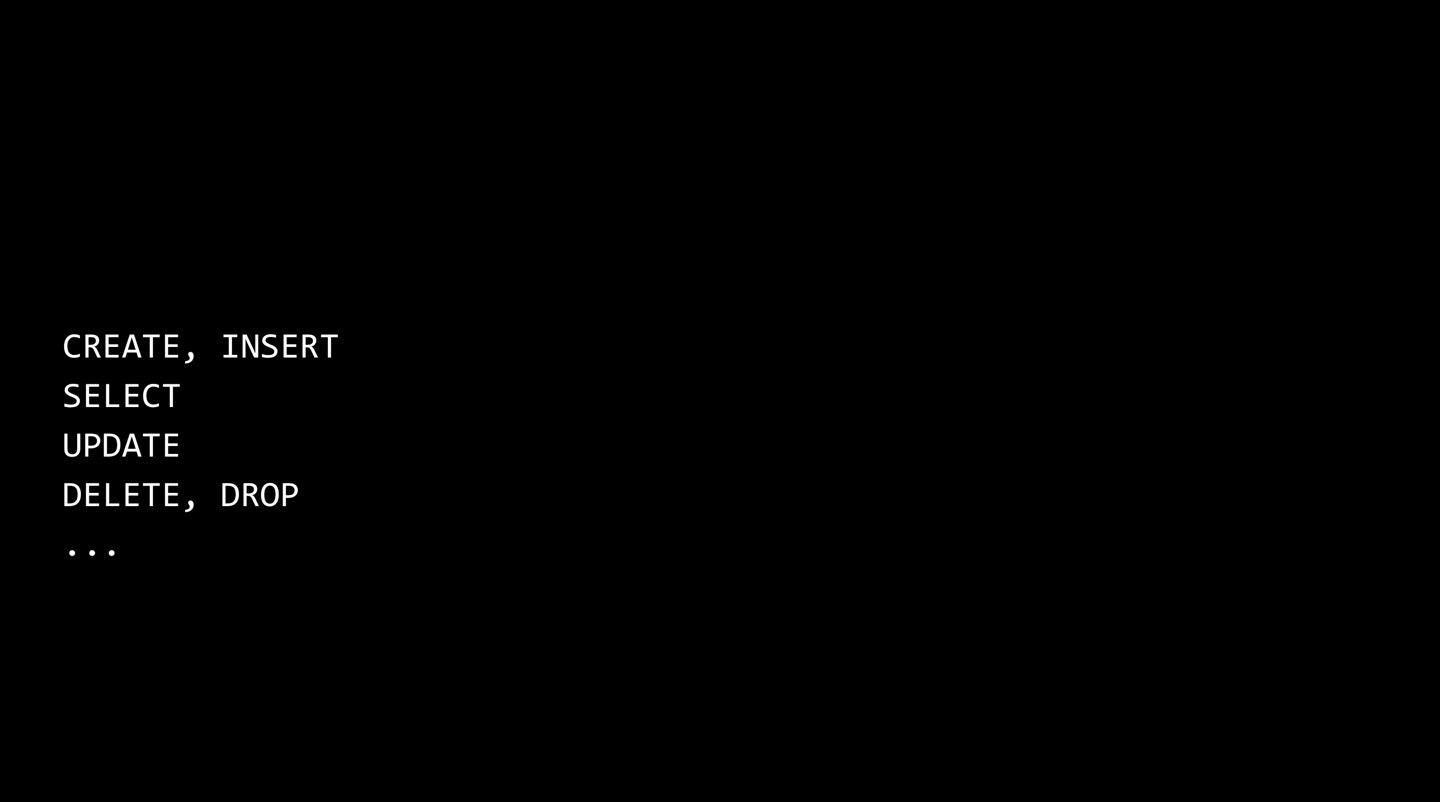
SQL follows CRUD paradigm. In relational database, you can really only do 4 things. You can CREATE, READ, UPDATE, DELETE the data. Specifically in SQL, there’s going to be other keywords that map to those 4 ideas. Technically you don’t just create data in the world of SQL, you can also insert it. And people use SELECT instead of READ. DROP lets you destructively, very dangerously delete entire database tables.
SQLite
SQLite is an implementation of SQL. SQLite is really popular on Macs, PCs, and phones nowadays. A lot of the data that games and other applications on your phone might store a binary file that’s in the SQLite format.
CREATE new DB
$ sqlite3 favorites.db
Are you sure you want to create favorites.db? [y/N] y
sqlite>
load CSV file
sqlite> .mode csv
sqlite> .import favorites.csv favorites
sqlite> .quit
$ ls favorites.csv favorites.db
favorites.csv favorites.db
.mode csv puts SQLite into CSV mode.
sqlite> .schema
CREATE TABLE IF NOT EXISTS "favorites"(
"Timestamp" TEXT, "language" TEXT, "problem" TEXT);
.schema is a command that show me the schema of this database table. This is showimg me, the SQL command that was automatically run when I imported this database the first time around.
SELECT data
SELECT column FROM table;
sqlite> SELECT * FROM favorites;
sqlite> SELECT languagte FROM favorites;
sqlite> SELECT languagte FROM favorites LIMIT 10;
There are bunch of keywords like these built into SQL. Below is the code to count the number of rows in table.
sqlite> SELECT COUNT(*) FROM favorites;
sqlite> SELECT COUNT(language) FROM favorites;
sqlite> SELECT DISTINCT(language) FROM favorites;
sqlite> SELECT COUNT(DISTINCT(language)) FROM favorites;
sqlite> SELECT COUNT(*) FROM favorites WHERE language = 'C';
sqlite> SELECT COUNT(*) FROM favorites WHERE language = 'C' AND problem = 'Hello, World';
sqlite> SELECT language, COUNT(*) FROM favorites GROUP BY language;
sqlite> SELECT language, COUNT(*) FROM favorites GROUP BY language ORDER BY COUNT(*);
sqlite> SELECT language, COUNT(*) FROM favorites GROUP BY language ORDER BY COUNT(*) DESC;
sqlite> SELECT language, COUNT(*) AS n FROM favorites GROUP BY language ORDER BY n DESC;
sqlite> SELECT language, COUNT(*) AS n FROM favorites GROUP BY language ORDER BY n DESC LIMIT 1;
INSERT data
INSERT INTO table (column, ...) VALUES(value, ...)
sqlite> INSERT INTO favorites (language, problem) VALUES('SQL', 'Fiftyville');
In the world of SQL, NULL has nothing to do with pointers or addresses, it’s just using the same word to represent the same idea, that there’s no data here.
DELETE data
DELETE FROM table WHERE condition;
DELETE FROM favorites;
The code above may be the most destructive things you can do as a database administator. If you google around, there are horror stories of interns in the real world executing commands like this at their companies. This will delte everything from favorites.
sqlite> DELETE FROM favorites WHERE Timestamp IS NULL;
UPDATE data
UPDATE table SET column = value WHERE condition;
sqlite> UPDATE favorites SET language = 'SQL', problem = 'Fiftyville'
Schema
Let’s design tables to store data about TV shows. 2 models below are poorly designed. Each row is going to have a different number of columns as I add more tv shows in the first table. Title is repeated in the second table. 
 We can solve these problems by making multible sheets and assume that there’s relationship between those sheets.

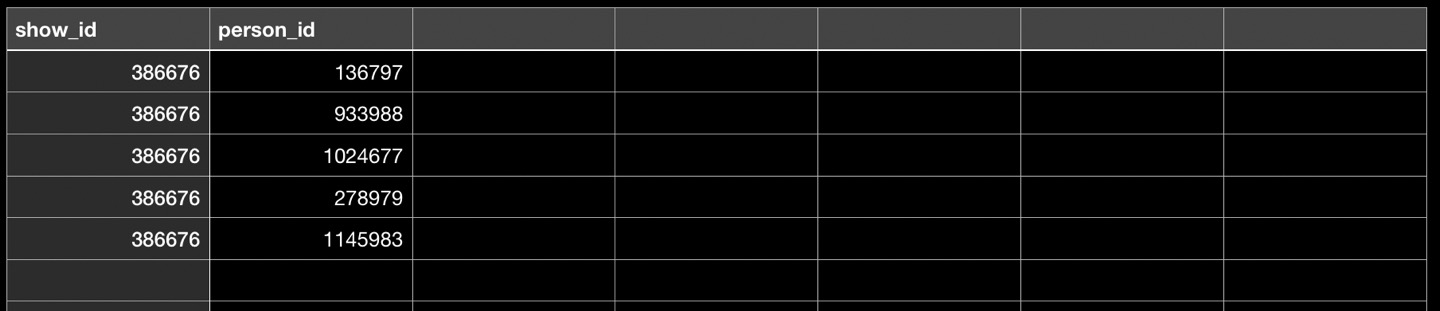 In this way, we can avoid 2 problems earlier, which is having a variable number of columns in one case, and redundancy in the other case. You only write the show’s name once in one place, TV stars’ names once in one place, and you relate one with the other, in the third sheet. Let’s call each sheet shows, people, and stars respectively. In the last sheet, the show_id is repeated so you may think it is a bad design. But think about our world of C. In C, and really computers, in general, data takes up finite amount of space. For instance, integer is 4 bytes. So even though I’m duplicating the value, it’s just the same 4 bytes. It’s not ‘t-h-e- -o-f-f-i-c-e-\0’ which is 11 bytes. Duplicating numbers is in general allowed. Duplicating strings will get you into trouble.
one-to-one relationship
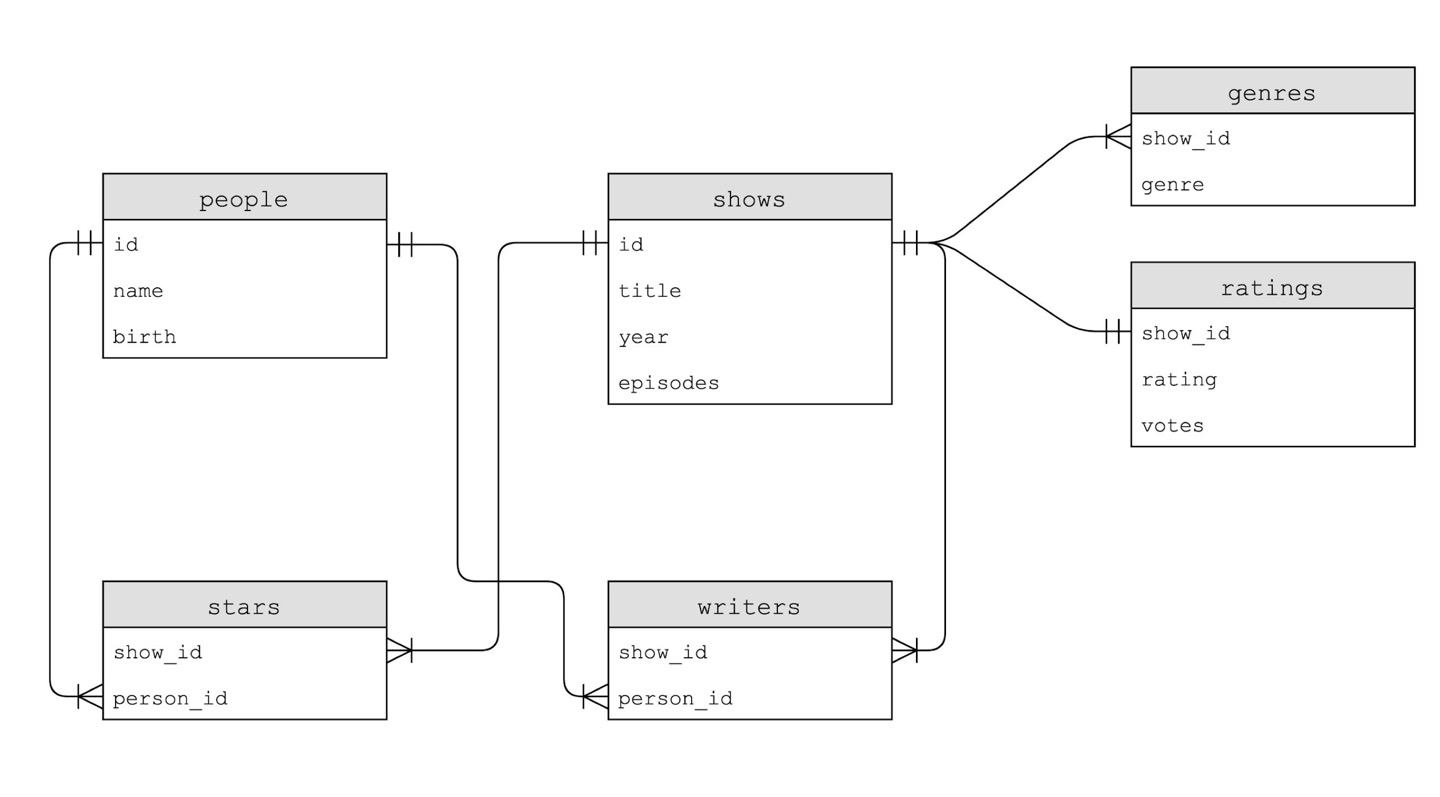 This is an artist’s rendition of 6 tables - entity relationship diagram - created based on IMDb. We can notice there is a standarad relationship between shows and ratings table which is one-to-one relationship whereby every show has one rating. This means every row in the shows table has corresponding row in the ratings table.
$ sqlite3 show.db
sqlite> .schema shows
CREATE TABLE shows (
    id INTEGER,
    title TEXT NOT NULL,
    year NUMERIC,
    episodes INTEGER,
    PRIMARY KEY(id)
);
sqlite> .schema ratings
CREATE TABLE ratings (
    show_id INTEGER NOT NULL,
    rating REAL NOT NULL,
    votes INTEGER NOT NULL,
    FOREIGN KEY(show_id) REFERENCES shows(id)
);
We can figure out there are some relationships across multiple tables.
data types
In SQL, we have data types. For instance, we have these 5 primarily. 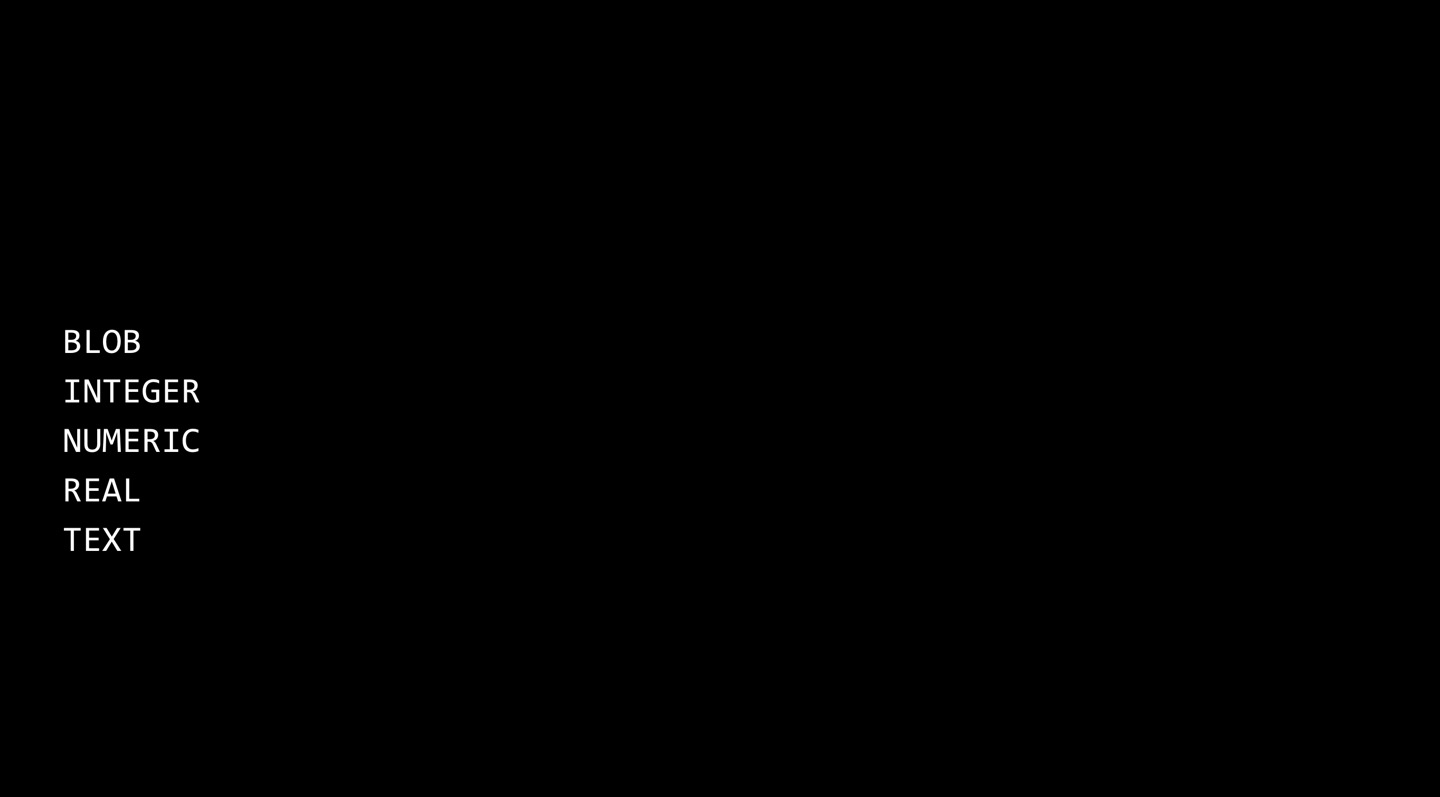 BLOB stands for Binary Large Object, which means a file or some piece of data that’s 0’s and 1’s. Though generally, it’s best to store files on file systems, like in folders, on disks, not in your database. Numeric is for dates and times, things that are numbers, but not necessarily integers or floating point values.
NOT NULL & UNIQUE
You can specify a column cannot be NULL by using keyword NOT NULL. You can specify that a column’s values must be unique by UNQUE.
PRIMARY KEY & FOREIGN KEY
In our IMDb database example above, IMDb gave every show in the wrold a unique ID. That unique ID is an integer that uniquely identifies that TV show. In other words, the id column of shows sheet is the primary key for the table. In the people sheet, different id column is the primary key. In stars table show_id and key_id are foreign keys. They didn’t come from this stars sheet but they are in the stars sheet, so they are relatively foreign to it. PRIMARY KEY is the column that uniquely identifies your data, FOREIGN KEY is just the appearnce of those same mumbers elsewhere. Command of CREATE ratings table earlier tells that show_id column is a FOREIGN KEY that references the shows table’s id column.
Nested Query
sqlite> SELECT show_id from ratings WHERE rating >= 6.0 LIMIT 10;
sqlite> SELECT * FROM shows WHERE id = 62614;
All of the shows’ names are in the shows table, but all of the shows’ ratings are in the ratings table. So even if I do SELECT * from ratings, I’m never going to know what show I’m looking at. I have to SELECT in shows table after and it’s cumbersome. Instead, I can have nested queries.
sqlite> SELECT * FROM shows WHERE id IN
   ...> (SELECT show_id from ratings WHERE rating >= 6.0);
I want what’s in parentheses to happen first and so what the database will do is select all show_ids from the ratings table where the rating vlue is at least 6.0 and return a list of show_ids.
JOIN
Now, I want to see not only titles but ratings of shows at the same time. You can JOIN more than 2 tables. 

sqlite> SELECT title, rating FROM shows JOIN ratings ON shows.id = ratings.show_id WHERE rating >= 6.0 LIMIT 10;
one-to-many relationship
Now, let’s focus on shows and genres. Since one show can have many genres, they have one-to-many relationships.
sqlite> .schema genres
CREATE TABLE genres (
    show_id INTEGER NOT NULL,
    genre TEXT NOT NULL,
    FOREIGN KEY(show_id) REFERENCES shows(id)
);
When you JOIN data with a one-to-many relationship, you’re temporarily going to get duplicates, which is not a bad thing because the temporary table exists just for us to look at the data, it’s not actually stored in duplicate in the database itself. 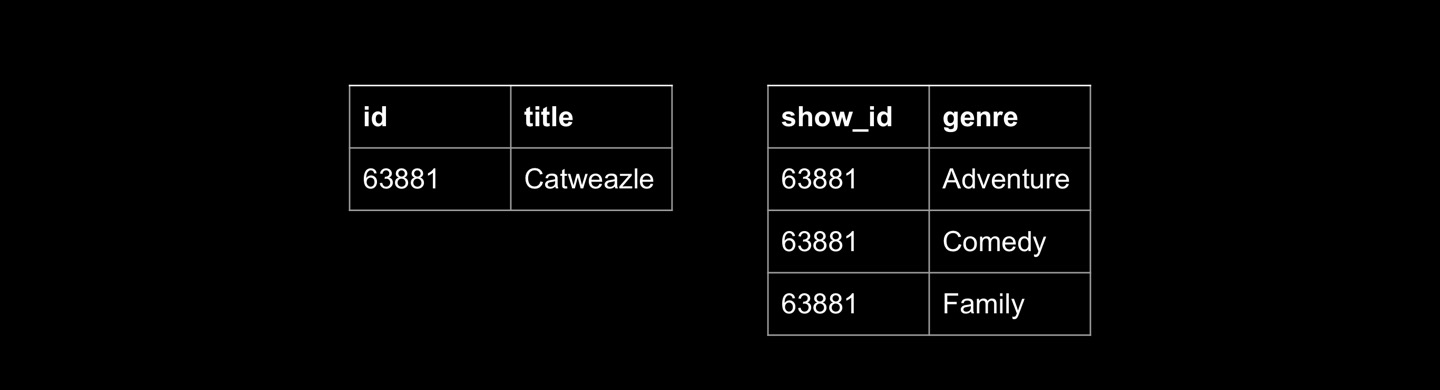
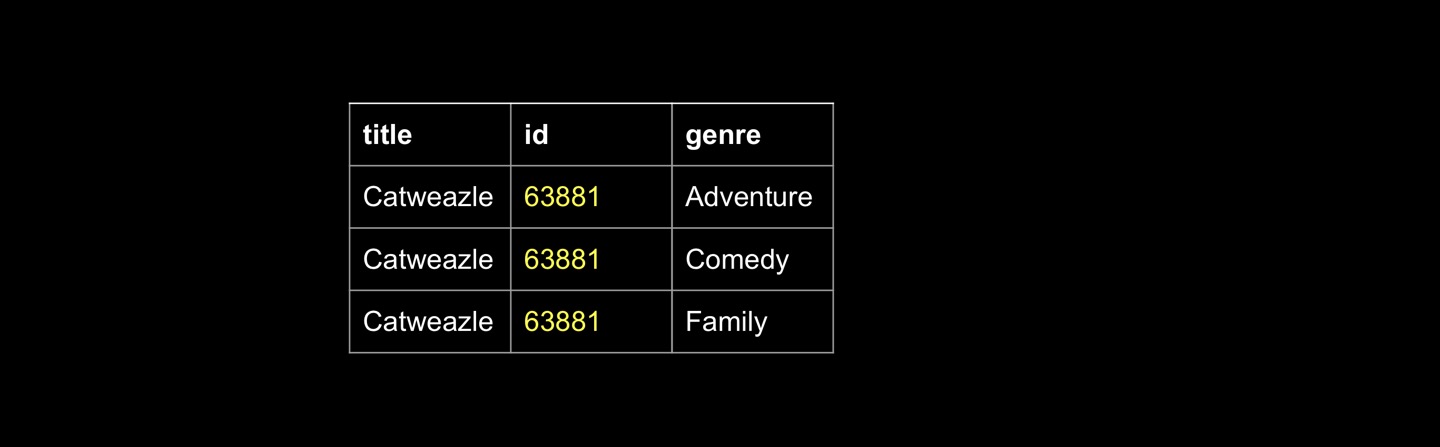
sqlite> SELECT * FROM shows JOIN genres ON shows.id = genres.show_id WHERE id = 63381;
many-to-may relationship.
Now, let’s focus on people, shows, and stars table. Since any TV show can have many people and one person can star in many different shows, it is many-to-many relationship. When you have many-to-many relationship, you do need this third table - stars in this case - to bridge the two.
sqlite> SELECT person_id FROM stars WHERE show_id =
   ...> (SELECT id FROM shows WHERE title = 'The Office' AND year = 2005);
sqlite> SELECT name FROM people WHERE id IN
   ...> (SELECT person_id FROM stars WHERE show_id =
   ...>  (SELECT id FROM shows WHERE title = 'The Office' AND year = 2005));
sqlite> SELECT title FROM shows WHERE id IN
   ...> (SELECT show_id FROM stars WHERE person_id =
   ...>  (SELECT id FROM people WHERE name = 'Steve Carell'));
There are 2 more ways to executre the same idea.
sqlite> SELECT title FROM shows
   ...> JOIN stars ON show.id = stars.show_id
   ...> JOIN people ON stars.person_id = people.id
   ...> WHERE name = 'Steve Carell';
sqlite> SELECT title FROM shows, stars, people
   ...> WHERE shows.id = stars.show_id
   ...> AND people.id = stars.person_id
   ...> AND name = 'Steve Carell'
INDEX
In SQL, you can create indexes, which is a fancy way of saying a data structure that makes it faster to perform queries.
CREATE INDEX name ON table (column, ...);
If you know that you application is going to search on certain columns frequently, you can prepare the db in advance to build up some fancy data structures in memory so it can get back answers even faster.
sqlite> .timer ON
sqlite> CREATE INDEX title_index ON shows (title);
In this way the server can handle way more query per unit of time. When we click button in our college site and if it is slow, a lot of time it can be explained by poor database design, or databases that might not have been indexed properly. So when you’re searching for some course, it’ll take so long because underneath the hood it’s essentially doing linear search over everything. But by contrast, in relational database, when you create an index in advance becasue you have a hunch that maybe users are going to search on certain columns, essentially you’re building up B-trees in memory.
B-trees
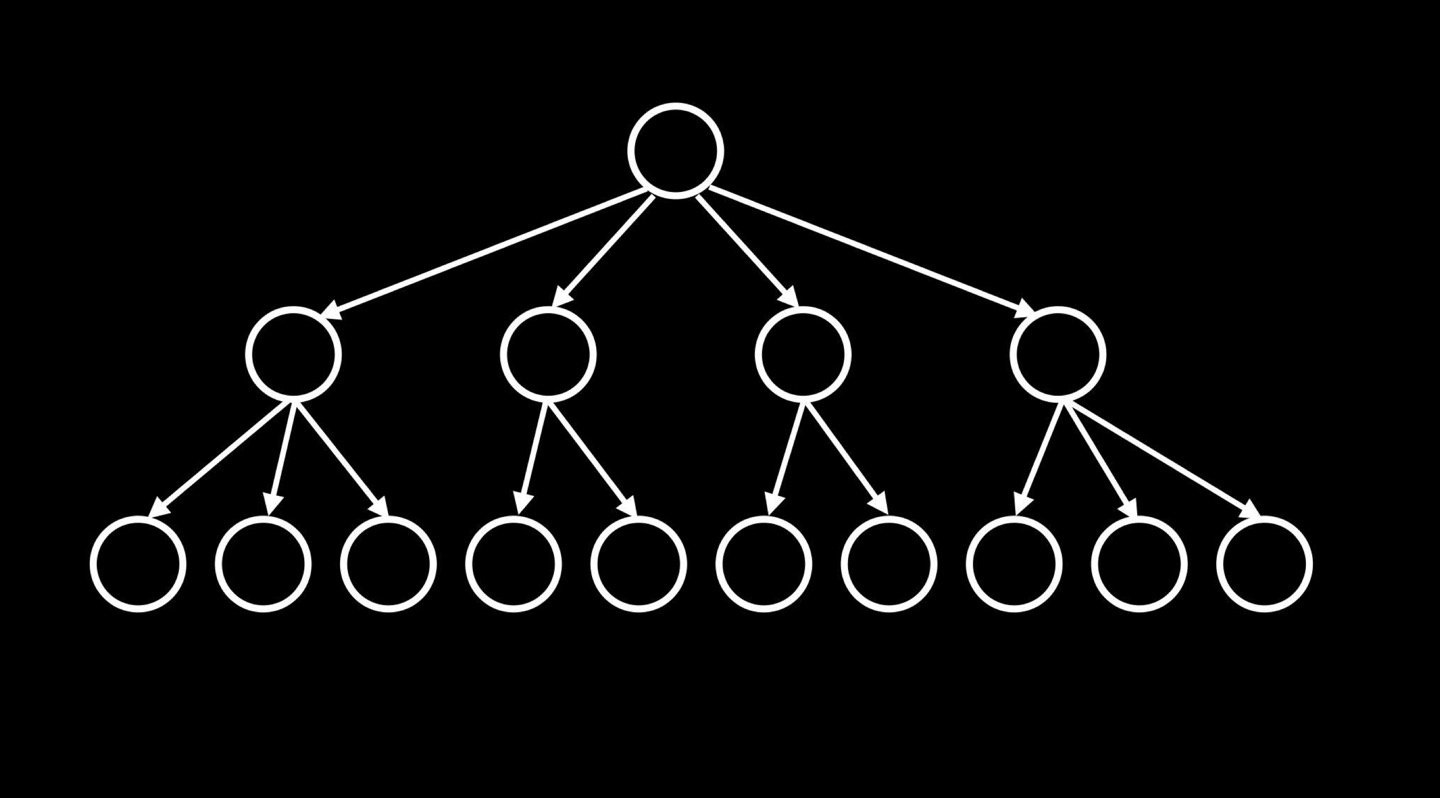 When you run CREATE table, that kind of data structure is being magically created for you by the db so it’s not a simple linear search through the entire column.
sqlite> SELECT title FROM shows, stars, people
   ...> WHERE shows.id = stars.show_id
   ...> AND people.id = stars.person_id
   ...> AND name = 'Steve Carell'
Whenever you declare a primary key in a db, at least in SQLite, you get an index for free. Primary keys are automatically indexed, so searching for a number in that column takes logarithmic or constant time. Above, I’m touching not just shows.id, but I’m also filtering on stars.show_id which is a foreign key. Foreign keys are not indexed by default. Same for start.person_id and name. So I’m touching 3 separate columns, 2 foreign keys, 1 name field, that have no fancy tree structure built for them. But I can do that.
sqlite> CREATE INDEX person_index ON stars (person_id);
sqlite> CREATE INDEX show_index ON stars (show_id);
sqlite> CREATE INDEX name_index ON people (name);
If I now run the same query, it will take 0.001 seconds instead of 2.7 seconds previously. Then why not index every column in every table? Lot’s of memory is a trade off.
Python & SQL
We can use python to execute SQL queries.
from cs50 import SQL

db = SQL("sqlite:///favorites/db")

favorite = input("Favorite: ")

rows = db.execute("SELECT COUNT(*) AS n FROM favorites WHERE problem = ?", favorite)
row = rows[0]

print(row["n"])
This is an incredibly common practice, to use one language for what it’s best at, like SQL is best at reading data from databses and Python is best for in this case creating a user interface or eventually making a web application. But it’s certainly fine to use one inside of the other.
Race condition
The problem with SQL and databases in general is if you have thousands, millions of things happening at once, things can get out of order and your math can be wrong. In order to keep track of number of ‘likes’ in certain instagram posts, maybe Meta is using this kind of codes.
rows = db.execute("SELECT likes FROM posts WHERE id = ?", id)
likes = rows[0]["likes"]
db.execute("UPDATE posts SET likes = ? WHERE id = ?", likes + 1, id)
If the user click certain post, the code above may be executed. The problem is with large systems like Metas is that they are executing code like this on multible servers, that might be executing slightly out of order. One might be faster, one might be slower. Which is to say, even though these 3 lines of code represent what should happend when I click on that post, and you click on that post, and somebody else click on that post, the lines of code chronologically might get shuffled a little bit. For instance the first line of code gets executed for me, and then it gets executed for you and then for the other person. And then the server moves on to the next line of code. So it’s sort of multitasking, handling lots of users at once. The problem with this is that you run into a race condition of sorts, where the servers are sort of racing to handle one user but other users requests are happening at the same time. Here’s an analogy. Suppose we have a refrigerator. You open the fridge and you find out there’s no milk. So you walk out to buy milk. Meanwhile, your roomate comes home, check the fridge, follow a different path to get more milk as well. Now we have twice as much milk as we need and we make a mistake. The point is that both of you made decisions bassed on the state of variable. But the problem was that variable was in the process of being updated when someone else looked at it. The first person in the story was on their way to the store so the variable was about to be incremented in terms of quantity of milk, but the other person didn’t know that yet so they too tried to increment it. Suppose what might happen in the code above. Suppose the post had 1,000,000 likes. And suppose the first line of code got executed fo 3 people A, B, and C. Well, the value of our likes variable in Meta servers might be 1,000,000, 1,000,000, 1,000,000. They therefore update to 1,000,001 3 times. But they lost 2 of those likes because they might have inspected the variable while some other server, some other user’s like was being processed. In short, when you have lots of data, on lots of servers, all of which is happening very quickly you run into these race conditions. And code like this can be dangerous. In world of SQL, there are solutions to this. There are keywords in certain databases that let you begin a transaction, which menas that line 2~4 in the code below should either all happen together or not at all. They should be atomic.
db.execute("BEGIN TRANSACTION") # cs50 library
rows = db.execute("SELECT likes FROM posts WHERE id = ?", id)
likes = rows[0]["likes"]
db.execute("UPDATE posts SET likes = ? WHERE id = ?", likes + 1, id)
db.execute("COMMIT") # cs50 library
SQL injection attacks
from cs50 import SQL

db = SQL("sqlite:///favorites/db")

favorite = input("Favorite: ")

rows = db.execute("SELECT COUNT(*) AS n FROM favorites WHERE problem = ?", favorite)
row = rows[0]

print(row["n"])
Code like this is too easily vulnerable to being hacked. That is misused in some way, unless you practice using placeholders like ‘?’. It turns out it’s very dangerous to take user input in, generally. Suppose Harvard are taking user input from sign-in forms in web or mobile app, and they’re just pluggin your input into a SQL query that they wrote in advance that just is waiting for your username or password to be plugged in so they can ask a complete query of the database. If I’m a bit malicious or curious and type some funky syntax to fields like this - malan@harvard.edu’– - that I know have special meaning to certain databases. In SQLite, sinqle quotes are important. I’ve been using them for strings. The comment character in SQLite is dash, dash. If you want the rest of a line to be ignored, you just say –. Suppose that some developer at Harvard has wriiten a code like this to check if the username and password typed in match what’s in the database.
rows = db.execute("SELECT * FROM users WHERE username = ? AND password = ?", username, password)

if rows:
    ...
This is safe because we use place holders. However, the code below is unsafe.
rows = db.execute(f"SELECT * FROM users WHERE username = '{username}' AND password = '{password}'")

if rows:
    ...
The problem is if you just blindly plug users input into pre-made queries like this, they can finish your thought for you, in ways you don’t expect if you trust the users.
rows = db.execute(f"SELECT * FROM users WHERE username = 'malan@harvard.edu'--' AND password = '{password}'")

if rows:
    ...
Now your program will not check the password.
Leave a Comment