
[CS50] 10 HTML, CSS, JavaScript
Published:
In this post, the tenth lecture of CS50 is summarized.
The Internet
Nowadays, every computers is interconnected either with wires or wirelessly. How? Routers are computers, servers whose purpose in life is to route information from left to right, top to bottom geographically to get data from point A to B. But typically, you’re not going to have a direct connection between A and B. You might have many different servers between you and someone else. If you send email to your friend, that email is going to be put inside packet. That packet pass through of any number of routers. We have software nowadays that dynamically figures out the best path of routers.
TCP/IP
What is router sending? A packet is a generic term for some amount of information. TCP/IP is a pair of protocols that the internet generally uses nowadays to get data from point A to B. IP stands for internet protocol. Every computer, every internet work device in the world has an IP address that uniquely represent computers - that’s a bit of a white lie because there’s way to share IP addresses. IP address is formatted as #.#.#.# where each # represents a vallue between 0 ~ 255. So IP address is generally 4 bytes. However, 4 billion is not enough nowadays considering number of internet devices in the world. The world is gradually in the process of transitioning from IPv4 to IPv6. In IPv6, 128 bits are used. 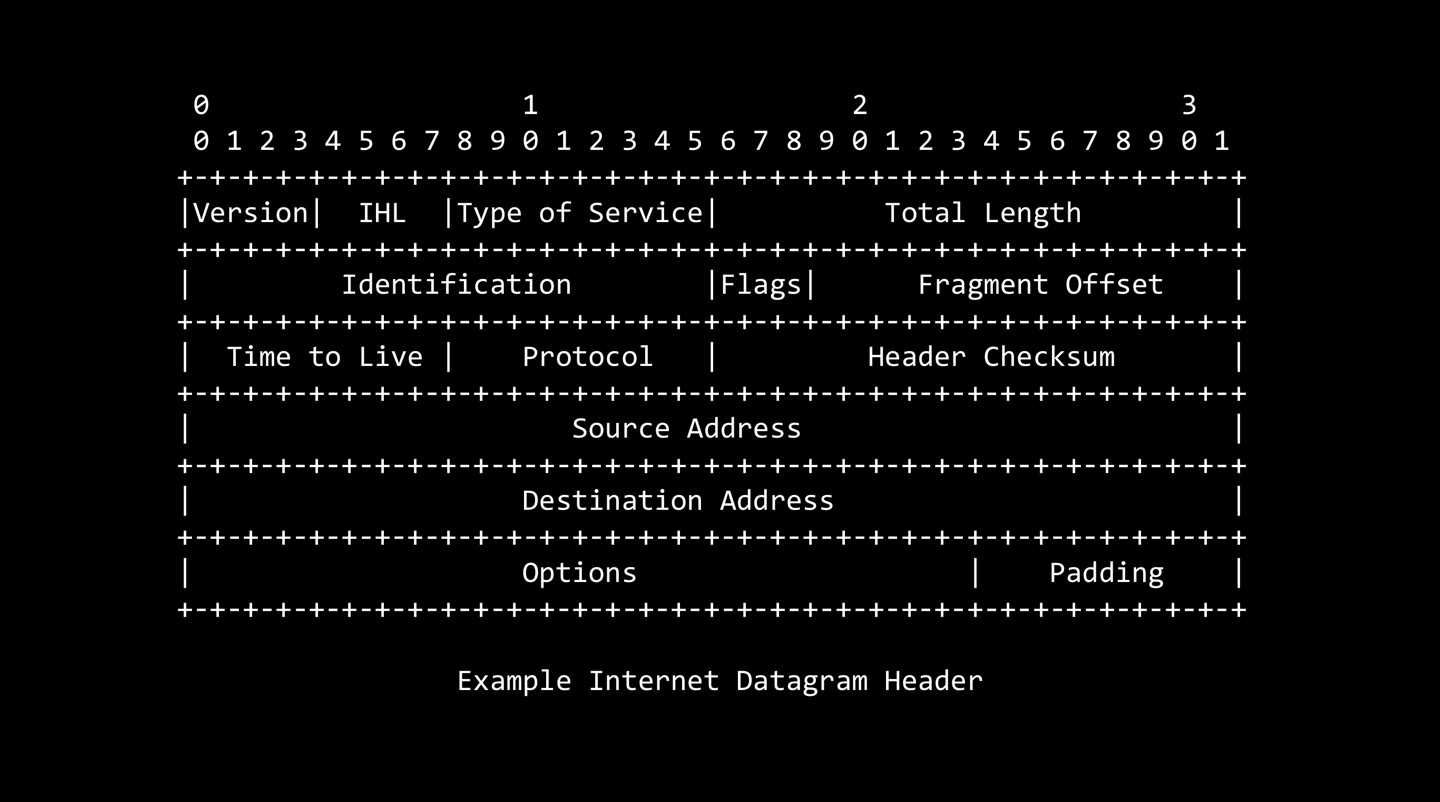 Above is the layout of certain IP packets. We’ll focus on Source Address and Destination Address. The most important thing IP does is it mandates computers on the internet minimally provide a source address and a destination address. IP alone doesn’t guarantee delivery because sometimes the packet might not get to its destination. More technically, that might happen because the router is overwhelmed - there’s not enough room in its memory to keep up with the traffic. People usually use TCP in conjunction with IP. TCP guarantees delivery by having device to write a sequence number. TCP gives us one other feature, port numbers. Ports indicate which programs to open the packet - email program, video conferencing program, etc. Two of the most common port numbers in TCP are 80, which represents the web - HTTP - and 443 whcih represents HTTPS.
 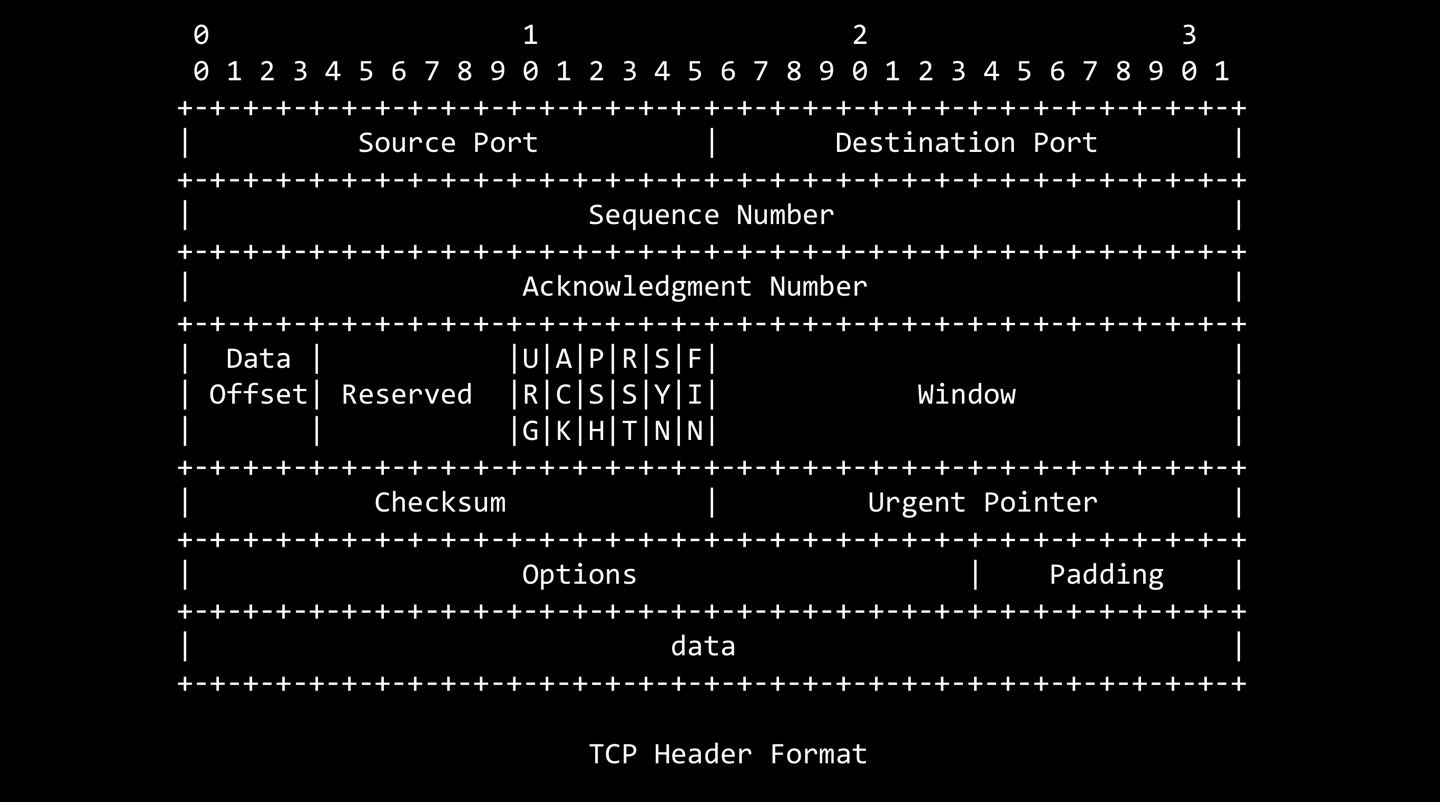 Just like with IP, TCP has fields look like this. In short, IP standardizes how the addresses work and TCP guarantees delivery with those sequence numbers and also helps the servers do more than one thing.
DNS
On the internet, there’s another type of server that are all over the place in your home, on campus known as DNS (Domain Name System) servers. DNS server answers questions of the form what is the IP address for certain domain name. If you type harvard.enu in your web browser, what your device is designed to do is to ask local DNS server on campus, on your mobile carrier’s network, on your apartment network, what is the IP address of harvard.edu. And the local DNS server will respond with a numeric address. DNS server is fitting the mdel of a dictionary or hash table whereby inside of a DNS server is essentially a dictionary. 2 columns databse table. 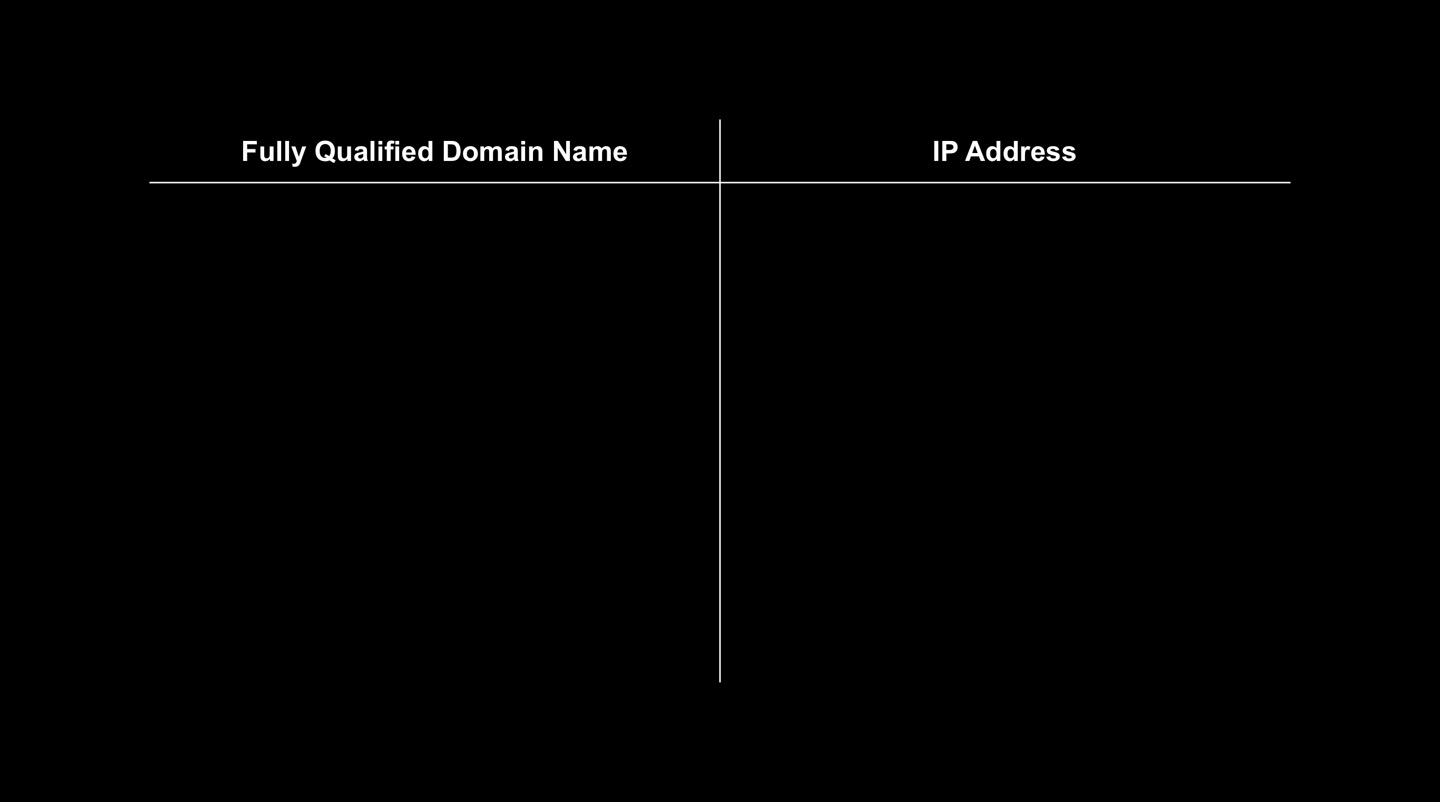 There’s hierarchy in DNS servers such that your phone will generally ask the nearest DNS server which is usually owned by your internet service provider at home, in your apartment, or by university. If that local DNS server does not have the answer, it’s going to ask to a server with higher status in hierarchy. There are finite number of root servers in the world that know about all domain names and their IP addresses. How does all this get started? At the first time you visit campus, you would configure your PC to know the IP addresses of your nearest router, and DNS server. Someone would come to your home when signing up for internet service and configure your PC for you. Nowadays it happens automatically by DHCP servers.
DHCP
DHCP servers answers questions of the form “what should be my DNS server and router”. Nowadays, if you turn on your phone, it broadcasts a Hello, World message, which is asking the local network “what IP address should I use for my DNS server and for my router.” And hopefully, your university or your apartment has a DHCP server nearby to answer that question. DHCP server also do is it tells your device what IP addresses your device should use. At the very beginning of your visit to campus, you did register somehow - logged in and authenticated against your university account - and that enabled the DHCP servers henceforth to recognize your particular computer and answer those questions for you.
HTTP
HTTP is another protocal that governs how web browsers and web servers speak. Just like IP is a protocal that governs how computers address each other on the internet and TCP governs how computers how computers keep track of sequences of packets and also multiplex among different services. So when it comes to the web, which is different from email and video conferencing and all of other services on the internet, the world wide web uses HTTP protocal. HTTP standardizes what goes inside of the envelopes in order to allow a web browser to request and receive information from a web server. TCP/IP standardizes what goes outside of the envelope and now let’s look inside of the envelope when it comes to actual web pages.
URL

https://www.example.com/
The last yellow slash means the default page for the website.
https://www.example.com/path
If you’re visiting more specific URL, ‘/path’ is representative of a path, maybe a file or a folder.
https://www.example.com/folder/file.html
Specifically, you might sometimes be in the habit of visiting an actual file. Nowadays, very often you won’t see .html, even if there is actually a file ending in that suffix. 
https://www.example.com/folder/file.html
The yellow part is the full domain name. Technically, www is called host name. A host name is the name of a specific server that lives somewhere in that domain. Using www is a configuration detail, not strictly required rules. Historically this was a kind of signal to let people know this is a web address. URL like cs50.dev does not use www. .com is called a top level domain. Countries have their own policies over who can use which top level domain. https is the scheme, or the protocal which means this URL is going to be securely accessing the server thanks to HTTPS instead of HTTP.
GET & POST
There’s 2 ways to request information from a server - 2 ways to format requests that go inside of the envelope. The most common one is GET and POST is an alternative way. Where as GET is all about getting information, POST is more about sending information. POST is used when you submit a credit card, or upload an image to website. Inside of the envelope, there is our messages as below. 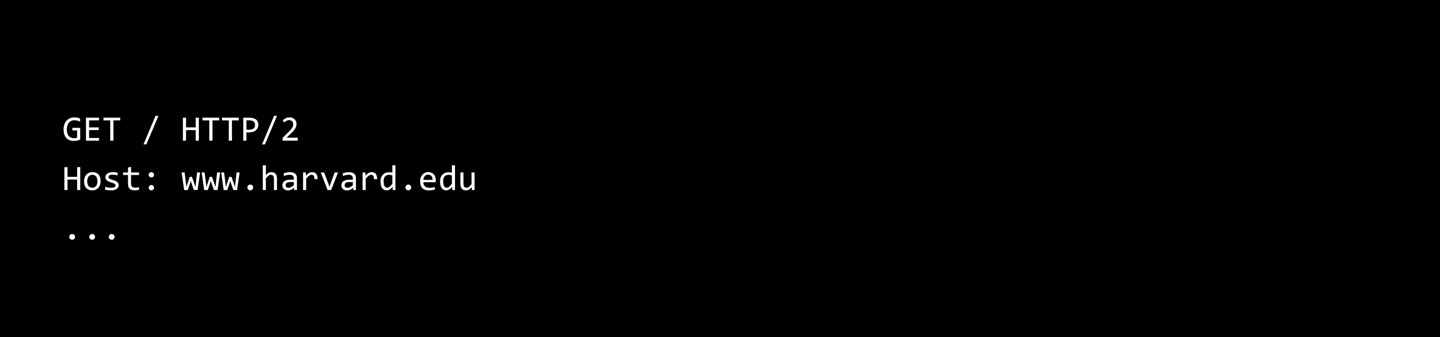 When you try to visit www.harvard.edu and hit enter, your PC puts a textual message as above inside of a virtual envelope, address it on the outside to the appropriate IP address for harvard.edu, using your own IP adress as the source address, and then hand if to some nearest router. Inside of the envelope is enough information to server to know what you want. You want to get an information of ‘/’, a default page. HTTP/2 is about the version of HTTP. HTTP header is a single line of text that tells the server what fully qualified domain name it’s looking for. This ensures when the server receives the packet, it knows to serve up harvard.edu not yale.edu where those websites are hosted on the same server because Harvard and Yale are paying the same cloud provider to host their websites (not true but just an example).
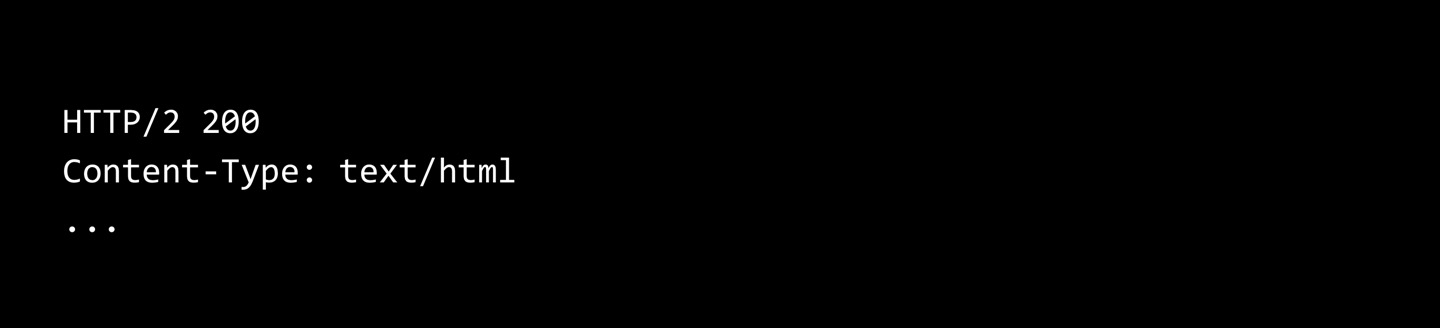
Server sends back a message like above ideally. 200 is a status code. It’s going to have another HTTP header of its own saying what type of content is in the envelope.
$ curl -I https://www.harvard.edu/
curl is a command line program and it connects to the url. We can see what’s inside of the envelope in terms of the server’s response. 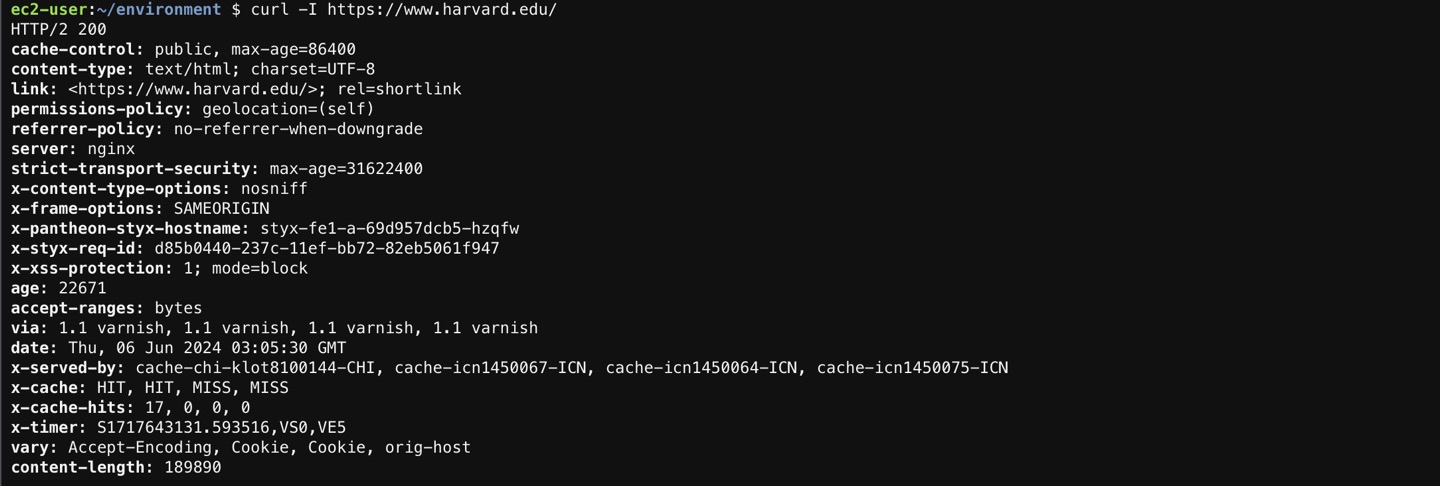
developer tools
Every web browsers have developer tools. At Network menu, you can see all HTTP requests that my PC and the server have send to each other. Notice it’s way more than a single envelope because each rows of output represents maybe a sound that was downloaded, a video, an image, some text. There’s all sorts of media in web pages nowadays. And that might be spread across multiple files. Browsers are designed to recursively get all of the media for a single web page and download it automatically. The first row’s status code is 200 which means OK. 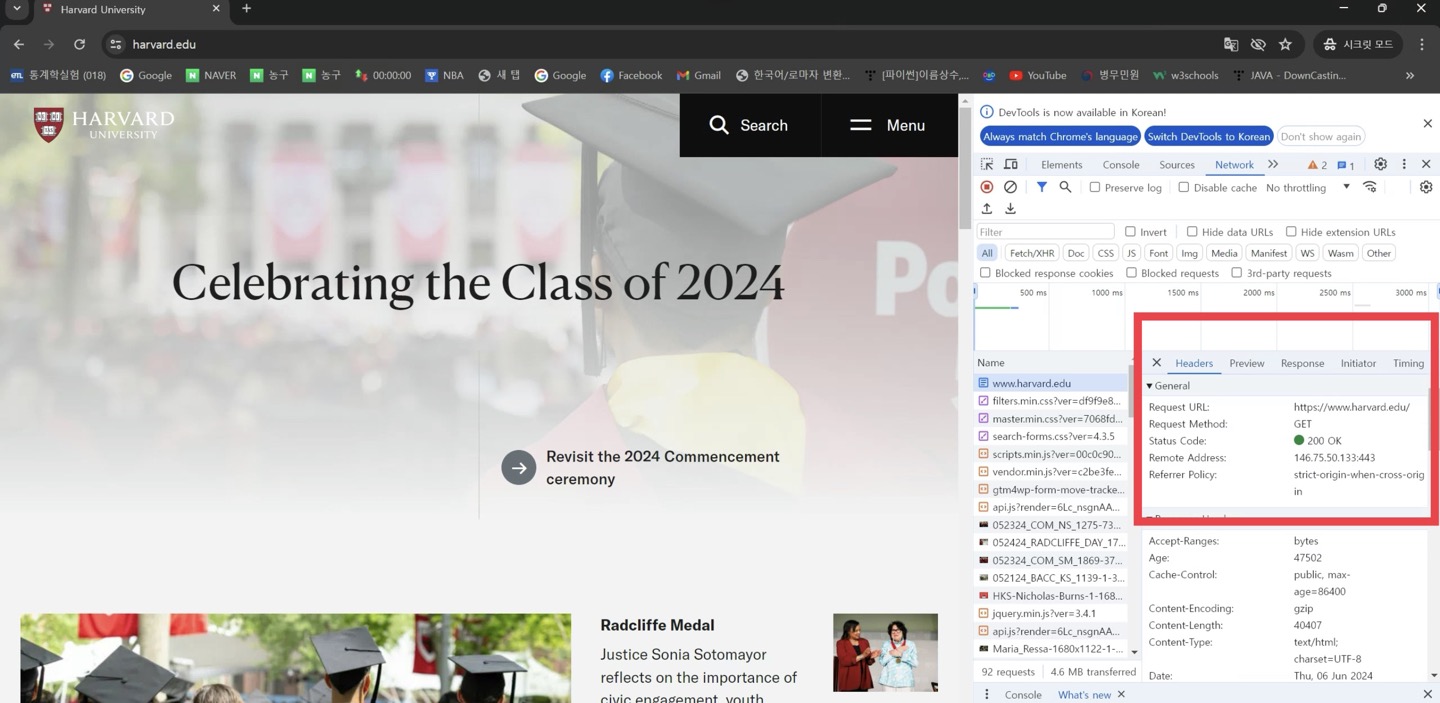
status code
Now let’s say I omit the www. 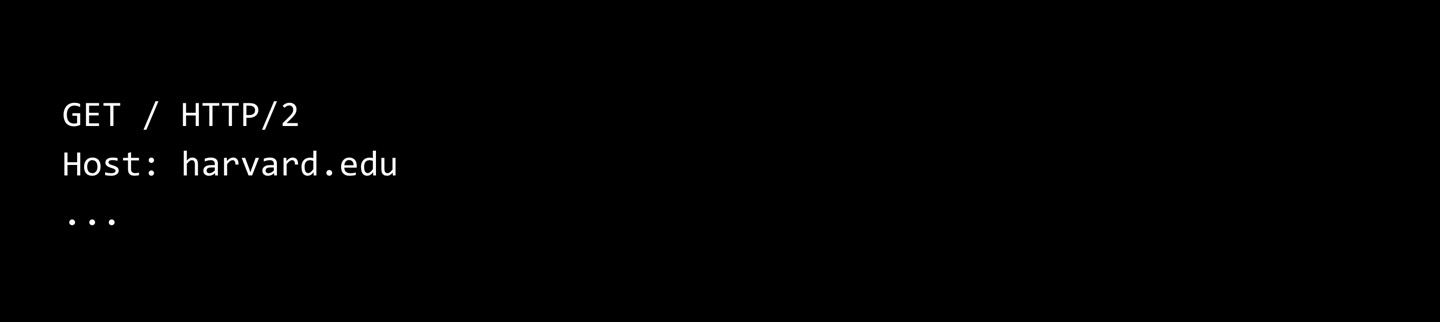
$curl -I https://harvard.edu/
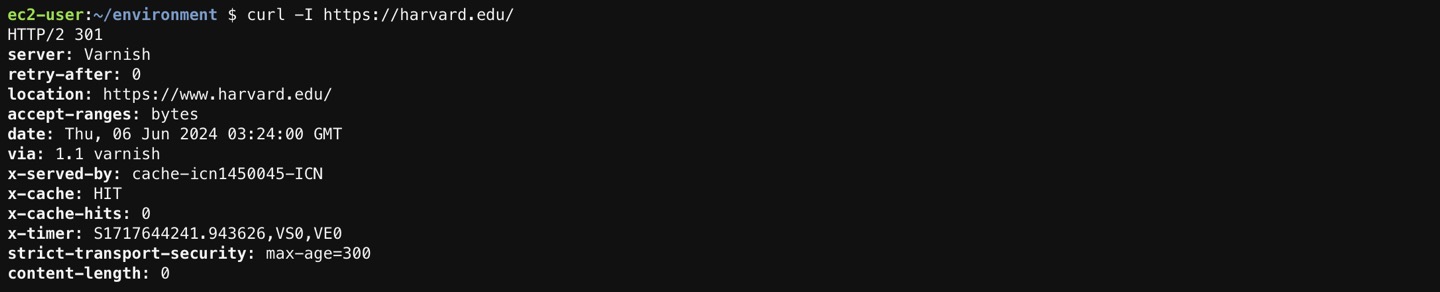 The status code is now 301 which means that Harvard’s website moved permanently. Any server can configure itself to redirect the user to another place if they prefer to canonicalize on some other URL. Those are some status codes we can expericne.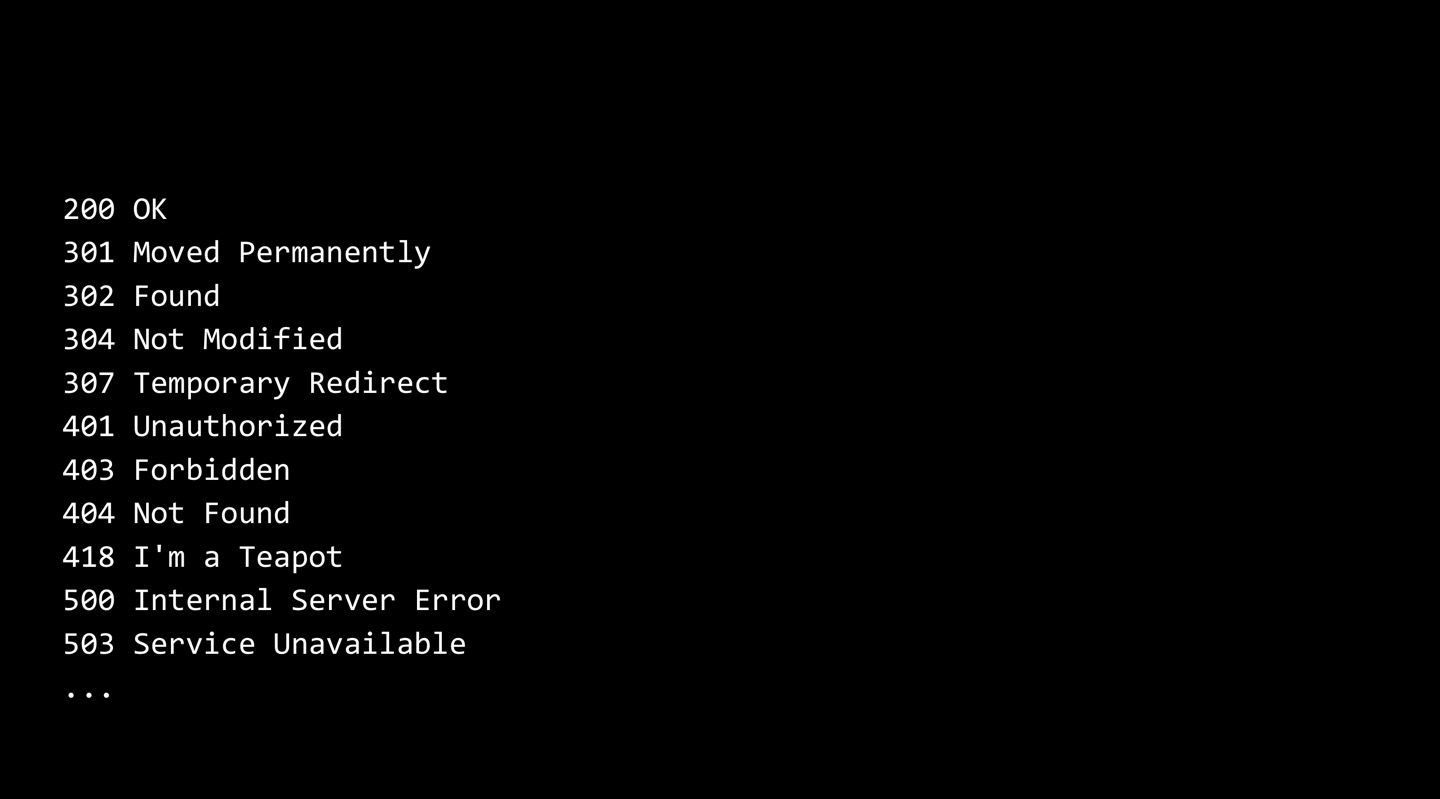
HTML
Now, let’s see what it is that composes this web page. HTML is not a programmingn language but a mark-up language which is about aesthetics, like mocking up a wab page. In the world of HTML there’s really 2 concepts, tags and attributes. HTML contains enough details that the server can display the information for it.
http-server
Let’s assume that I write .html file. How do I actually view it with a web browser? If this file is created in my PC, I could literally double click it and my default broweser would open up and show me the web page. But the file I wrote in cs50.dev is in the cloud. So we need to turn on a web server to serve the file to me or to anyone else in the world. http-server is a software that listen for HTTP requests. And as soon as it receives one from a browser, it will respond with the contents of that file. In my cs50.dev codespace, I wrote hello.html file as below.
<!DOCTYPE html>

<html lang="en">
        <head>
            <title>
                hello, title
            </title>
        </head>
        <body>
            hello, body
        </body>
</html>
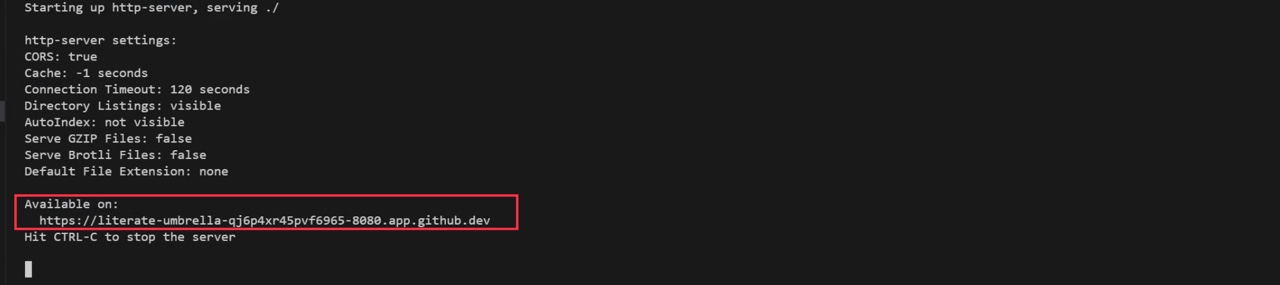
And I run http-server and click the URL in the red box. That will open up in a new tab this folder.
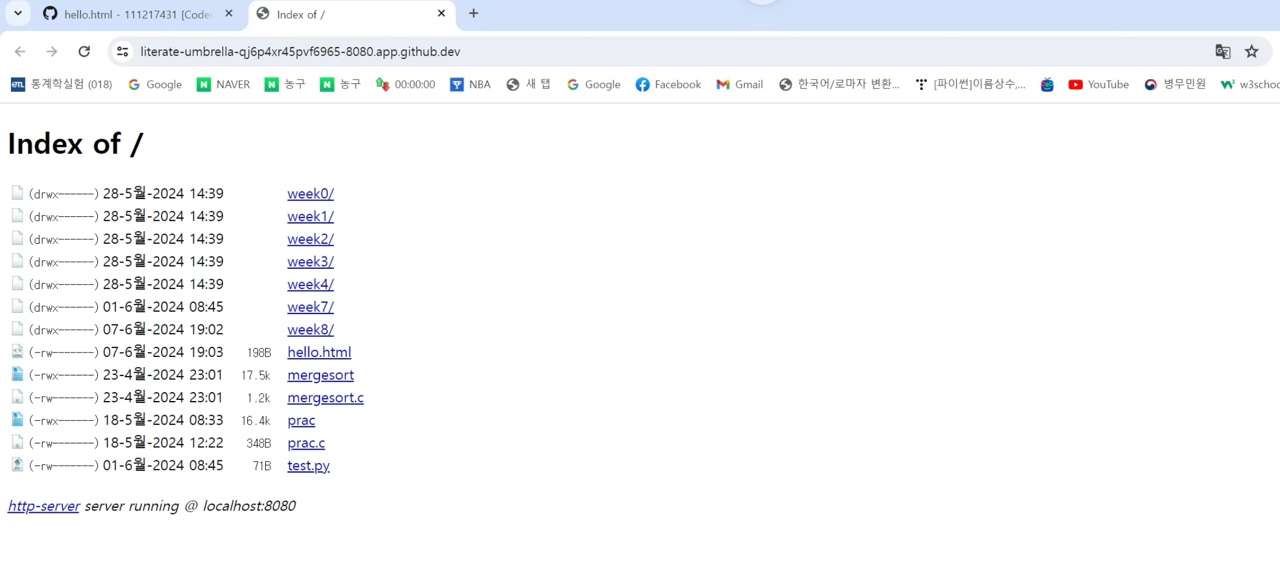
This is what’s called a directory listing - contents of folder I’m in. So I’m in my codespace’s default folder. This web page is specific to the codespaces. I am running my own web server at this weird looking URL that github dynamically generated for me.
https://literate-umbrella-qj6p4xr45pvf6965-8080.app.github.dev/
You can see a port number 8080 is baked into this URL. Normally, I would have to access this web server at port 80, or 443, or even 8080. And the reason for this is because cs50.dev, that is to say codespaces, the tool that we’re using in the cloud, is obviously itself already a web server. And it’s github’s web server that’s listening on port 80 and 443. So if I want to run my own web server on their web server, I just have to pick another port number. By convention, http-server does not try to use 80 or 443, it uses 8080 by default. And that’s why you see it in the URL. When I click hello.html, I can see the result. !!! img hello.html told the browser what to do visually.
- The first line is the document type declaration and it means that I’m using version 5 of HTML.
- The HTML tag tells here’s come the html. And lang=”en” is an attribute. Anything after the name of a tag is what we’d call an attribute.
- head and body tag are child tags of HTML tag. Everything between the start and end tag is called an element. Below is the tree representation of it. This is going to be useful because with JS, we can start to modify this tree in the computer’s memory or RAM and make the page dynamically change by essentially creating new HTML on the fly, even if that didn’t come from the server. !!! img I would omit every explanations about tags and attributes in html becasue it’s easy to read document and use it. One major feature in HTML is linking one page to another. All of today’s social media sites, when you copy paste a URL, someone at the server side wrote code to automatically notice and detect URLs and then wrap them with HTML tags that actually hyperlink them.
<a href="https://www.harvard.edu/">Harvard</a>However, this can be abused. You can change the element and dupe people into clicking something that leads you to your PayPal account so that you log into some bogus website and given them access to your account. It is called phishing attacks.
key-value
!!!img In URLs you can put user input in the form of key-value pairs. In any URL you can have a path with a key-value pair prefixed with a single question mark. There is a standard way in HTTP for sending input from a browser to a server. If you visit ‘https://www.google.com/search?q=dogs’, you can see the results of searching dogs. Google did the back end, they crawled the internet and found dogs. But I can make the front end as below.
<!DOCTYPE html>

<html lang="en">
    <head>
        <title>search</title>
    </head>
    <body>
        <form action="https://www.google.com/search" method="get">
            <input name="q">
            <button>Search</button>
        </form>
    </body>
</html>
regular expressions
Regular expressions, also known as regexes is a way of using patterns to validate input or to extract information from strings.
<!DOCTYPE html>

<html lang="en">
    <head>
        <title>register</title>
    </head>
    <body>
        <form>
            <input autocomplete="off" autofocus name="email" pattern=".+@.+\.edu" placeholder="Email" type="email">
            <button>Register</button>
        </form>
    </body>
</html>
If I want to tolerate only ‘.edu’ addresses, I can add another attribute pattern attribute in the input tag. Inside of its value, I can put regular expression - an actual pattern that the browser should match the user’s input against and make sure it need matches. Below is the cheat sheet for regular expressions. !!!img !!!img Thus, “.+@.+.edu” means one or more(+) characters(.) to the left and right of an @, and it ends with .edu. However, this is not generally the best technique for validating user input and protecting against invalid user input. Clients can be trusted because the way HTML works is that everything happens locally. Your browser downloads the HTML and displays it on your PC. By using the element menu in developer tools, you can change the downloaded HTML. If you are a hacker trying to register without .edu postfixed address, you can simply erase the ‘pattern’ attribute. The web browser will let me register with unvalidate email address. Client-side validation is user friendly but not secure. Next week, we’ll spend more time server-side validation.
validator.w3.org
This is a free web service to validate your own code.
CSS
Let’s see the HTML, CSS code below.
<!DOCTYPE html>

<html lang="en">
    <head>
        <title>home</title>
    </head>
    <body>
        <div>
Leave a Comment