
[WAFFLE] 0-2 venv & Poetry
Published:
In this post, concept of virtual environment and usage of venv and Poetry is introduced.
pip
pip is a Python package management tool used to install and manage packages (libraries) that can be utilized within the Python programming language. Standard Python and its libraries are installed in the OS’s standard locations, and files in those locations cannot be modified. In contrast, pip uses a base directory that does not affect the standard Python files on the system, and this directory is modifiable.
To use multiple versions of Python or to install packages on a per-project basis, it is essential to know exactly which packages are installed. To facilitate this, Python supports virtual environments. A virtual environment is a directory where packages downloaded by pip are stored. When a virtual environment is activated, our shell first checks this location when loading Python modules.
venv
- To set up a virtual environment, the venv module is used. First, check the currently installed packages in Python by using the following command.
$ pip list - To create a virtual environment, enter the following command.
$ python -m venv .venvThe -m option indicates that the venv module is being used, and .venv is the name of the virtual environment. As a result, a .venv folder will be created, and you need to execute the ./.venv/Scripts/activate.bat file to activate the virtual environment.
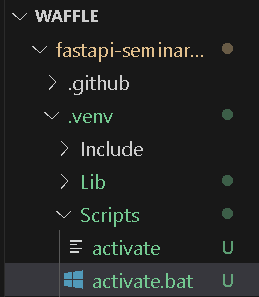
./venv/Scripts/activate - When you run pip list within the virtual environment, you will see that there are only a few installed packages. Now you can install the desired packages using the pip install command in the terminal.
- If you are using Visual Studio Code, press Ctrl + Shift + P and select .venv from the Python Select Interpreter.
- If you need to use the current virtual environment elsewhere, you can do so by running:
pip freeze > requirements.txtThis will write the information about the installed packages in the current virtual environment to a requirements.txt file. You can then download the packages using the following command.
pip install -r requirements.txt - To deactivate the virtual environment, enter the following command and switch the interpreter.
deactivate
Poetry
Useful resource https://teddylee777.github.io/poetry/poetry-tutorial/ Below is a simple guide for installing poetry and activating virtual machine using it.
# poetry install
pipx install poetry

# after adding PATH
source ~/.bashrc

# check installation
poetry --version

# activate virtual machine
poetry shell

# download packages
poetry install --no-root
Leave a Comment