
[CS50] 05 Memory
Published:
In this post, the fifth lecture of CS50 is summarized.
Memory
As we seen before, our computer is just grid of memory, where each of these squares represents a single byte. Computers typically use numbers to represent all of the bytes in their memory, and they typically use hexadecimal notation for such by convention.
int main(void){
  int n = 50;
}
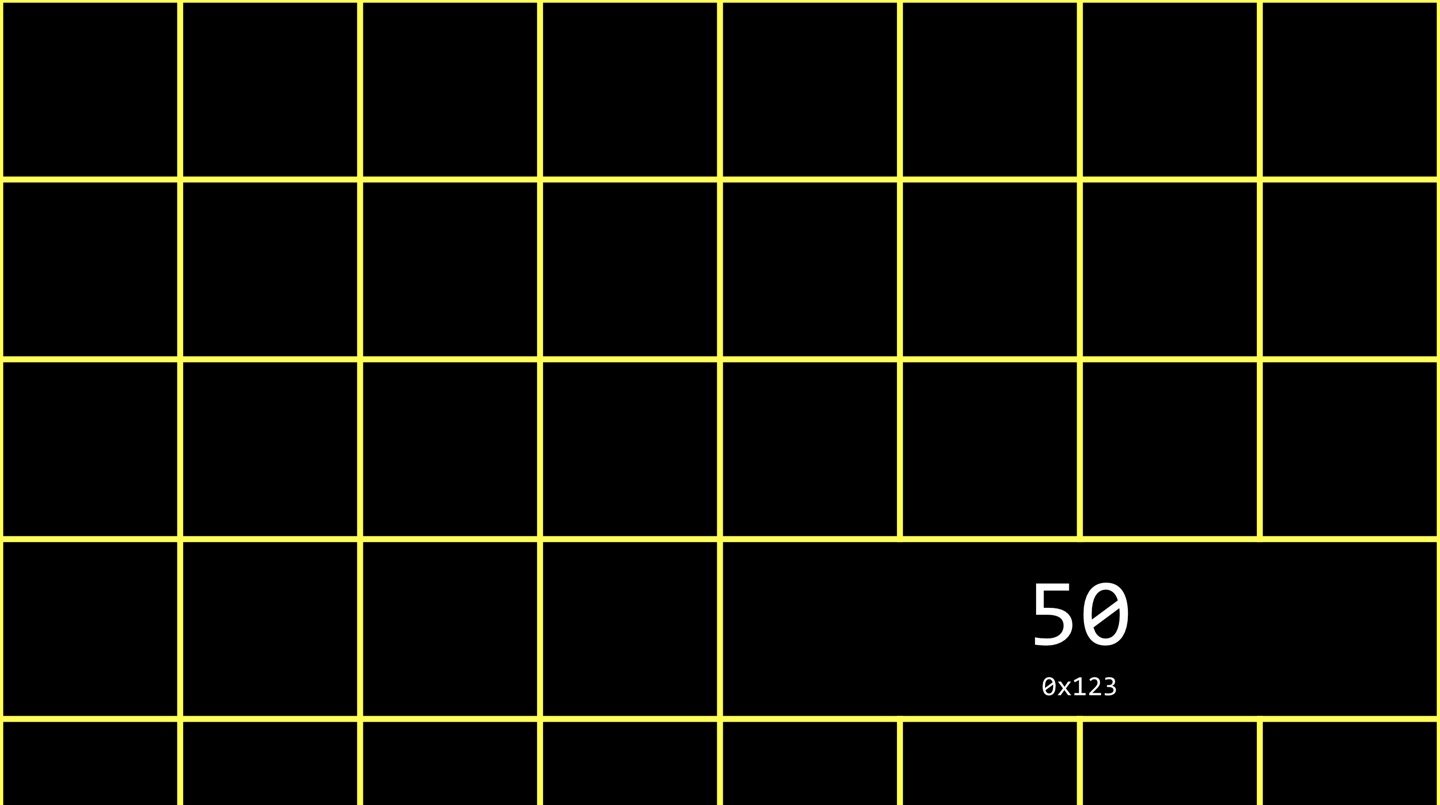 When you write the line of code above, that 50 and that variable n, live somewhere in the computer’s memory. In C, there is a syntax that gives you access to the locations of variables inside of the computer’s memory. By using ‘&’ which is called the ‘address of operator’, you can ask the computer at what address is this variable. The ‘*’, which called “dereference operator”, allows you to take an address and go to it.
int main(void){
  int n = 50;
  printf("%p\n", &n);
}
0x7ffc3a7cffbc
If I run the code as above, I can get the memory location where variable n is stored. At the moment I run the code, on the server, the location is 0x7ffc3a7cffbc. The %p symbol we’re passing into printf as a format code is leveraging the fact that C supports pointers.
Pointers
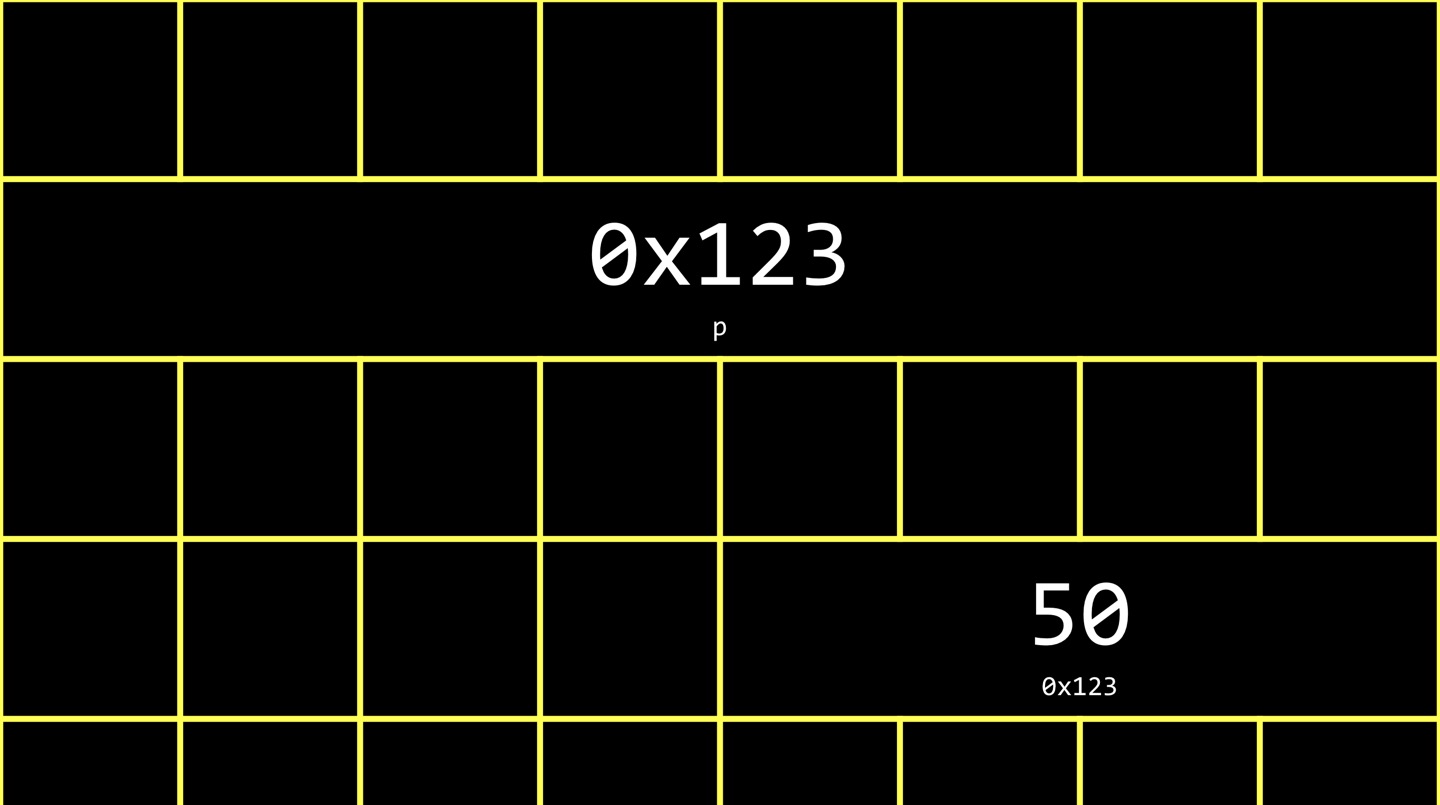
A pointer is an address of variable that you can store in another variable called itself a pointer.
int n = 50;
int *p = &n;
In the code above, we created an pointer, a variable whose purpose is to store the address of some value. If you want ‘p’ to be a pointer, a variable that stores an address, you add ‘*’ in front of the variable name. ‘*’ in this case is different from the ‘*’ that I mentioned earlier in the Memory part. Below is the code to see the address of the variable n.
int main(void){
  int n = 50;
  int *p = &n;
  printf("%p\n, p);
}
I can also reverse this process. I can ask the computer “go to the address of n and tell me what is there.” It is possible by the following code.
int main(void){
  int n = 50;
  int *p = &n;
  printf("%i\n", *p);
}
Inside of the printf function ‘*p’ means go to the address and show me what’s inside of the computer’s memory there. Clearly we are using ‘*’ in two different locations. When I specify a data type like int, and then I have a ‘*’, and then the name of a variable, that is the syntax for declaring a pointer. When I write ‘*’ and then the name of a pointer without specifying a type, this means go there. Since ‘p’ itself is another variable, so it’s got to live somewhere in the computer’s memory. By convention, pointers take up more space. They typically use 8 bytes nowadays, rather than 4.
string
When we declare a string variable, since we learned that string is an array of chars, it is stored in the memory of contiguous addresses.
string s = "HI!";
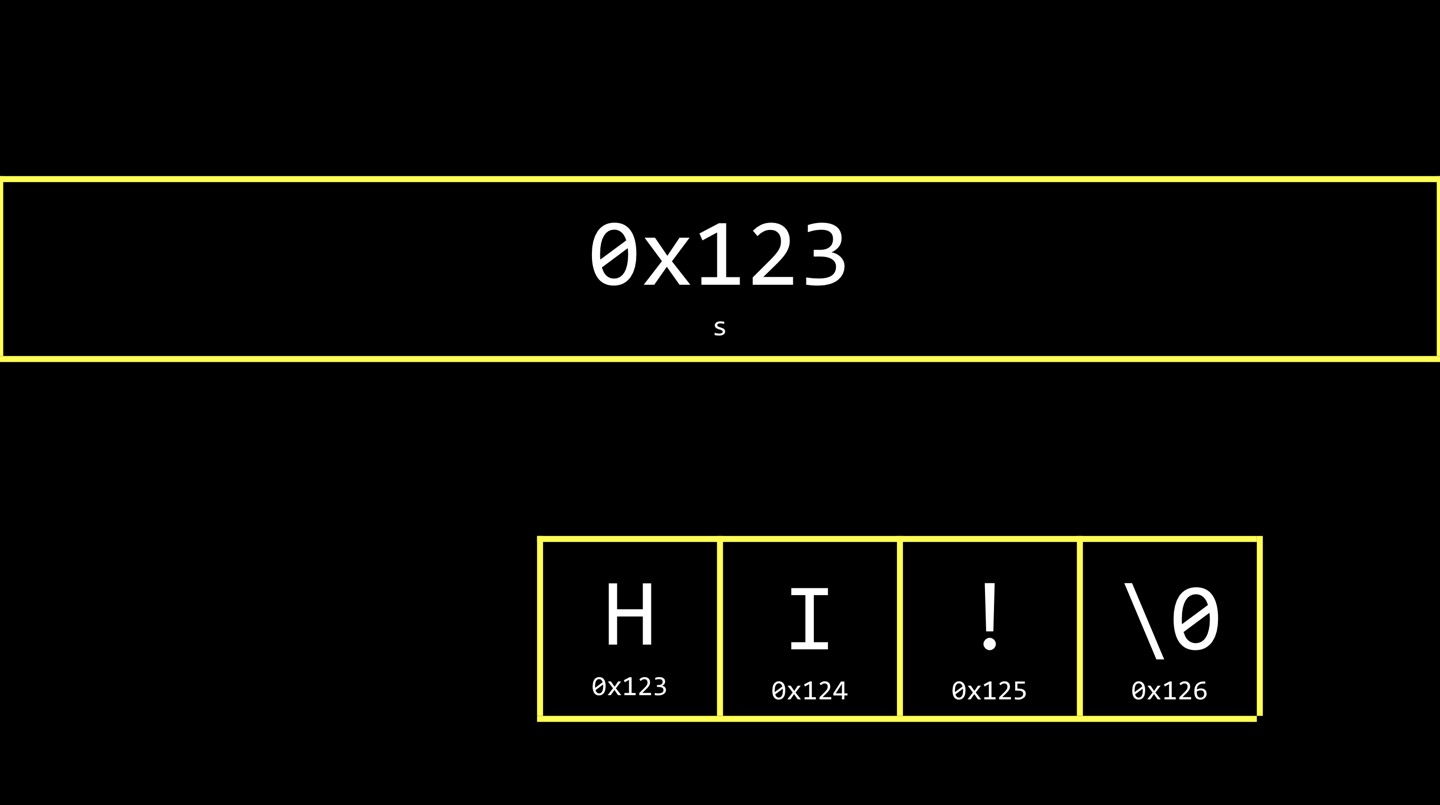
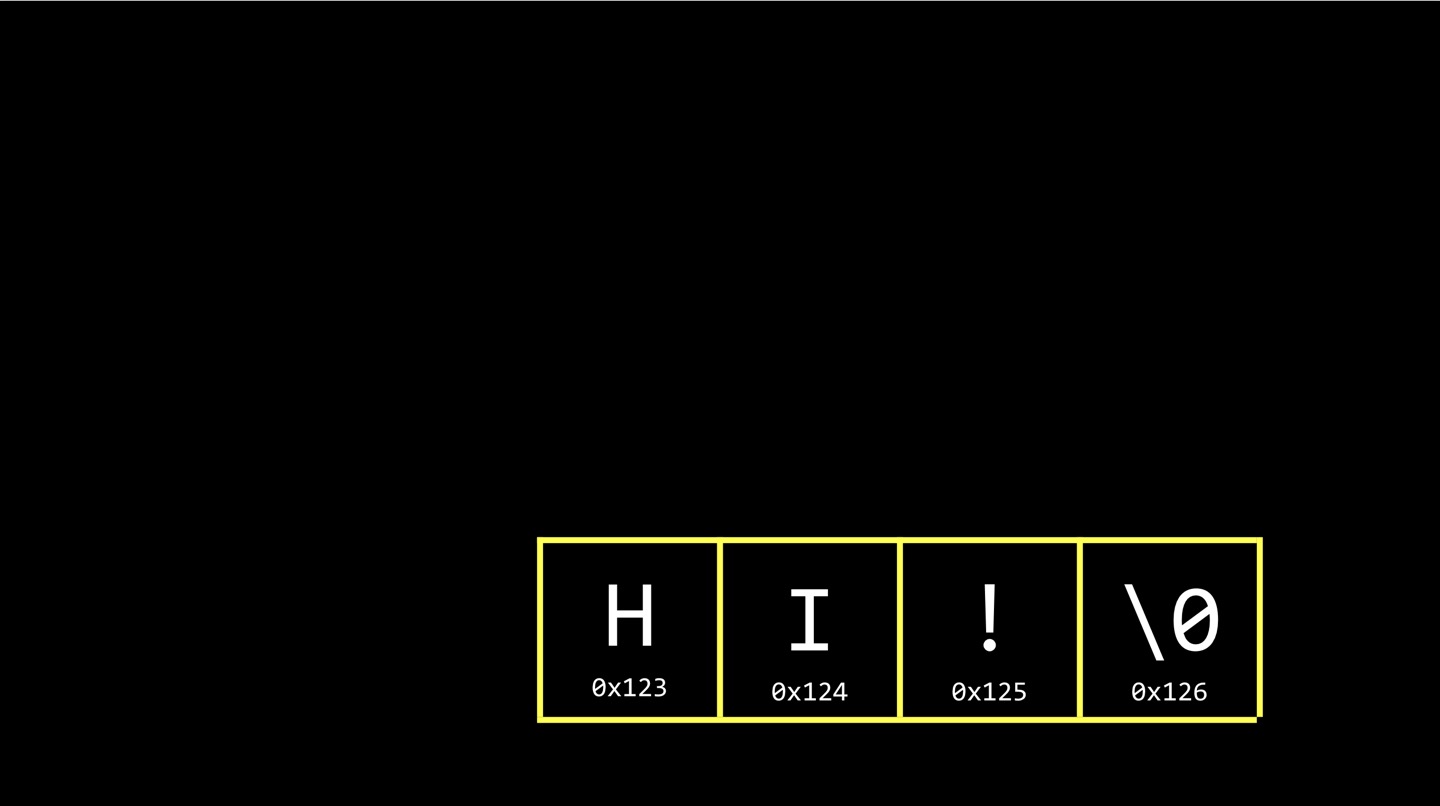 What is ‘s’ then in the code above? ‘s’ it self, is a pointer. ‘s’ is the address of the string. The string is somewhere in memory, but ‘s’ itself is a seperate variable that gives you a clue as how to find all of those characters in memory. In this case ‘0x123’ might well suffice as the value of ‘s’. It is because that essentially gives you enough information to find the beginning of the string “HI!”. If ‘s’ storing the location of the beginning of the string, someone’s got to keep track of where the string ends, and that’s effectively the string itself because there is a NUL at the end of the string. You can use a for loop, a while loop, to visit through the each character of string.
int main(void){
  string s = "Hi!";
  printf("%p\n", s);
  printf("%p\n", &s[0]);
  printf("%p\n", $s[1]);
  printf("%p\n", &s[2]);
  printf("%p\n", &s[3]);

}
0x5586554ce004
0x5586554ce004
0x5586554ce005
0x5586554ce006
0x5586554ce007
The code above shows that the variable of type string stores the memory address of the first character. Also, we can see the characters is stored in the contiguous bytes of memory. Now, we know that ‘string s = “HI!”’ is equal to the below.
char *s = "HI!"
In CS50, the staff invented the data type called string, just to hide this lower level detail. But why don’t we use the ‘&’ symbol in this case? The C compiler, Clang, is smart enough to realize when it sees double quotes around a sequence of characters, it wants to put the address of that first char in the variable for you.
typedef
With typedef, you can create your own data types. For example, you can create you own data type called integer, that itself is a synonym for int as below.
typedef int integer;
C has no data type for a byte. There is no built in obvious way to represent eight bits and store whatever you want in them. However, you can use what’s called a uint8_t, which is a data type that comes with C. It’s a lot more convinient to think of a BYTE as being its own data type. When you want to write code that manipulates one or two or more bytes, it would be nice to have a data type called BYTE.
typedef uint8_t BYTE;
So whawt is in the CS50 header file? Literally, this line of code.
typedef char *string;
Pointer Arithmetic
Now we can think ‘s’ below as an array, but also a pointer. In this regard, the follwing two codes will give you an same output.
char *s = "HI!";
printf("%c\n", s[0]);
printf("%c\n", s[1]);
printf("%c\n", s[2]);
char *s = "HI!";
printf("%c\n", *s);
printf("%c\n", *(s + 1));
printf("%c\n", *s(s + 2));
Array syntax is a “syntatic sugar” for a pointer. When you say s[0], the compiler is essentially doing *s.
String Comparison
Below is the code that compares 2 integers. It works well.
int main(void){
    int i = get_int("i: ");
    int j = get_int("j: ");
    if (i == j){
        printf("Same\n");
    }
    else{
        printf("Different\n");
    }
}
i: 1
j: 1
Same
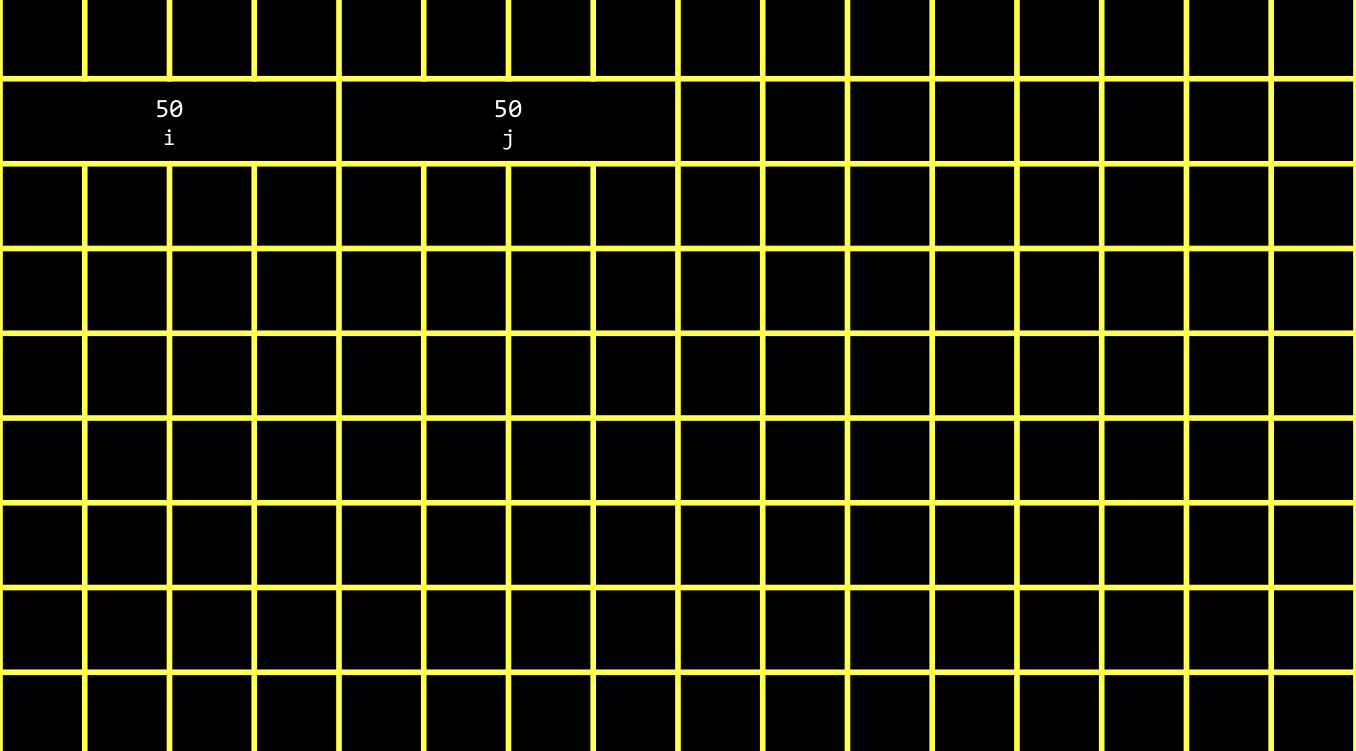 However, when I try to compare 2 strings in this way, it gives logically wrong output.
int main(void){
    char* s = get_string("s: ");
    char* t = get_int("t: ");
    if (s == t){
        printf("Same\n");
    }
    else{
        printf("Different\n");
    }
}
s: HI!
t: HI!
Different
In this case, we are comparing the addresses of those two strings stored in different memory location. 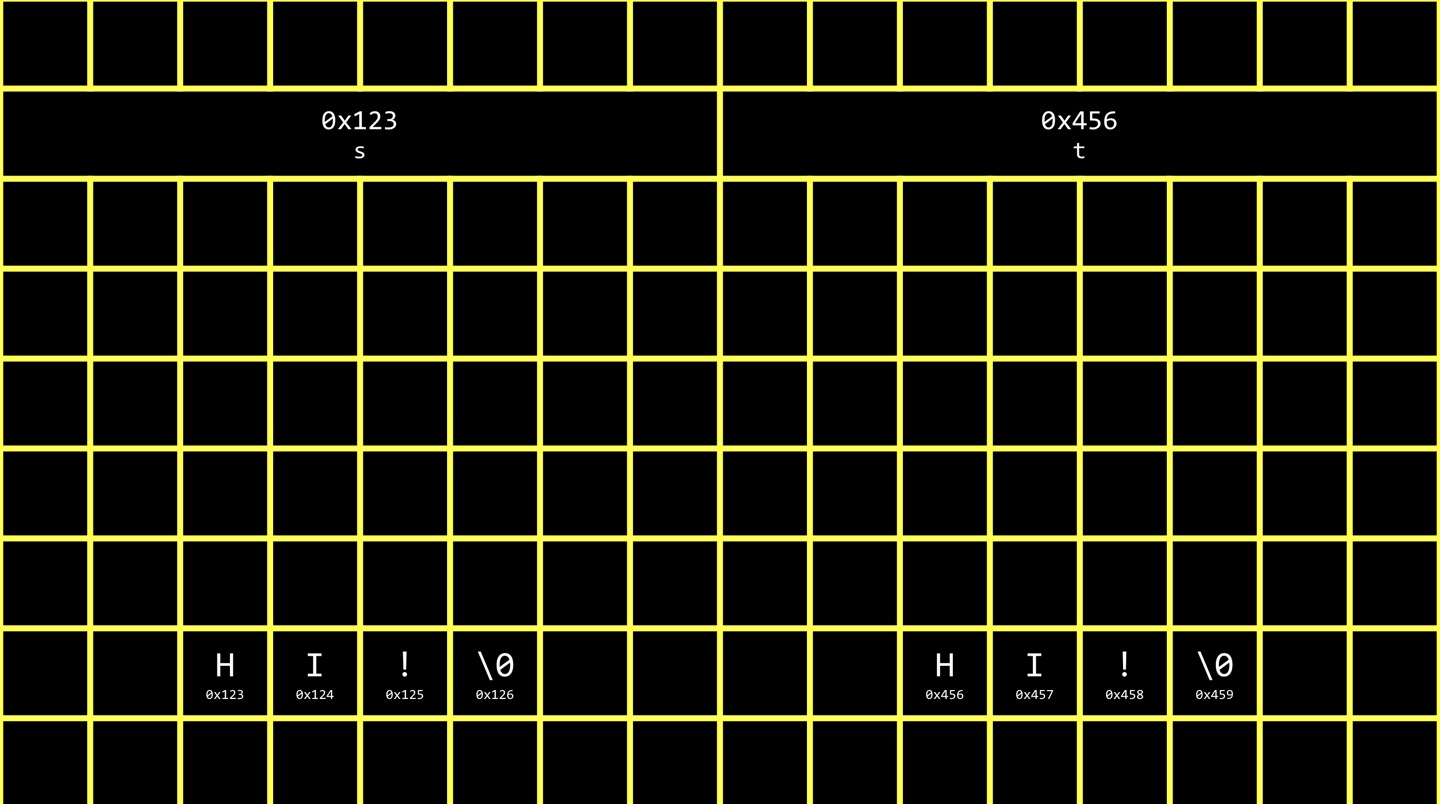 Instead, we can use ‘strcmp’ function in ‘string.h’.
char* s = get_string("s: ");
printf("%s\n", s);
printf("%p\n", s);
Since ‘s’ stores the addresss, I don’t need to add & in front of ‘s’ to print out the address of where string is stored. Also, it turns out that printf is smart enough when you use ‘%s’, and give it an address of the string, to just go there for you.
Copy
I expected the code below to print ‘s’ with first letter lower case and ‘t’ with first letter upper case.
string s = get_string("s: ");
string t = s;
t[0] = toupper(t[0]);
printf("%s\n", s);
printf("%s\n", t);
s: hi!
Hi!
Hi!
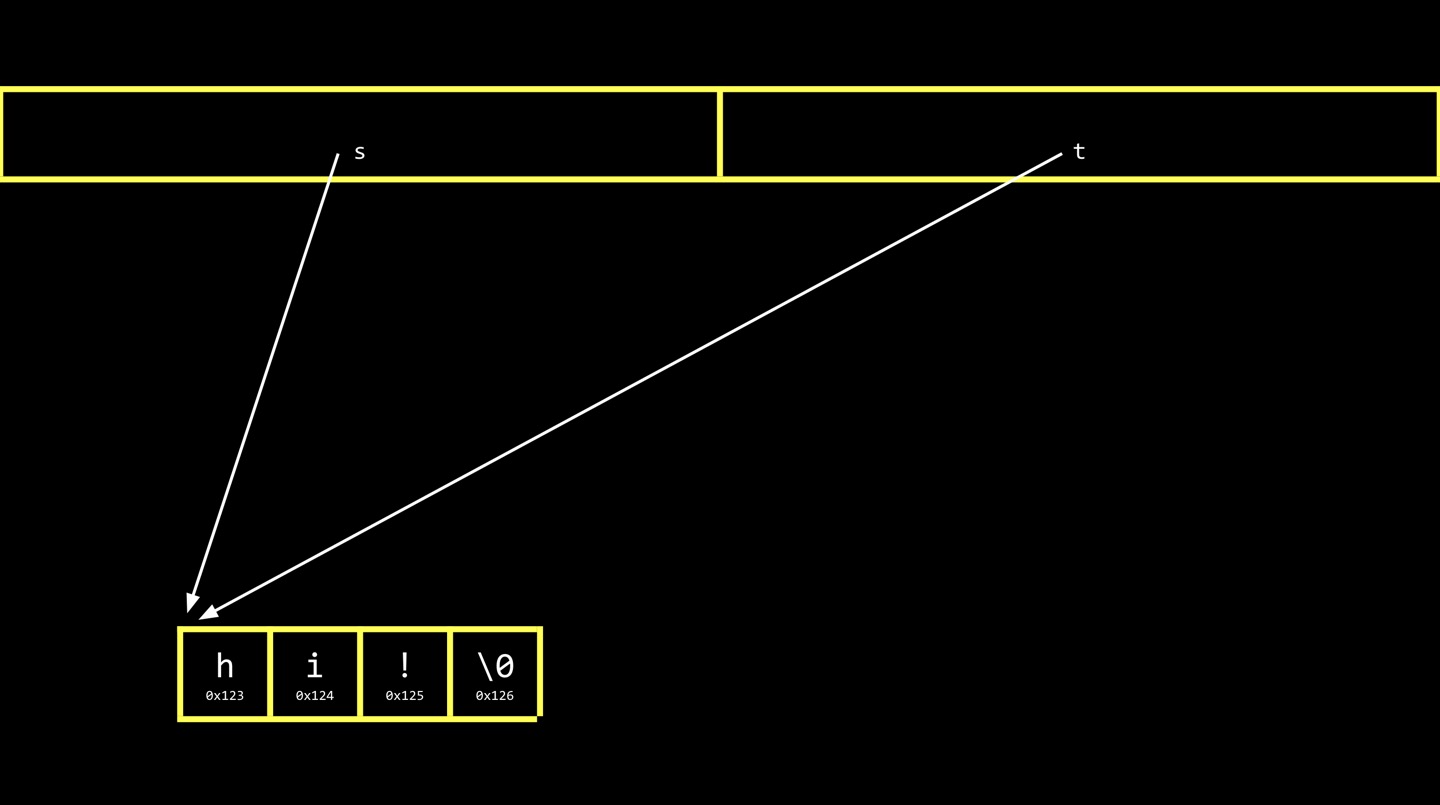
However, they’re both capitalized. When I write ‘s = t’, it copies the address in s over to t, thus they’re pointing at the same thing.
malloc
Then how can I solve this problem? We can use ‘malloc’ and ‘free’ which is both declared in ‘stdlib.h’. Clearly, we got into trouble by blindly copying the addresses. What I want to do first is to create a duplicate string, a second array that is identical, but is elsewhere in memory.
char *s = get_string("s: ");
char *t = malloc(strlen(s) + 1);

for (int i = 0, n = strlen(s); i <= n; i++){
  t[i] = s[i];
}

if (strlen(t) > 0){
  t[0] = toupper(t[0]);
}

printf("%s\n", s);
printf("%s\n", t);
s: hi!
hi!
Hi!
In the code above, I call the function malloc, which stands for memory allocate, and it takes a single argument, which is the number of bytes you would like the os to allocate for you. The reason why I wrote ‘strlen(s) + 1’ is because there is ‘\0’ at the end of every string.
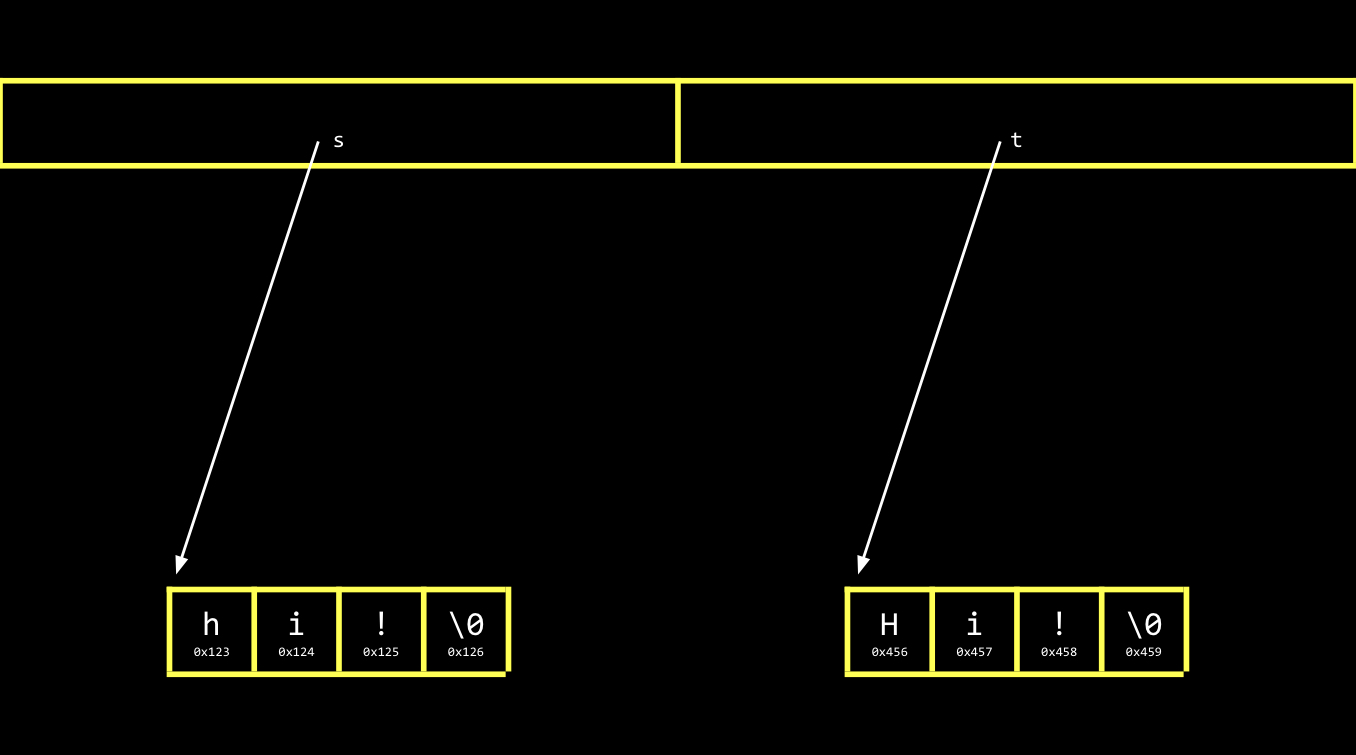
What value is malloc returning? Conceptually, it’s returning a chunk of memory, but precisely, it’s returning the first address of the chunk of memory. Here’s a difference with strings. This chunk of memory is not terminated with NUL for you. Malloc, and in turn, your os, does keep track of how big these chunks of memory are. So even though it’s only returning the address of the first byte of that memory, the os will going to know that it used up 4 byts and it will keep track of so that it doesn’t give you an overlapping address in the future. But you have to remember or figure out how many bytes are available. It’s up to you to manage it, as by putting a NUL character there.
NULL, strcpy, free
char *s = get_string("s: ");
char *t = malloc(strlen(s) + 1);
if (s == NULL){
  return 1;
}
if (t == NULL){
  return 1;
}
strcpy(t, s);

if (strlen(t) > 0){
  t[0] = toupper(t[0]);
}

printf("%s\n", s);
printf("%s\n", t);

free(t)
return 0;
There are 3 points we should check in this code. First, if malloc returns NULL, it means there’s not enough memory available(‘get_string’ also returns NULL if user inputs very large string). NULL is an address, and it’s literally the address zero. The address zero is hands off. It’s a wasted byte that your computer should never use because the computer uses zero as special sentinel value NULL to signify error. We’re spending one byte out of billions to make sure there’s special symbol that’s coming back that can indicate when something has gone wrong. Second, we can use ‘strcpy’ function to copy strings. Third, you’re done with your computer’s memory, you’re supposed to give it back to your os so it can reuse it. If you keep using malloc but never call free, your computer will run out of memory and the symptom is that it gets very slow.
valgrind
valgrind shows your usage of memory.
int *x = malloc(3*sizeof(int));
x[1] = 72;
x[2] = 73;
x[3] = 33;
There’s no compile error or runtime error in the code above. However, there’s 2 problems. I didn’t start the index of array from 0, and I didn’t free the memory. By using valgrind program, I can detect those problems. 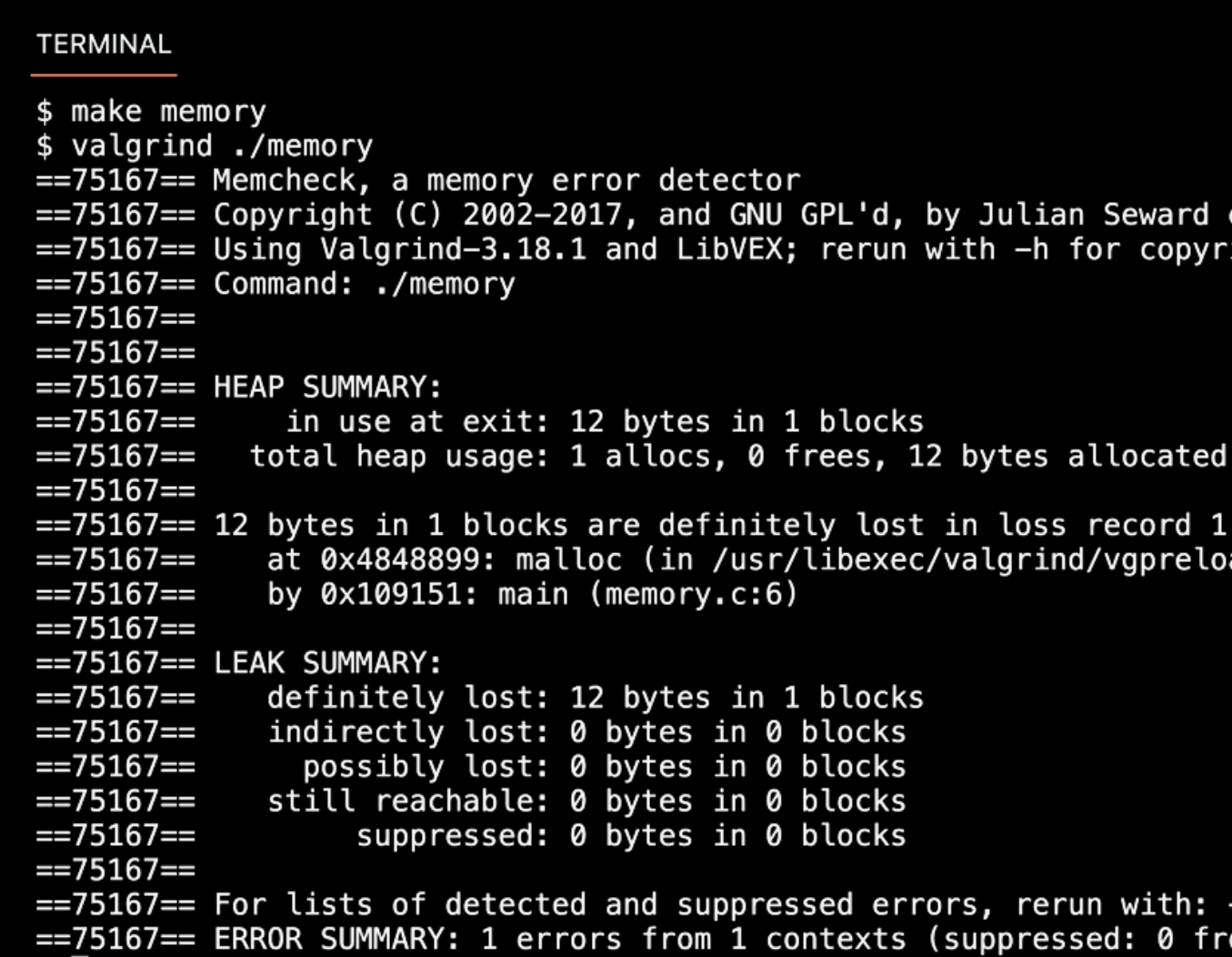
We can see there is a memory leak, since we didn’t free the memory of 12 bytes. valgrind is not for logical bugs, not for syntax error, but for memory related bugs.
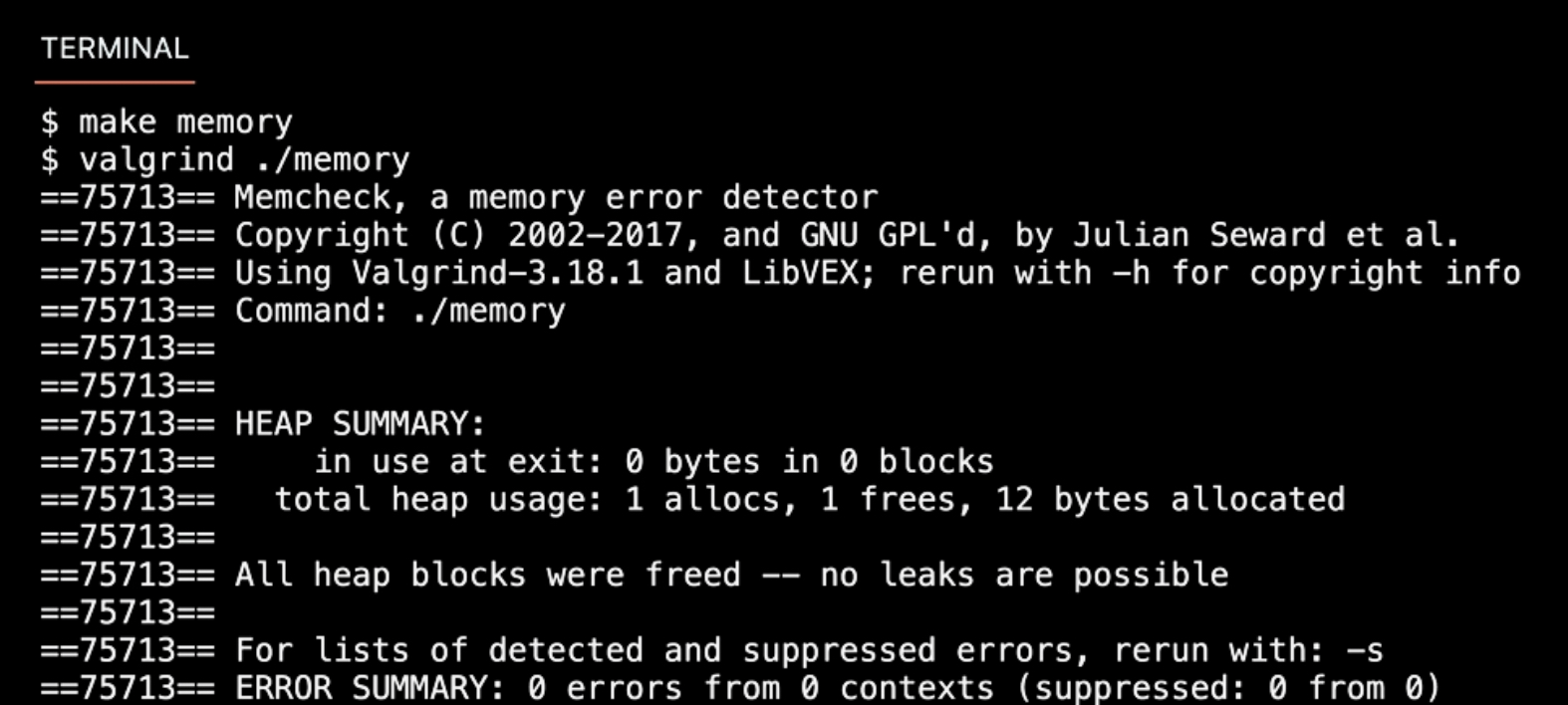
Garbage values
Garbage values are values of variables that you did not proactively set yourself as intended.
int scores[1024];
for (int i = 0; i < 1024; i++){
  printf("%i\n", scores[i]);
}
I declared the array of size 1024, but I never put values in there myself, so there’s garbage values there. 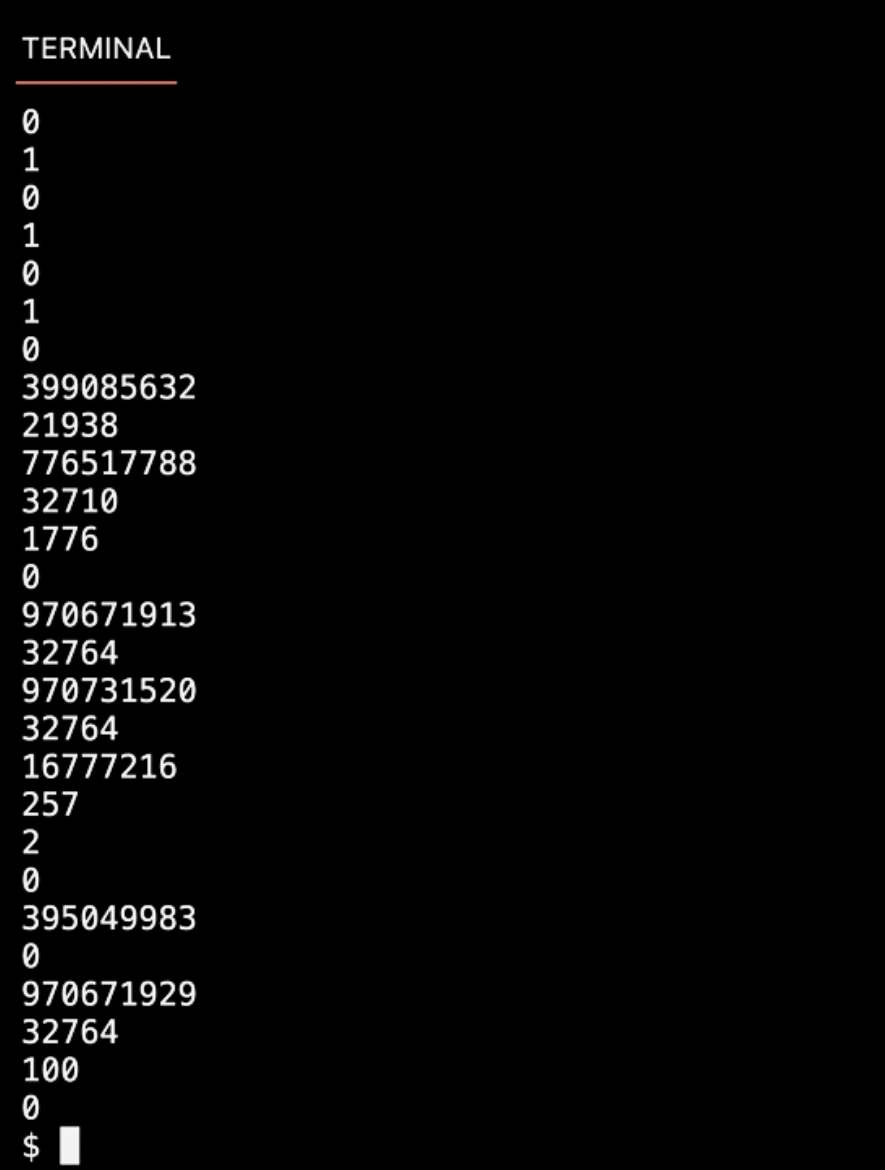 Now, let’s see the code below.
int *x;
int *y;

x = malloc(sizeof(int));

*x = 42;
*y = 13;

y = x;
*y = 13;
I never assigned ‘y’ a value, which means it’s containg a garbage value. It could be an actual address, but who knows what memory I’m touching by writing ‘*y = 13’? That’s how computers crash if you touch memory that you’re not supposed to. However, if I delete the first ‘*y = 13’ line, the program will work as we intended.
Swap
Pass by Value
I want to swap the integer value of ‘x’ and ‘y’, but it doesn’t work.
int main(void){
  int x = 1;
  int y = 2;
  swap(x, y);
  printf("x: %i, y: %i\n", x, y);
}

void swap(int a, int b){
  int tmp = a;
  a = b;
  b = tmp;
}
x: 1
y: 2
In this case, the way I’ve implemented the ‘swap’ function is ‘Pass by value’, ‘Pass by copy’. There are conventions of how computers use the memory. The top of your memory, is where machine code goes. The zeros and ones that you compile get loaded into the top. Below that, are where global variables go. Then there’s something called the ‘heap’, and it grows downward. At the bottom of the memory, is what’s called the ‘stack’. The stack grows in the other direction of heap. When you use malloc and ask the computer for memory, it comes from the heap region. When you use functions with variables and arguments, you’re using stack memory. 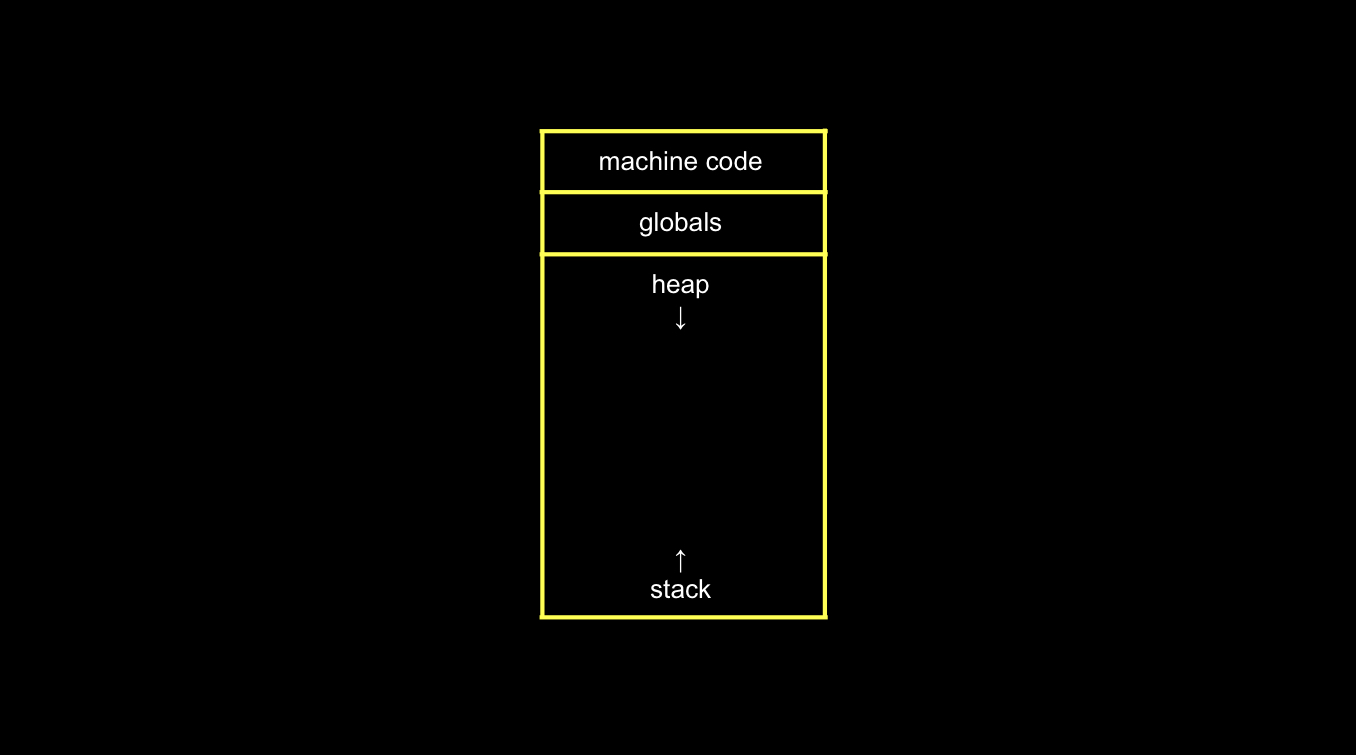 Let’s focus on the stack when we do something like the swap function. The first function ‘main’, if you have any variables, they go at the bottom of the computer’s memory once you’ve loaded the program. When ‘main’ calls ‘swap’, ‘swap’ goes above it on the stack. Each of these rectangles is called ‘stack frame’. As soon as ‘swap’ returns, that memory essentiall goes away and ‘main’ remains until ‘main’ finishes and exits your program. Inside of the stack frame of ‘main’, there are 2 variables ‘x’ and ‘y’. Those were 1 and 2 respectively. ‘main’ called ‘swap’ which had 2 arguments ‘a’ and ‘b’. When ‘swap’ is called, ‘swap’ is using its frame of memory as follows. Since functions in C pass by value, ‘a’ is a copy of ‘x’, and ‘b’ is ia copy of ‘y’. But ther’re separate bytes - they’re in different memory locations. By the logic of ‘swap’ function the value of ‘a’ and ‘b’ is swapped, but ‘x’ and ‘y’ is not swapped.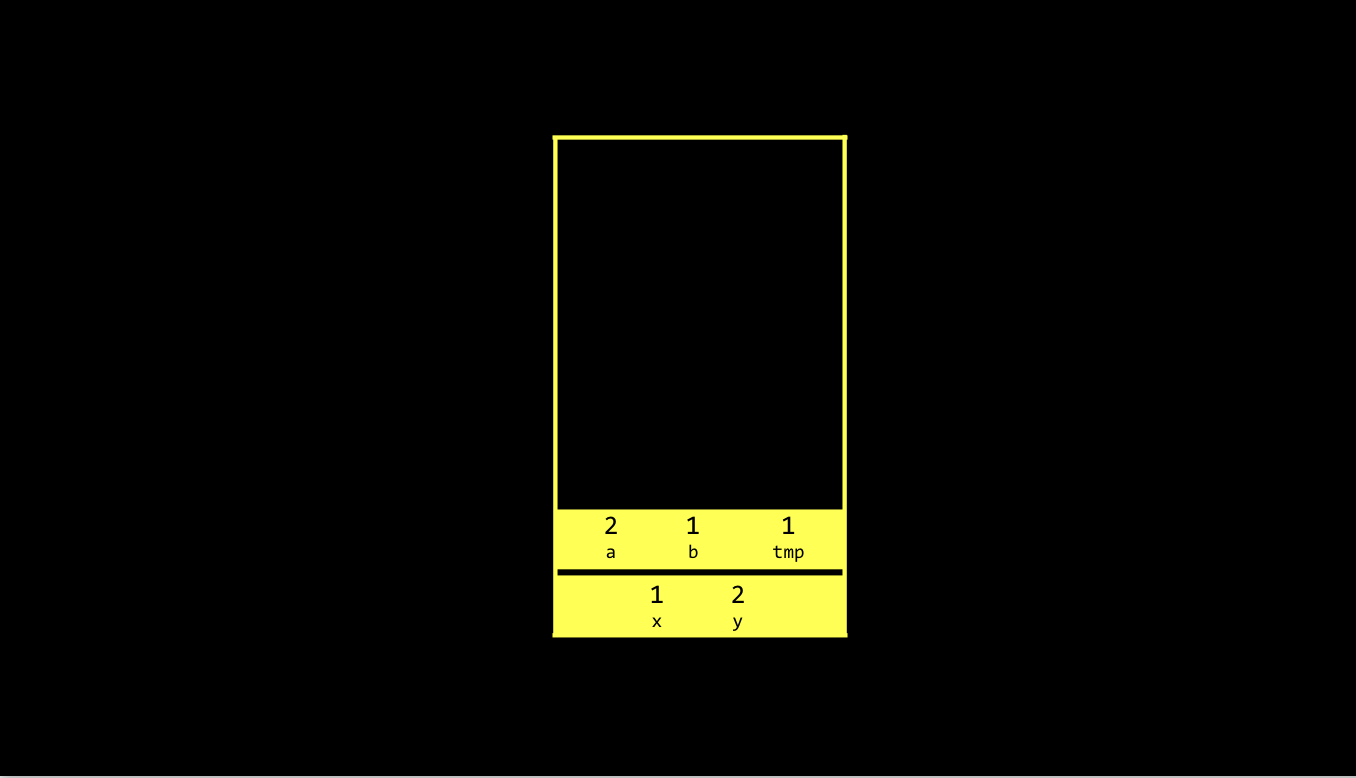
Pass by Reference
To solve this problem, we should tell ‘swap’ where ‘x’ and ‘y’ is, not what it is. We can do so by passing by reference.
int main(void){
  int x = 1;
  int y = 2;
  swap(&x, &y);
  printf("x: %i, y: %i\n", x, y);
}

void swap(int *a, int *b){
  int tmp = *a;
  *a = *b;
  *b = tmp;
}
The way you specify pass by reference or pointer is you change ‘swap’ to take 2 addresses of integers. 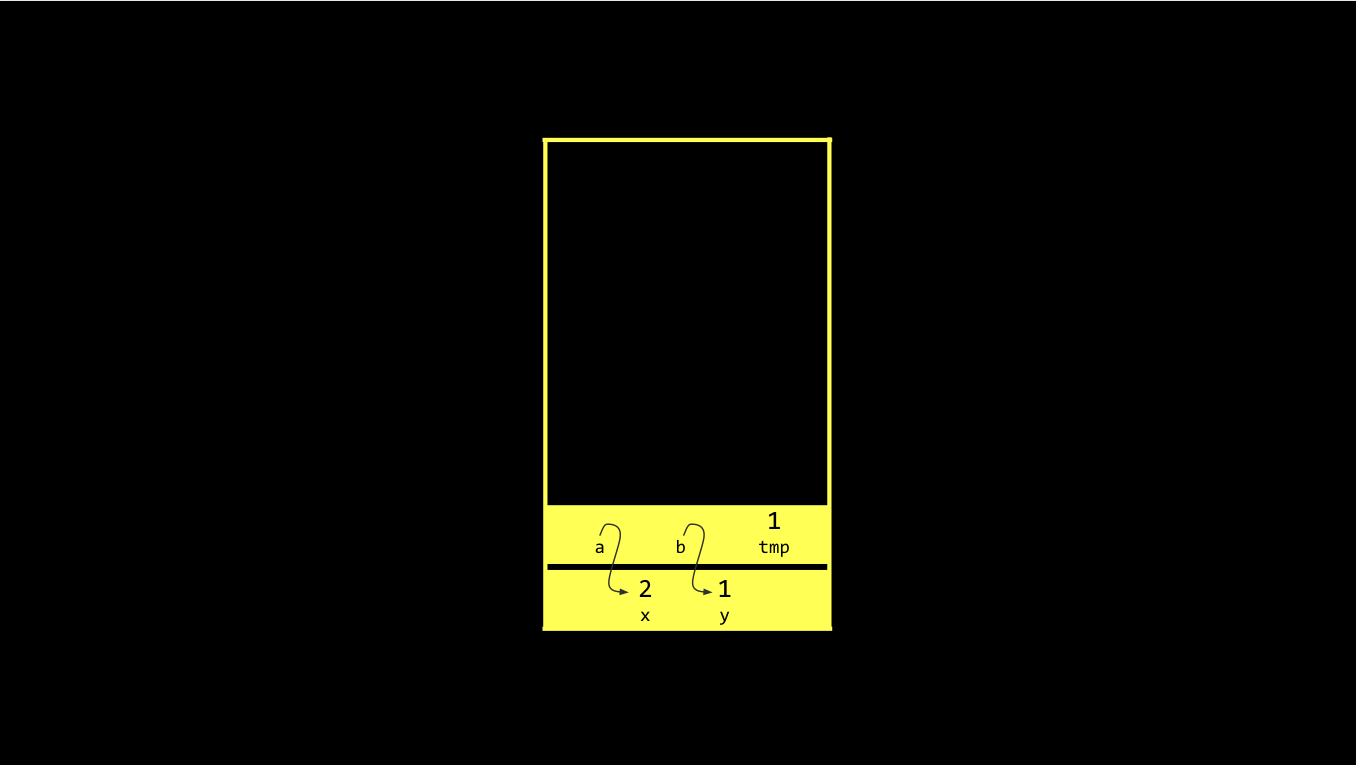
Overflow
It seems like it’s a bad design to make heap grow downward and stack grow upward because they might crash. However, it’s the only way, because it you’ve only got a finite amount of memory, you can have them both grow in the same direction but they’re still going to hit some impasse eventually. If you call many functions again and again, if you do something recuresively, you’re going to pile stack frames and you could start to hit the heap area. Meanwhile if you call malloc too many times, you might be growing down and overrun some of the stack memory as well. We call this stack overflow and heap overflow. And these are specific examples of what we call buffer overflow. Buffer is a chunk of memory. Buffer overflow means using too much of that memory. Buffers are everywhere. If you’ve used YouTube and it paused and spinning, it’s because there’s no more bytes in your buffer. There’s no more video footage in the buffer because maybe you have such a bad connection. In C, it is very non-trivial to get user input without running the risk of overflowing a buffer. It is because the programmer can’t know in advance how big of a string a human might type.
Scanf
Below is a code getting an integer input from the user without using cs50 library.
int n;
printf("n: ");
scanf("%i", &n);
printf("n: %i\n", n);
If I pass ‘n’ instead of ‘&n’ in ‘scanf’ function, the variable ‘n’ is going to be passed by value. Effectively, a copy is going to go into scanf. Thus, scanf is not going to have the ability to change the value. If you think back how we swapped 2 values, we know we have to pass those 2 values in by their addresses. Now, let’s try this with string.
char* s;
printf("s: ");
scanf("%s", s);
printf("s: %s\n", s);
If I run this code and give an input, Segmentation fault error occurs. It means something has gone wrong related to memory. In the first case when we dealt with an integer, even if the memory is filled with garbage values, when I declared ‘n’ to be an integer, I just need 4 bytes and I put the number there. So, it doesn’t matter that there were these garbage values. I just went to those 4 bytes after declaring a variable called ‘n’ and overwrote those bits. 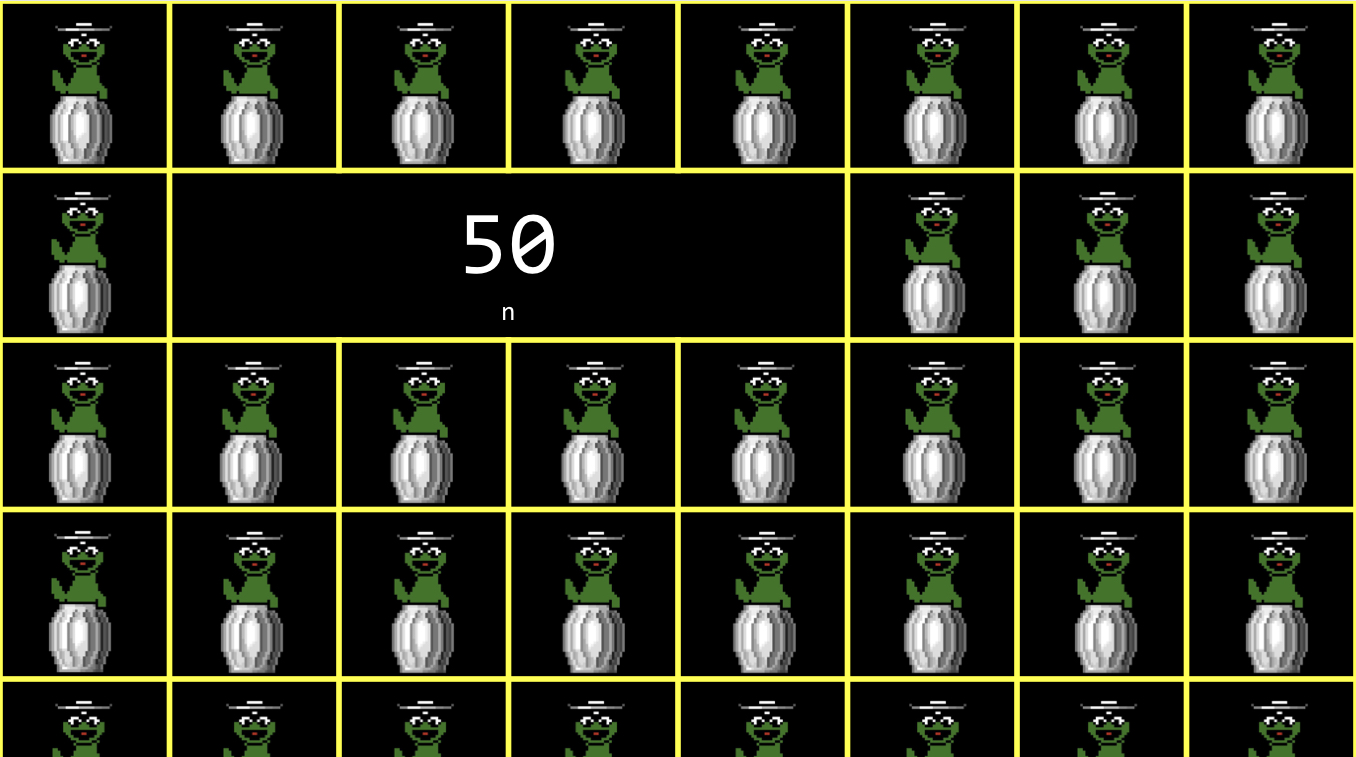 In case of string, I declare ‘s’ to be a pointer - which is generally 8 bytes on modern systems. The point is, if I haven’t initialized ‘s’ to actually be a valid location, as via calling malloc, there are still garbage values - patterns of bits that maybe have been there always, but from some previous function that got called, or some other lines of code - there.
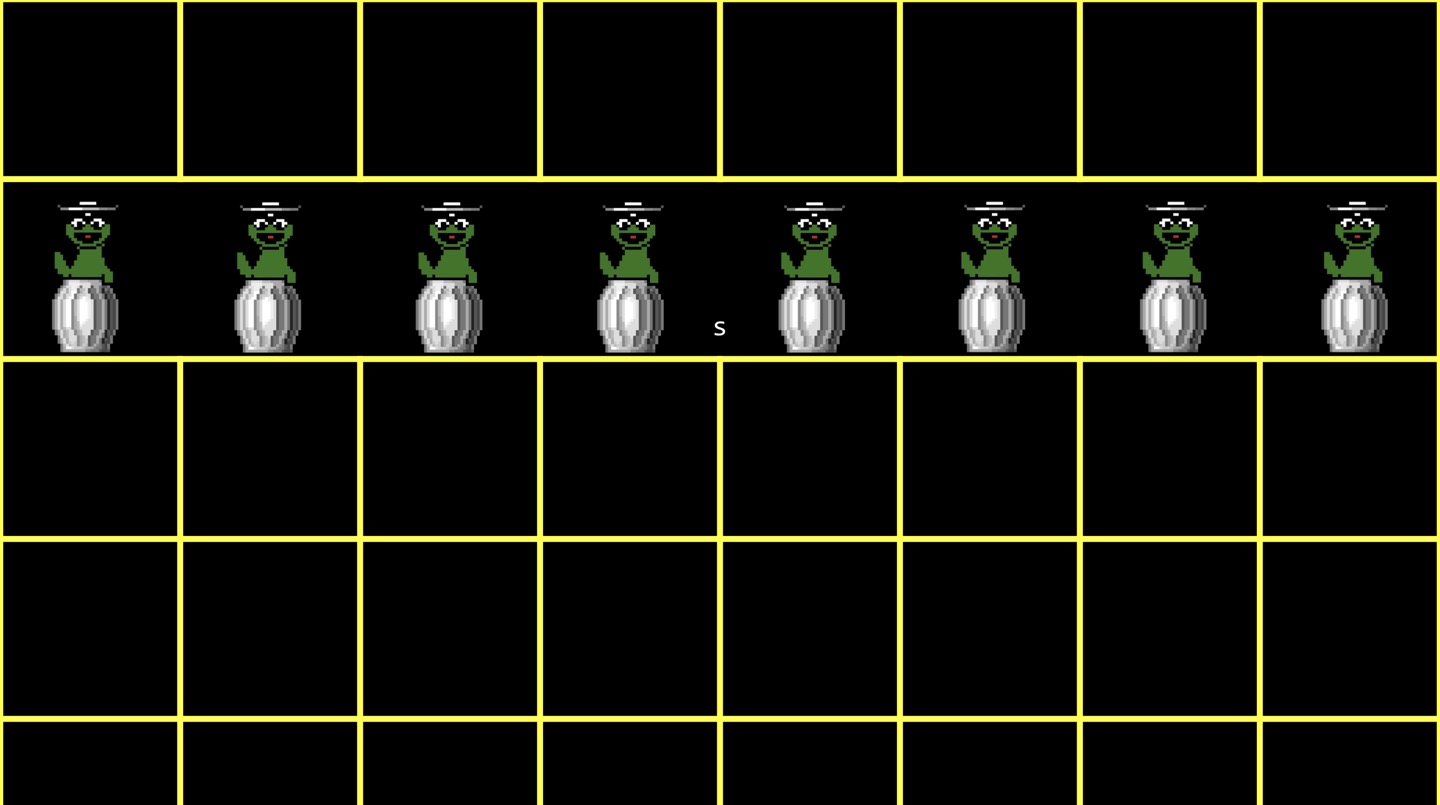
The problem is in my code now, when I call scanf and tell scan a string from the user and to put it at that location ‘s’, the location is invalid. How to fix this? We need ‘s’ to point at valid chunk of memory, and we could do that using malloc. Or more simply, we can declare ‘s’ to be an array of characters.
char s[4];
printf("s: ");
scanf("%s", s);
printf("s: %s\n", s);
s: HI!
s: HI!
In this case, I actually had enough space for ‘s’, since I’ve redeclared ‘s’ as an actual array of 4 chars. That’s like asking os for these 4 chars here. However, it I give longer string than length of 3(except NUL), they’re just going to, by default remain contiguous from left to right, top to bottom in the computer’s memory. But they’re going to end up, some of those chars, at locations I didn’t ask the os for in this array. We are going to see segmentation faults any time you touch segments of memory, that do not belong to you, that you didn’t allocate space for, as via an array, or via malloc. In ‘cs50’ libraries ‘get_string’ function conservatively walks thorugh user’s input one character at a time and as soon as it realizes the user give another byte, it constantly allocates more and more memory using malloc. It gets one char from the user and then checks if there’s another one coming. Then it allocates more space for a second. So essentially, ‘get_string’ uses malloc again and again lays the tracks down as the user is typing in the keystrokes and hitting enter, so that we never assume how many chars the user going to type in(dynamic allocation).
File I/O
FILE *file = fopen("phonebook.csv", "a");
if (file == NULL){
  return 1;
}
char *name = get_string("Name: ");
char *number = get_string("Number: ");

fprintf(file, "%s,%s\n", name, number);
fclose(file);
‘fopen’ opens the file and returns a pointer to a file. Anytime we’re dealing with pointers, something could go wrong. Any time a function returns a pointer, you should check if it’s NULL because if it is, almost always means something has gone wrong - file not found or something’s not working on the server in this case.
#include <stdio.h>
#include <stdint.h>

typedef uint8_t BYTE;
int main(int argc, char *argv[]){
  FILE *src = fopen(argv[1], "rb");
  FILE *dst = fopen(argv[2], "wb");

  BYTE b;

  while (fread(&b, sizeof(b), 1, src) != 0){
    fwrite(&b, sizeof(b), 1, dst);
  }
fclose(dst);
fclose(src);
In ‘stdint.h’, there is ‘uint8_t type’ that mentioned earlier, which gives the user an 8 bits value that’s unsigned. “rb” is ‘read binary mode’, used in order to don’t copy text files, but only binary data, like images. I do the copying 1 byte at a time. ‘fread’ function read bytes. The user have to tell it where to load those bytes in memory(&b), the size of a byte(sizeof(b), how many bytes do I want to read at a time(1), and where to read those bytes from(src). ‘fread’ returns how many bytes were successfully read.
$ ./cp cat.jpg backup.jpg
Now we understand in terms of locations and memory using pointers, strings and files are really just abstractions on top of these lower level details.
BMP
BMP is bitmap file, and it essentially implements images as just a map of bits, xy coordinates of grids, each of which represents a pixel coordinate. A bitmap is a type of file with a .BMP file extension on a computer that stores images in this way. Now that we have the ability to write code that manipulates images, we can do powerful things all on Instagram, and TikTok filters nowadays. For instance, we can apply black and white filter to the image.


Leave a Comment