
[CS50] 05-2 Shorts
Published:
In this post, the shorts video of the fifth lecture of CS50 is summarized.
Memory
Every file on your computer lives on your disk drive, be it a hard disk drive(HDD) or a solid-state drive(SDD). It’s usually somewhere in the neighborhood of 250GBs to maybe a couple of TBs now. Even when your computer is shut off, you can turn it back on and you’ll find your files are there again when you reboot your system. We can’t actually do anything with the data that is in hard disk, or in a solid-state drive. We have to move it to RAM. You may have somewhere in the neighborhood of 512MBs to 2, 4, 8, 16GBs of RAM. That’s where all of the volatile data exists. But when we turn our computer off, all of the data in RAM is destroyed.
Pointers
- What happens if we try to dereference a pointer whose value is NULL? Segmentation falut occurs. It is a good behavior to set your pointers to NULL immediately if you aren’t setting them to a known, desired value. It defends against accidental dangerous manipulation of unknown pointers.
- When you write code as below, you will get a pointer to an integer, and two integers.
int* px, py, pz;Since ‘*’ is actually part of both the type name and part or the variable name, if I want to create multiple pointers on the same line, of the same type, I should write like this.
int* px, *py, *pz;
typedef
The C keyword typedef provides a way to create a shorthand or rewritten name for data types. The basic idea is to first define a type in the normal way, then alias it to something else.
typedef <old name> <new name>;
typedef becomes great when combined with structures. Structures have a two-word type name but you can short it to one by using typedef.
struct car{
  ...
};

typedef struct car cat_t;
Alternatively because structures are som commonly used in typedef, you can actually define the type in between the start and the end.
typedef struct car{
 ...
}
car_t;
So the typedef structure is usually ‘typedef oldName newName’, where the names are already types that you’ve created. But you can actually define a structure right in the middle of the typdef instead of having to define it separately.
Dynamic Memory Allocatoin
We’ve seen one way to work with pointers, namely pointing a pointer variable at another variable that already exits in our system. This requires us to know exactly how much memory our system will need at th emoment our program is compiled. What if we don’t know how much memory we’ll need at compile-time? Maybe you’re going to be asking the user to give you a number and they’re going to genearate a hundred linked list object. How do we get access to new memory while our program is running? We can do this by allocating memory from the heap. The heap is a giant pool of memory. Dynamically allocated memory comes from a pool of memory known as the heap and statically allocated memory which is anything that you give a name to, typically like a variable name, is going to be set up on the stack. malloc finds memory for you and returns a pointer to that memory. If it can’t give you memory, it’ll hand you back NULL.
// static memory allocation
int x = get_int();
float stack_array[x];

// dynamic memory allocation
float* heap_array = malloc(x * sizeof(float));
There are 3 golden rules using malloc.
- Every block of memory that you malloc() must subsequently be free()d.
- Only memory that you malloc() should be free()d.
- Do not free() a block of memory more than once. Once you free memory, if you try to use it, some strange things might result.
Call stacks
The process of recursion migh have seemed a bit magical. How does a function know to wait for another function and pass its data to some other thing that’s running at the same time? When you call a function, a big chunk of memory is set aside for that function to do its work. We call shuch chunks of memory stack frames or function frames. It’s possible more than one functions’ frame might exist in memory at any given time.
- The frame for the most recently called function is always on the top of the stack and we call it active frame.
- When a new function is called, a new frame is pushed onto the top of the stack and becomes the activve frame.
- When a function finishes its work, its frame is popped off o fthe stack, and the frame immediately below it becoms the new, active, function on the top of the stack. This function picks up immediately where it left off.
File Pointers
The ability to read data from and write data to files is the primary means of storing persistent data, data taht does not disappear when your program stops running. The abstraction of files that C provides is implemented in a data strucure known as a FILE.
- The file manipulation functions all live in stdio.h. All of them accept FILE’*’ as one of their parameters, except for the function fopen(), which is used to get a FILE pointer in the first place.
- fopen, fclose, fgetc, fputc, fread, fwrite is most common file I/O functions
- fopen()
- opens a file and returns a file pointer to it.
- always check the return value to make sure you don’t get back NULL.
FILE* ptr1 = fopen("file1.txt", "r");
FILE* ptr2 = fopen("file2.txt", "w");
FILE* ptr3 = fopen("file3.txt", "a");
- fclose()
- closes the file pointed to by the given file pointer.
fclose(ptr1);
- closes the file pointed to by the given file pointer.
- fgetc()
- reads and returns the next character from the file pointed to.
- Note: The operation of the file pointer passed in as a parameter must be “r” for read, or you will suffer an error.
char ch = fgetc(ptr1);char ch; while ((ch = fgetc(ptr)) != EOF){ printf("%c", ch); } - EOF is a special value that’s deined in stdio.h, which is the end of file character. The code above is a duplicate of linux command ‘cat’.
- fputc()
- writes or appends the specified character to the pointed-to file.
- Note: The operation of the file pointer passed in as a parameter must be “w” for write or “a” for append, or you will suffer an error.
fputc("!", ptr3);char ch; while ((ch = fgetc(ptr)) != EOF){ fputc(ch, ptr2); } - The code above is a duplicate of linux command ‘cp’.
- fread()
fread(<buffer>, <size>, <qty>, <file pointer>);- reads <qty>units of size <size> from the file pointed to and stores them in memory in a buffer (usually an array) pointed to by <buffer>. Generic version of fgetc() that allows us to get any amount of information.
- Note: The operation of the file pointer passed in as a parameter must be “r” for read, or you will suffer an error.
int arr[10]; fread(arr, sizeof(int), 10, ptr); double* arr2 = malloc(sizeof(double) * 80); fread(arr2, sizeof(double), 80, ptr); char c; fread(&c, sizeof(char), 1, ptr); - We are reading 40 bytes of information from the file and storing those 40 bytes somewhere where we have set aside 40 bytes worth of memory - arr.
- fwrite()
fwrite(<buffer>, <size>, <qty>, <file pointer>);- writes <qty>units of size <size> from the file pointed to by reading them from a buffer(usually an array) pointed to by <buffer>.
- Note: The operation of the file pointer passed in as a parameter must be “w” for write or “a” for append, or you will suffer an error.
int arr[10];
fwrite(arr, sizeof(int), 10, ptr);

double* arr2 = malloc(sizeof(double) * 80);
fwrite(arr2, sizeof(double), 80, ptr);

char c;
fwrite(&c, sizeof(char), 1, ptr);
More details about FILE I/O
- You should always ‘fclose’ all files you ‘fopen’. Why? First to prevent memory leak. Second, if you ever want to send that file to somebody else, you had better close it so they can modify it without you also modifying it at the same time.
- A buffer is a chunk of memory that can temporality store some data from the file. But if we want to read an entire file, why use a buffer? Why mmight you not want to read the entire file into memory at once? First, you can save memory and avoid overflow. Also, we often don’t know exactly how big a file is. So the best we can do is look at small bits of it one at a time until we get to the end of our file at the end of the day.
- For fread(…, …, …, …) functions the second argument is about ‘What Size’ is each block of data you want to read. The third argument is about ‘How Many’ blocks do you want to read. It turns out that files themselves are composed of individual blocks of data. If it is a text file, the individual chunks of the file is an individual character(1 byte). If it is a image file, the individual chunks of the file is each pixel which needs 3 bytes. How do we know the size of the block? Often you just know that from convention. You are able to read documentation for .png, .bmp file type for instance. At first, the pointer of a file(f) points to the first chunk of the memory. After fread executes, the pointer points at whatever is till left to read. If you read 4 bytes at a time and storing it at a buffer, as I call fread again and again, the file pointer will point next 4 bytes repeatedly.
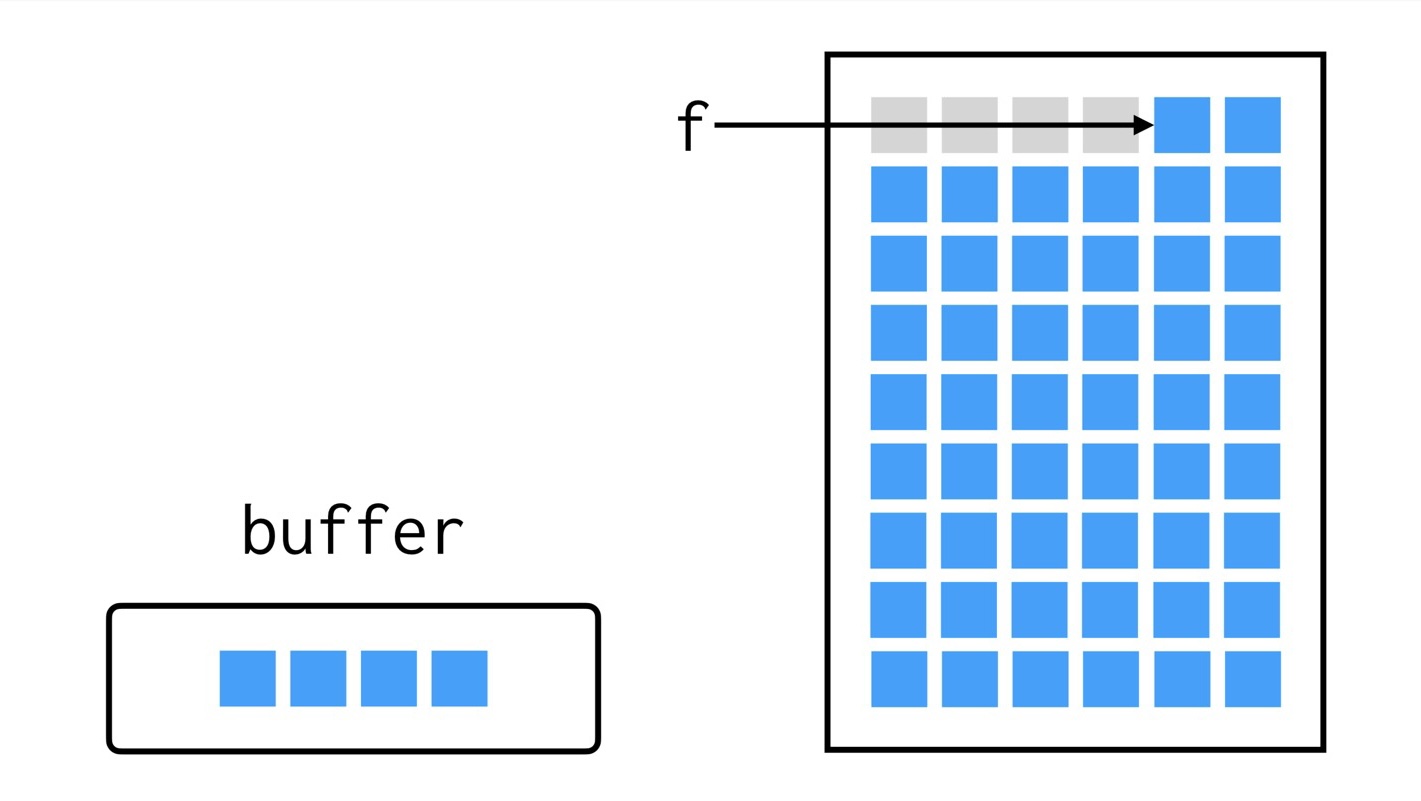
- In fread function how do we decide the magnitude of the third parameter? It will depend on how much memory do you want to use at any one time. If you were to take a big chunk out of your file, that’s a lot of memory to store in your program. At the same time, maybe you care about seeing all that data at once. Also, other consideration is it tends to be a little bit faster to read things in bigger chunks.
- What happens if my chunk is bigger that the last bits in the file? In that case, fread won’t read past the end of your file. Also, fread has a return value, which is the number of elements it has read. So, if you say read me 8 elements of 1 byte size each, it’ll return to you the number 8 if it successfully did that. If it only read 4, it’ll return 4.
- Generally, files have a signature of bytes at the very beginning that tell your program and tell you what kind of file it is. For instance, a PDF tends to begin with a four-byte sequence which is 37, 80, 68, 70(uint8_t type). Below is a C code which tells you if the given file is a PDF.
#include <cs50.h>
#include <stdio.h>
#include <stdint.h>

int main(int argc, string argv[]){
  string filename = argv[1];
  FILE *f = fopen(filename "r");
  uint8_t buffer[4];
  int blocks_read = fread(buffer, 1, 4, f);
  for (int i = 0; i < 4; i++){
    printf("%i\n", buffer[i]);
  }
  printf("Blocks read: %i\n", blocks_read);
  fclose(f);
}
  $ ./pdf test.pdf
  37
  80
  68
  70
  Blocks read: 4
‘uint8_t’ is a particular kind of integer, which is 1 byte long and unsigned. When you’re reading files, you could look up what kind of type is best suited for reading data from that file. If you write ‘int’ instead of ‘uint8_t’ above, the results will be different.
  $ ./pdf test.pdf
  1178882085
  0
  395049983
  0
  Blocks read: 4
Leave a Comment