
[CS50] 10-2 Shorts
Published:
In this post, the shorts video of the tenth lecture of CS50 is summarized.
Internet Primer
When you change your Wi-Fi network on your computer, you don’t see one called internet which means somethings exist in between you and internet.
DHCP
- We cannot simply pick IP address we want. Then how do we get an IP address in the first place? Somewhere between your computer and the Internet at large exits a Dynamic Host Configration Protocal server, whose role is to assign IP addresses to devices.
- Prior to the widespread promulgation of DHCP, the task of assigning IP addresses fell to a system administrator, who would need to manually assign such addresses.
DNS
Odds are, you’ve usually don’t tried to visit a website by typing its IP address into your browser.
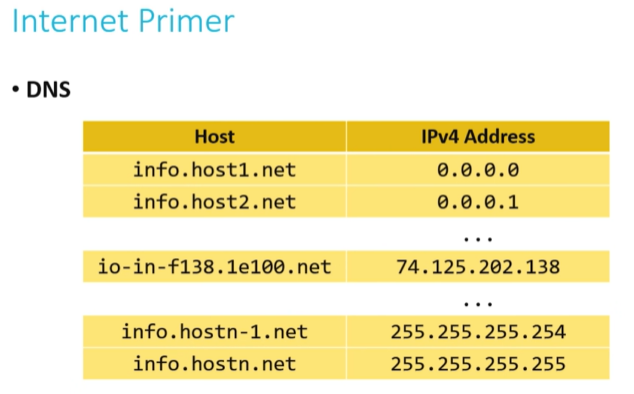
The Domain Name System translates IP addresses to more memorable names that are more human-comprehensible.
DNS is somewhat like the yellow pages of the web.
Not every name that maps is actually clear what it is. Sometimes somebody who owns an IP address might name their host somethiing that they’re actually not. For example, the IP address in the middle of the table is actually google.com. But Google has a lot of different servers and they can’t call them all google.com. So they have their own internal system for translating google.com to whatever server actually is connected to that IP address.
Much like there is no yellow pages of the world, there is really no DNS record of the entire internet.
Rather, large DNS server systems (like Google’s own) are more like aggregators, collecting smaller sets of DNS information and pooling them together, updating frequently.
In that way, large DNS servers are like libraries that stock many different sets of local yellow page books. In order to have the most up-to-date phone numbers for businesses, libraries must update the books they have on hand.
DNS record sets are thus fairly decentralized.
Access Points
- One of the ways we’ve dealt with the IPv4 addressing problem is to start assigning multiple people to the same IP address.
- The IP address is assigned to a router, whose job it is to act as a traffic cop that allows data requests from all of the devices on your local network (your home or business, e.g.) to be processed through a single IP address.
- Modern home networks, consist of access points that combine a router, a modem, a switch, and other technologies together into a single device.
- Modern business networks or large-scale wide-area networks (WANs) still frequently have these as separate devices to allow the size of their network to scale more easily.
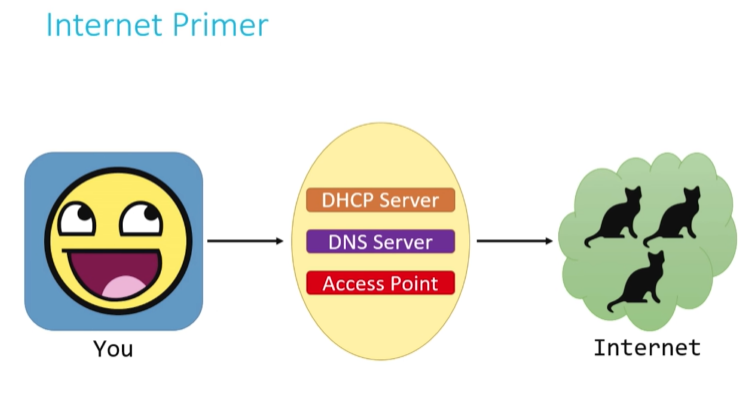 Now we know what’s between you and internet.
Internet
But what exactly internet is? It’s really just all these individual networks at my house, and at every other house, inter-connected. Instead of thinking about the internet as this giant cloud, this ethereal thing that exists out there, it’s really just a connection among all of these networks. And somewhere on these networks exists the services we want. To get information about something, we traverse this chain of networks to get the information we want. Information can flow through networks. How? The internet is really a system of protocols. 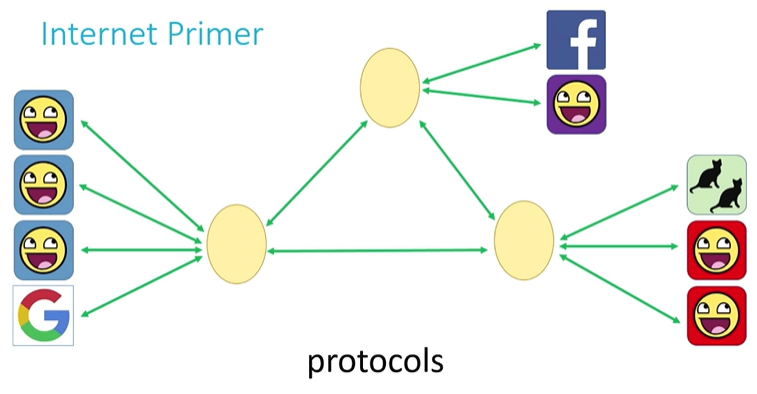
Internet Protocal (IP)
The last picture above is bit misleading because it implies all 3 networks have a connection to one another. And when I talk about a connection here, I’m talking about a physical, wired connection. We do have wireless, but it’s really impractical for data to be transmitted wirelessly over a large scale. So at some point, we do rely on wired technology - telephone wires, fiber optic wires, etc.
- Modern Internet consists of a lot of networks. We can’t afford to wire them together such that each directly connects with every other. If we’re trying to connect to a network in Asia or in Europe, we’re going to have to span an entire ocean. We’re going to need to use wires at some point, but we want to minimize the number of wires.
- This is where routers come back. What if, instead of being connected to every other network, each network has connected to a limited number of routers (ecah of which was connected to other nearby routers), and each router had instructions built into it on how to move information toward its destination?
- This information might be stored in a routing table, inside of the router. For the illustration, let’s assume each device has IP addresses in the range of n.x.x.x, where n is its netwrok number.
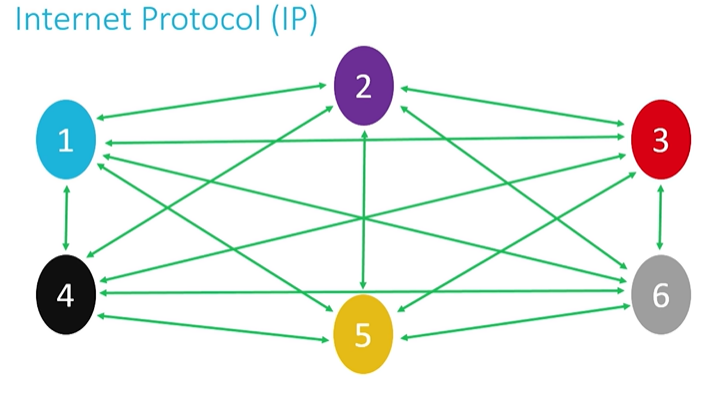 Above is the problematic situation where we don’t use routers.
 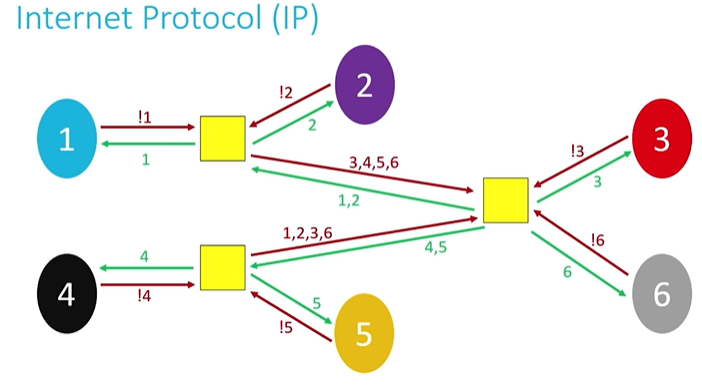 Instead, we use routers. !1 means if I see an address that does’t start with 1, I’m going to pass it off to a router. All 6 networks can still connect to every other network but they’re not physically connected anymore.
 - On a small scale, this configuration may be inefficient in terms of speed. On a large scale, this configuration dramatically reduce the costs of network infrastructure.
- In general, it’s not going to send one big chunk of data. Sendinf information along the network is expensive. The larger the chunk, the more costly it is to move every step of the way. One big block in the system can slow everybody else down. IP splits the data into packets. It’s going to take the big email or FTP transer, or web browser request and break it up into many pieces and send them separately. If something goes wrong and some packets are dropped, we have to send the message again. If we are sending a whole chunk, it is expensive. Instead, sending a small packet one more time is less expensive.
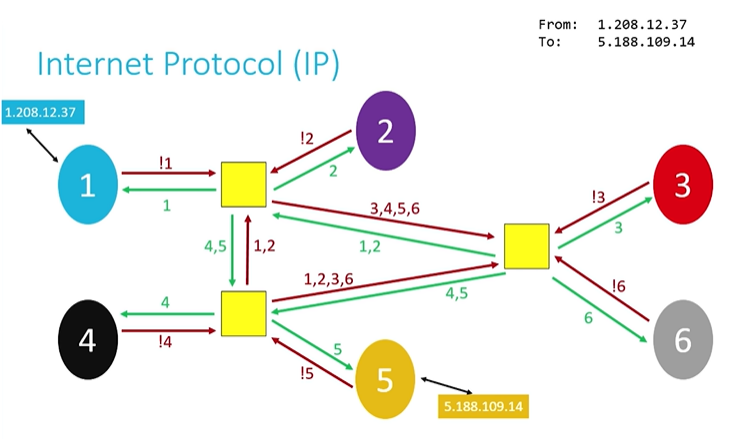
- IP is also known as a connectionless protocol. There is not necessarily a defined path from the sender to the receiver, and vice versa. As we can see in the image below, there are 2 ways to go from network 1 to 4 or 5. This means that in response to traffic that might be “clogging” up one particular path throught the Internet, some packets can be “re-routed” around the traffic jame to follow the most optimal path, based on the current state of the network.
Transmission Control Protocal (TCP)
If we want to get a packet or information to a specific program, on a specific machine, we need more information than just what IP does. If the IP is thought of as the protocol for getting information from a sending machine to a receiving machine, then TCP can be thought of as directing the transmited packet to the correct program on the receiving machine.
- It is important to be able to identify both where the receiver is and what the packet is for, so TCP and IP are almost an inseparable pair: TCP/IP
- Each program/utility/service on a machine is assigned a port number. Coupled with an IP address, we can now uniquely identify a specific program on a specific machine.
- The other thing that TCP does is it guarantees delivery. It indicates how many packets IP has splits data into, and it orders those packets so they can be reconstructed on the receiving machine, even if they received in a different order than they were sent. TCP does this by including information about how many packets the receiver should expect to get, and in what order, and transmitting that information alongside the data.
- Some of these port numbers are very commonly used, and they’ve been standardized across all computers.
- FTP uses port 21
- SMTP (e-mail) uses prot 25
- DNS uses port 53
- HTTP uses port 80
- HTTPS uses port 443
TCP/IP process
When a program goes to send data, TCP breaks it into smaller chunks and communicates those packets to the computer’s network software, adding a TCP layer onto the packet.
IP routes the individual packets from sender to receiver; this info is part of the IP layer surrounding the packet.
When the destination computer gets the pacekt, TCP looks at the header to see which program it belongs to; and since the routes packets take may differ, TCP also must present those packets to the destination program in the proper order.
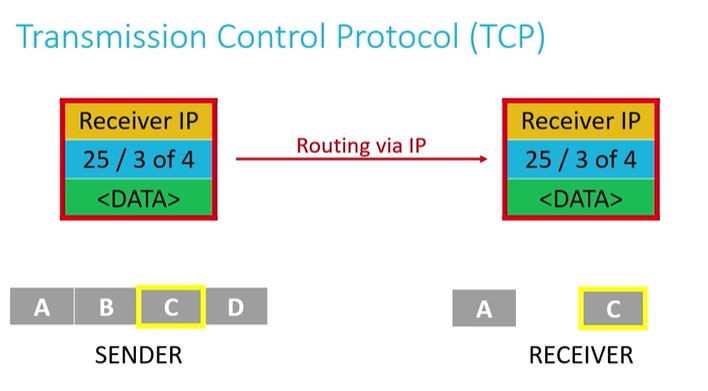
- If at any point along the way a router delivering information using the IP dropped a packet, TCP would use additional information inside the headers to request that the senders pass along the extra packet so it could complete assembly.
- After the packets have arrived, TCP ensures they are organized the correct order and can then be reassembled into the intended unit of data and delivered to the correct service.
HTTP
It is frequently the case that the application itself has a system of rules for how to interpret data that was sent. HTTP is one such example of an application layer protocal, which specifically dictates the format by which clients request web pages from a server, and the format via which servers return information to clients.
- Other application layer protocols include:
- File Transer Protocol (FTP)
- Simple Mail Transer Protocol (SMTP)
- Data Distribution Service (DDS)
- Remote Desktop Protocol (RDP)
- Extensible Message and Presence Protocol (XMPP)
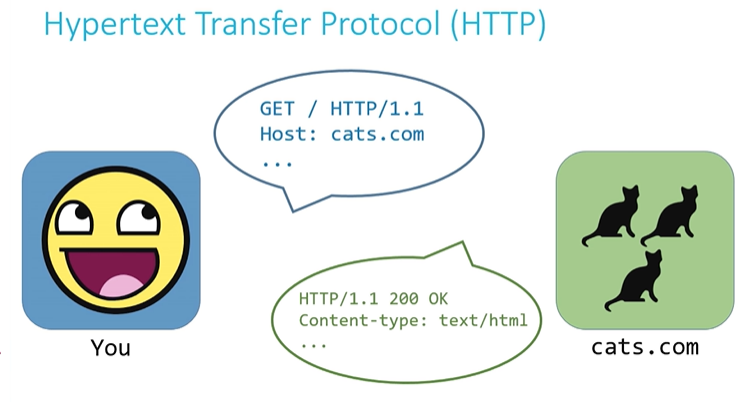
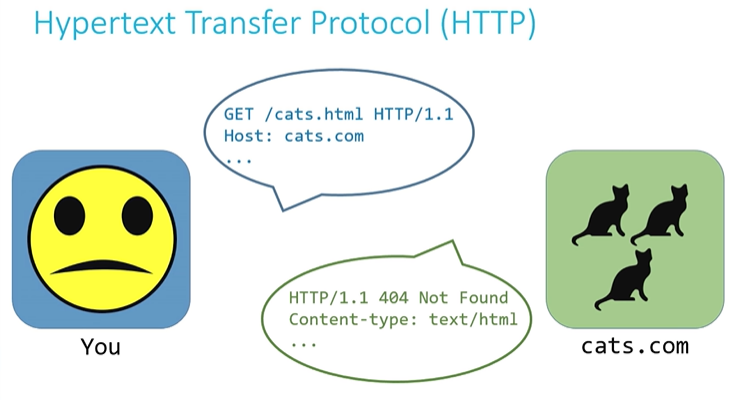


- Above line is called an HTTP request line. It’s usally the first thing that is transmitted as part of an HTTP request. HTTP version is probably always HTTP/1.1.
- The host name is also included as a separate line of the overall HTTP request. Taken together, the host name and the request target from the request line specify a specific resource being sought. In the image above, cats.com being the host, /cats.html being my request target. So overall I was asking the resource located at www.cats.com/cats.html.
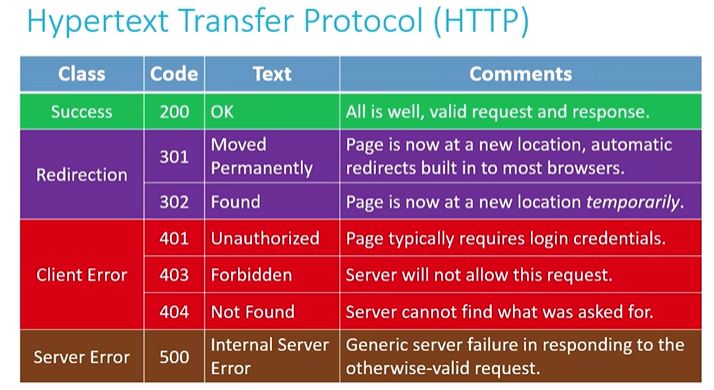
- Based on whether the resoure exists and whether the server is empowered to deliver that resource pursuant to the client’s request, a number of status codes can result.
status code
- A status code is part of the first line that a server will use to respond to an HTTP request. For example, modern broweser redirect to correct locations in case of 301 status code.

Leave a Comment